

Utilities macOS
VeraCrypt for macOS
Create encrypted file containers and protect non-system storage with VeraCrypt for Mac. This download is the FUSE-T build for macOS 12 Monterey or later.
- Operating system
- macOS 12 Monterey or later
- Architecture
- Apple silicon (ARM64)
- Download package
- DMG disk image — FUSE-T-compatible edition
Publisher recommends FUSE-T for Apple silicon. Install FUSE-T separately; the macFUSE-compatible edition is a different download. Intel package architecture was not independently verified.
Link checked · Download guidance
What is VeraCrypt?
VeraCrypt stores files inside an encrypted volume that you mount when you need to use it. A file container works as a virtual disk, while device-hosted volumes protect non-system partitions or storage devices such as USB drives. Encryption and decryption happen on the fly as files are written and read, rather than requiring a separate manual operation for every file.
This entry links to the VeraCrypt 1.26.30 FUSE-T disk image. The publisher recommends the FUSE-T edition for Apple silicon Macs and lists macOS 12 Monterey or later as the requirement. FUSE-T is a separate dependency, not included in the VeraCrypt package. A distinct macFUSE-compatible edition is also available from the publisher; choose the build that matches your filesystem component.
VeraCrypt on macOS is not a way to encrypt the macOS startup system: the publisher documents system encryption for supported Windows systems only. Keep the password and any required keys available, because the publisher cannot recover lost credentials. If upgrading the FUSE-T edition from 1.26.29, follow the release-note instruction to dismount volumes and restart macOS before using the updated build.
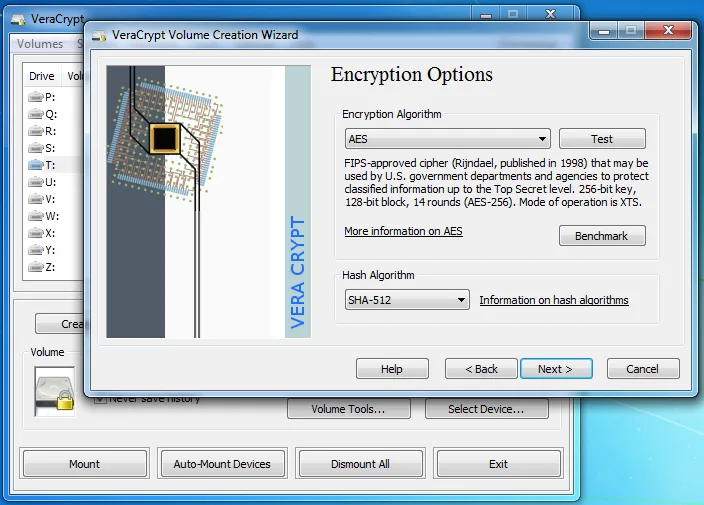
The publisher screenshot illustrates the encryption-options wizard on Windows. It is a real VeraCrypt interface image, not a screenshot of the Mac edition or a capture of version 1.26.30.
What it offers
- Create a file-hosted encrypted volume and mount it as a virtual disk.
- Encrypt non-system partitions and storage devices such as USB drives.
- Encrypt and decrypt data automatically on the fly during reads and writes.
- Use a FUSE-T-compatible macOS edition, with a separate macFUSE-compatible build available.
Good to know
- Requires macOS 12 Monterey or later and a matching filesystem component; FUSE-T must be installed separately for this build.
- System/startup-drive encryption is not supported on macOS; publisher system-encryption support is for Windows.
- Lost passwords or required keys cannot be recovered by the publisher.
- Upgrading the FUSE-T build from 1.26.29 requires dismounting volumes and restarting macOS before using the updated build.
Product images
Sources
References used for this listing. Retrieval dates do not indicate hands-on testing.
- VeraCrypt — official features and publisher screenshots ↗Retrieved
- VeraCrypt — official downloads ↗Retrieved
- VeraCrypt — Supported Operating Systems ↗Retrieved
- VeraCrypt — Operating Systems Supported for System Encryption ↗Retrieved
- VeraCrypt License ↗Retrieved
- VeraCrypt — Release Notes ↗Retrieved
- VeraCrypt upstream discussion — FUSE-T dependency ↗Retrieved
- VeraCrypt — Frequently Asked Questions ↗Retrieved
More in utilities
View category ↗
1.1.1.1 with WARP 2026.8.2115.0
Encrypt traffic from your Mac to Cloudflare’s network with WARP, or use DNS-only mode for encrypted DNS queries to the 1.1.1.1 resolver.
1.1.1.1 with WARP 2026.8.2115.0
Encrypt traffic between your Windows PC and Cloudflare, or use encrypted DNS only, with the free 1.1.1.1 with WARP app.

3uTools 9.12.005
Manage iPhone and iPad photos, music, apps and backups from Windows with 3uTools, a free utility that also includes device checks and firmware flashing tools.