
Utilities Windows
ViceVersa PRO
Compare folders side by side, synchronize files and create mirror backups with ViceVersa PRO for Windows. Includes a 30-day trial; this download is the 64-bit installer.
- Operating system
- Windows 11, 10, 8, 7, Vista; Windows Server 2025, 2022, 2019, 2016, 2012, 2008 (64-bit)
- Architecture
- 64-bit
- Download package
- EXE installer
This link is the 64-bit edition. A separate 32-bit installer is available from the publisher.
Link checked · Download guidance
What is ViceVersa PRO?
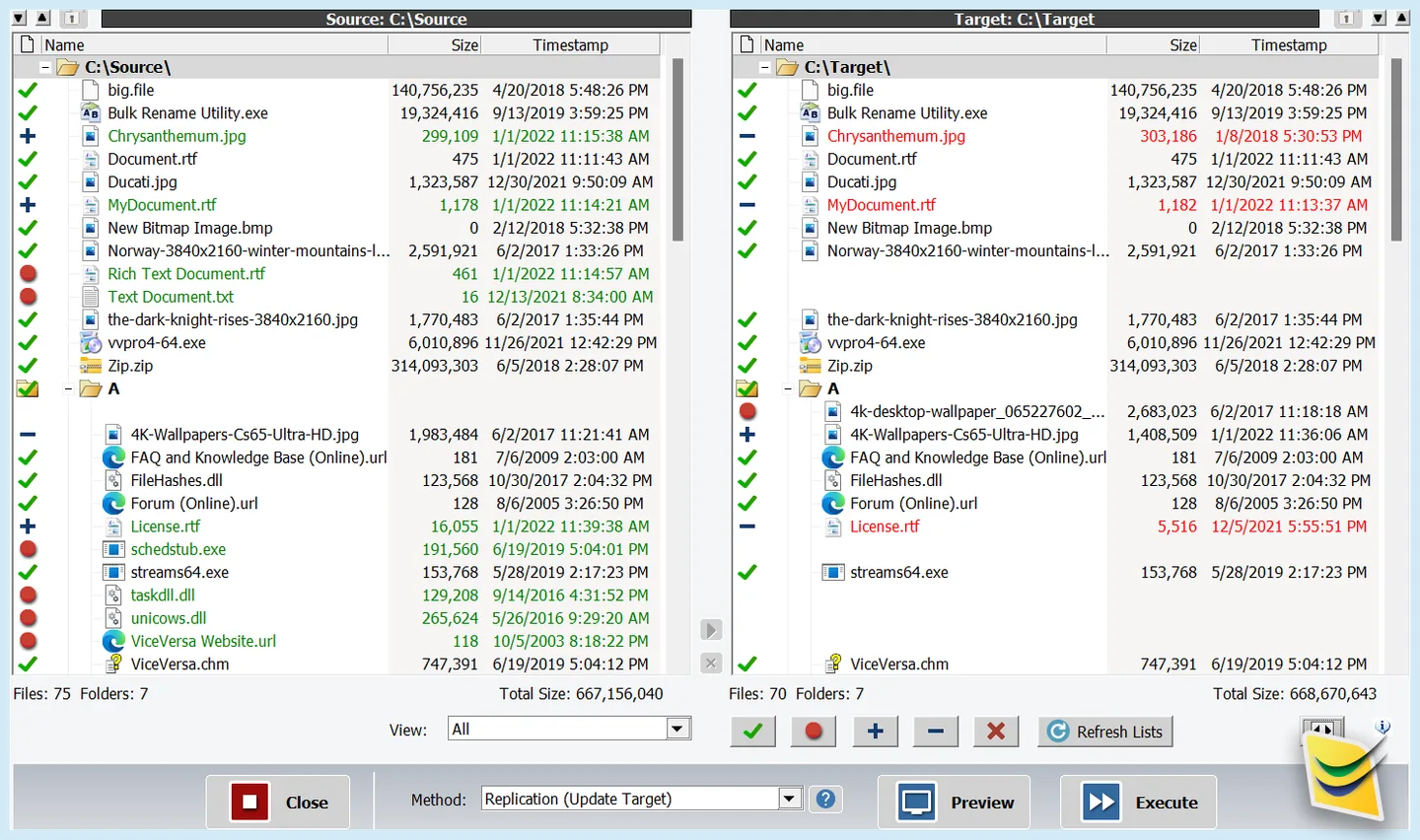
ViceVersa PRO compares files and folders before synchronizing, replicating or backing them up. Its side-by-side view shows source and target contents so you can review differences and preview operations before execution. It supports local drives, external USB storage and network locations such as NAS and SMB shares.
Choose a synchronization, mirror backup, replication or move method for each job. Profiles store job settings, include/exclude filters narrow what gets processed, and Windows Task Scheduler integration supports recurring runs. The publisher also offers compression, encryption and file archiving options.
ViceVersa PRO is commercial software with a fully functional 30-day evaluation, not a permanently free utility. Advanced real-time scheduling and profile chains use the optional VVEngine add-on. The linked EXE is the 64-bit Windows edition; the publisher provides a separate 32-bit installer. The screenshot is a publisher illustration of the comparison interface, not a hands-on test or a verified version 7 capture.
What it offers
- Compare source and target folders side by side and preview copy or delete operations.
- Choose file synchronization, mirror backup, replication or move execution methods.
- Work with local drives, external USB storage and network folders, including NAS and SMB shares.
- Save job profiles and include or exclude files and subfolders with filters.
- Schedule recurring jobs through Windows Task Scheduler integration.
Good to know
- The fully functional evaluation lasts 30 days; continued use requires a paid license.
- Advanced real-time scheduling and profile chains use the optional VVEngine add-on.
Product images
Sources
References used for this listing. Retrieval dates do not indicate hands-on testing.
More in utilities
View category ↗
1.1.1.1 with WARP 2026.8.2115.0
Encrypt traffic from your Mac to Cloudflare’s network with WARP, or use DNS-only mode for encrypted DNS queries to the 1.1.1.1 resolver.
1.1.1.1 with WARP 2026.8.2115.0
Encrypt traffic between your Windows PC and Cloudflare, or use encrypted DNS only, with the free 1.1.1.1 with WARP app.

3uTools 9.12.005
Manage iPhone and iPad photos, music, apps and backups from Windows with 3uTools, a free utility that also includes device checks and firmware flashing tools.