
Utilities Windows
Virtual Magnifying Glass
Enlarge a desktop area with a mouse-following lens, adjust zoom from 1x to 32x and inspect pixel colors with this free, open-source Windows screen magnifier.
- Operating system
- Publisher lists Windows 7, 8, 10 or later for version 3.10.
- Architecture
- Not specified on the publisher page.
- Download package
- EXE installer (Vmg3.10_install.exe)
Older Windows 2000/XP users are directed to version 3.5. No installation or current Windows build testing was performed.
Link checked · Download guidance
What is Virtual Magnifying Glass?
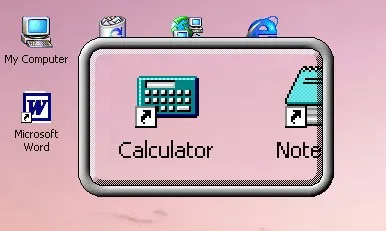
Virtual Magnifying Glass places a movable magnifying lens over the desktop so you can inspect small text, icons or individual pixels without enlarging the whole screen. The publisher documents a 1x to 32x scale range, adjustable lens dimensions and multi-monitor support on Windows. Its graphical tools can show the center pixel’s RGB values in decimal and hexadecimal and copy them with Ctrl+C.
The everyday controls are distinct from quitting the application: clicking the left mouse button or pressing Esc hides the lens, while the tray icon brings it back. Right-click the tray icon for customization, use the mouse wheel to adjust magnification and press Q to exit. These are publisher-documented controls, not results of an installation test.
The selected EXE is version 3.10, which the publisher labels for Windows 7, 8, 10 or later; it lists a separate 3.5 installer for Windows 2000 and XP. The page also contains older, broader system requirements, so those should not be read as compatibility proof for this package. Dynamic mode is explicitly described as a beta feature with legacy Aero caveats. The historical screenshots illustrate the lens rather than proving how version 3.10 looks or behaves on a current Windows build.
What it offers
- Magnify a selected desktop area with a lens that follows mouse movement.
- Adjust magnification from 1x to 32x using the scroll wheel or keyboard controls.
- Resize lens width and height independently and use multiple Windows displays.
- Display the center pixel’s RGB values in decimal or hexadecimal and copy them with Ctrl+C.
- Hide the lens with Esc and reopen it from the system tray; press Q to exit.
Good to know
- Dynamic mode is documented as beta with legacy Aero-related caveats; do not assume unrestricted interaction beneath the lens on every Windows version.
- Version 3.10 is listed for Windows 7, 8, 10 or later; the publisher directs Windows 2000 and XP users to a separate older build. Architecture and specific current Windows build compatibility were not confirmed.
- The project states that it provides no customer support.
Product images
Sources
References used for this listing. Retrieval dates do not indicate hands-on testing.
- Virtual Magnifying Glass 3.10 ↗Retrieved
- Virtual Magnifying Glass - Download ↗Retrieved
More in utilities
View category ↗
1.1.1.1 with WARP 2026.8.2115.0
Encrypt traffic from your Mac to Cloudflare’s network with WARP, or use DNS-only mode for encrypted DNS queries to the 1.1.1.1 resolver.
1.1.1.1 with WARP 2026.8.2115.0
Encrypt traffic between your Windows PC and Cloudflare, or use encrypted DNS only, with the free 1.1.1.1 with WARP app.


3uTools 9.12.005
Manage iPhone and iPad photos, music, apps and backups from Windows with 3uTools, a free utility that also includes device checks and firmware flashing tools.