

Utilities Windows
VirtualHere USB Client for Windows
Use USB devices shared by a VirtualHere USB Server from your Windows PC. The client discovers network devices and connects them through a tree-view interface.
- Operating system
- Windows 10 and 11; Windows Server 2016, 2019 and 2022
- Architecture
- x86_64 (64-bit)
- Download package
- EXE executable (vhui64.exe)
This link is the x86_64 client, not the server. A separate Windows ARM64 client is available from the publisher. Requires a reachable VirtualHere USB Server.
Link checked · Download guidance
What is VirtualHere USB Client?
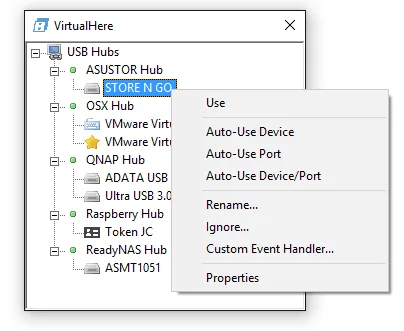
VirtualHere USB Client connects a Windows computer to USB devices attached to a machine running VirtualHere USB Server. Instead of moving a peripheral to your desk, you select a shared device in the client and use it as though it were connected locally. The client automatically discovers servers on the network and groups available devices in a tree; right-click a device and choose Use to connect.
For managed setups, the client can run as a service and exposes an API for scripted control. SSL support is available with configuration. The linked Windows download is the x86_64 executable; the publisher offers a separate ARM64 build.
The client alone does not share a USB device: a reachable VirtualHere USB Server is required at the other end. A device cannot be used by two clients simultaneously. The client is available at no charge, but server licensing and trial restrictions are separate, so a free client download does not make every server deployment free.
What it offers
- Discover USB devices shared by VirtualHere USB Servers on the network.
- Browse shared devices in a tree and connect through the right-click Use command.
- Run the client as a service for managed setups.
- Control the client through an API and configure SSL support.
Good to know
- Requires VirtualHere USB Server on the machine sharing the USB devices; the client is not a standalone USB-sharing server.
- Two clients cannot connect to the same USB device simultaneously.
- Server licensing and trial restrictions are separate from the no-charge client.
Product images
Sources
References used for this listing. Retrieval dates do not indicate hands-on testing.
More in utilities
View category ↗
1.1.1.1 with WARP 2026.8.2115.0
Encrypt traffic from your Mac to Cloudflare’s network with WARP, or use DNS-only mode for encrypted DNS queries to the 1.1.1.1 resolver.
1.1.1.1 with WARP 2026.8.2115.0
Encrypt traffic between your Windows PC and Cloudflare, or use encrypted DNS only, with the free 1.1.1.1 with WARP app.

3uTools 9.12.005
Manage iPhone and iPad photos, music, apps and backups from Windows with 3uTools, a free utility that also includes device checks and firmware flashing tools.