
Utilities Windows
VolumeLock
Lock Windows volume, balance and mute settings with custom rules, saved presets and scheduled changes. VolumeLock is a paid audio utility with a fully functional 14-day trial.
- Operating system
- Windows Vista, 7, 8, 10 and 11 (publisher-listed)
- Architecture
- Not specified by the publisher
- Download package
- EXE installer
This is the Vista-and-later 2.4 package. Windows XP and earlier use a separate 1.9 download. Publisher requires a working sound card and 3 MB of free disk space; installation not tested.
Link checked · Download guidance
What is VolumeLock?
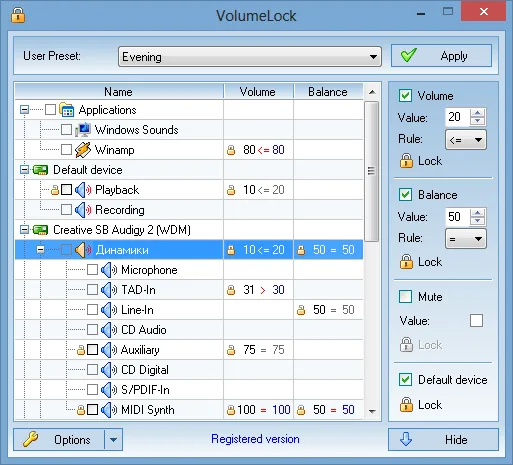
VolumeLock keeps selected Windows audio settings within rules you choose. It is designed for situations where another application changes playback or recording levels unexpectedly. You can set rules for volume, balance and mute, then save different configurations as presets and recall them with system-wide hotkeys.
The utility also supports per-application volume control on Windows Vista and later, locking default playback and recording devices, password protection and scheduled changes. Command-line support lets you recall settings from a script, while the tray icon shows lock status.
The publisher lists Windows 10 and 11 among supported systems and provides version 2.4 for Vista and later. Older Windows XP and earlier systems use a separate 1.9 release. The download here is the publisher’s Windows package, not an independently tested installation.
VolumeLock is not freeware: the trial provides all features for 14 days, after which the publisher requires registration or discontinuing use. A working sound card is required.
What it offers
- Set custom rules for volume, balance and mute on playback and recording controls.
- Save rule configurations as presets and recall them with system-wide hotkeys.
- Control per-application volume on Windows Vista and later; lock default playback and recording devices.
- Schedule audio-setting changes or use command-line control.
- Protect access with a password and monitor lock status from the system tray.
Good to know
- The fully functional trial lasts 14 days; continued use requires paid registration.
- Per-application volume control requires Windows Vista or later. Older Windows XP and earlier systems use a separate legacy release.
Product images
Sources
References used for this listing. Retrieval dates do not indicate hands-on testing.
- Utility to lock audio volume - VolumeLock ↗Retrieved
- VolumeLock Features ↗Retrieved
- Free Trial Downloads ↗Retrieved
- Product Registration ↗Retrieved
- What's New in VolumeLock ↗Retrieved
- VolumeLock screenshots ↗Retrieved
- Publisher catalog link selection source (read only; never executed) ↗Retrieved
More in utilities
View category ↗
1.1.1.1 with WARP 2026.8.2115.0
Encrypt traffic from your Mac to Cloudflare’s network with WARP, or use DNS-only mode for encrypted DNS queries to the 1.1.1.1 resolver.
1.1.1.1 with WARP 2026.8.2115.0
Encrypt traffic between your Windows PC and Cloudflare, or use encrypted DNS only, with the free 1.1.1.1 with WARP app.


3uTools 9.12.005
Manage iPhone and iPad photos, music, apps and backups from Windows with 3uTools, a free utility that also includes device checks and firmware flashing tools.