

Utilities Windows
Volumouse for Windows
Adjust Windows sound volume with your mouse wheel using Volumouse, a freeware utility with configurable key, mouse-button and taskbar rules.
- Operating system
- Windows 10 and 11; older Windows versions are also listed by the publisher
- Architecture
- x64
- Download package
- ZIP archive for manual extraction
Selected download is the x64 manual-installation ZIP. A wheel mouse and sound card are required. The publisher also offers separate 32-bit packages.
Link checked · Download guidance
What is Volumouse?
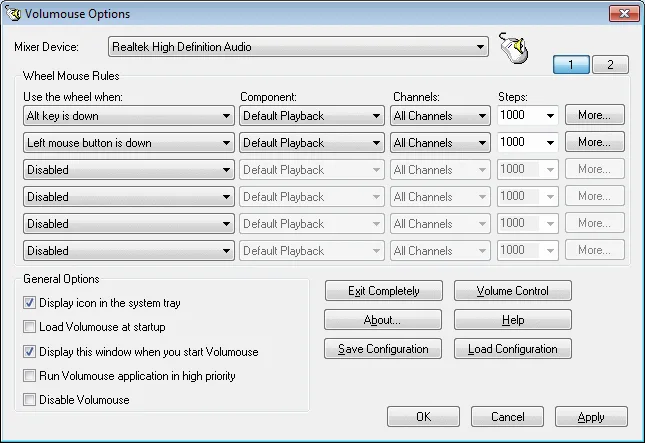
Volumouse turns your mouse wheel into a volume control when a condition you choose is met. Hold Alt, press the left mouse button or place the pointer over the taskbar to adjust sound; outside your configured conditions, the wheel continues its normal scrolling work. It suits users who want a volume shortcut without opening the Windows mixer each time.
Rules let you choose the sound component, channels and adjustment step size. You can set mute/unmute behavior, configure an on-screen volume indicator and save or load your configuration. The publisher also documents brightness controls, although monitor brightness and contrast through DDC/CI depend on monitor support.
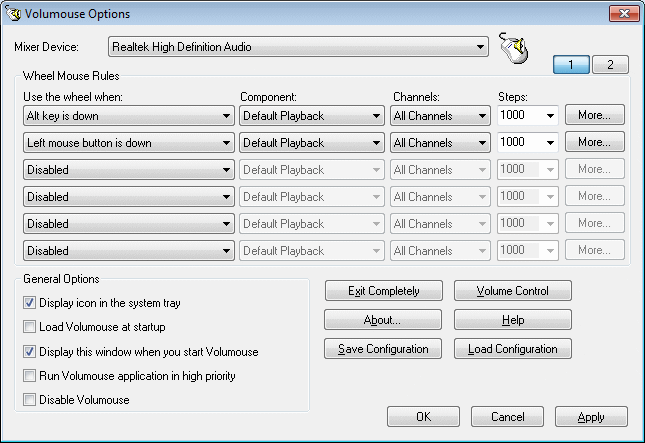
This entry links to the publisher's x64 ZIP for manual extraction, not the separate 32-bit setup program. With Windows User Account Control enabled, Volumouse cannot capture mouse events from an application running as Administrator unless Volumouse also runs as Administrator. The screenshot is the publisher's older options-window illustration, not evidence of the exact appearance of version 2.21.
What it offers
- Activate mouse-wheel volume control with rules such as holding Alt, pressing a mouse button or hovering over the taskbar.
- Choose sound components, channels and adjustment steps for each rule, including mute/unmute behavior.
- Configure an on-screen volume indicator and save or load rule configurations.
- Control monitor brightness and contrast through DDC/CI on monitors that support it.
Good to know
- With UAC enabled, controlling applications running as Administrator requires Volumouse to run as Administrator too.
- DDC/CI brightness and contrast controls require a compatible monitor; they do not work on every display.
Product images
Sources
References used for this listing. Retrieval dates do not indicate hands-on testing.
More in utilities
View category ↗
1.1.1.1 with WARP 2026.8.2115.0
Encrypt traffic from your Mac to Cloudflare’s network with WARP, or use DNS-only mode for encrypted DNS queries to the 1.1.1.1 resolver.
1.1.1.1 with WARP 2026.8.2115.0
Encrypt traffic between your Windows PC and Cloudflare, or use encrypted DNS only, with the free 1.1.1.1 with WARP app.

3uTools 9.12.005
Manage iPhone and iPad photos, music, apps and backups from Windows with 3uTools, a free utility that also includes device checks and firmware flashing tools.