
Utilities Windows
wfview
Control supported ham radios from Windows with wfview, a free, open-source interface for tuning, spectrum viewing and remote operation.
- Operating system
- Windows 10 and newer; see release-note compatibility caveat
- Architecture
- x64 (64-bit)
- Download package
- EXE installer
The v2.25 GitHub notes claim Windows 7 x64 and newer; the older website x64 catalog specifies Windows 10+. Compatibility has not been independently tested. This link is not the separate x86 build.
Link checked · Download guidance
What is wfview?
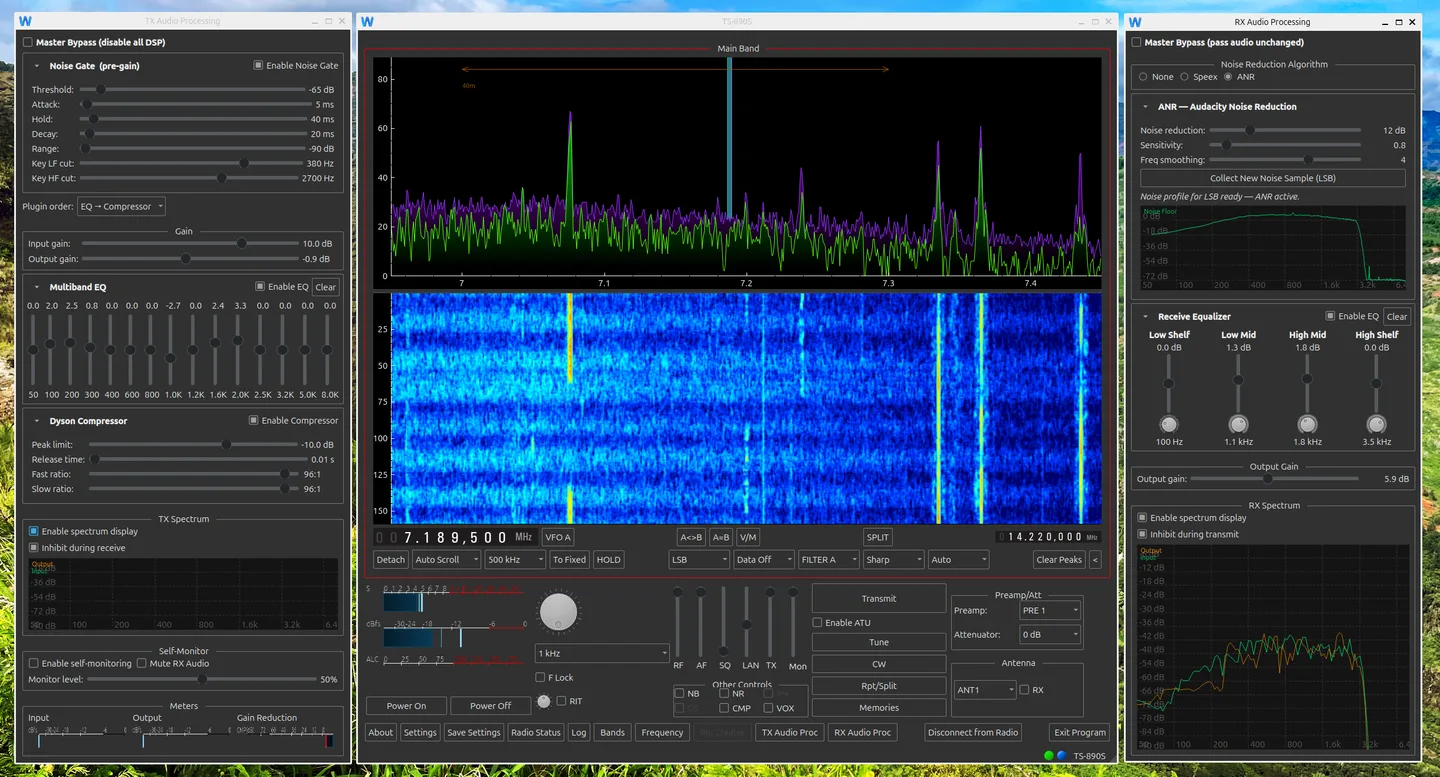
wfview brings supported amateur-radio transceiver controls to a desktop interface. Connect a compatible radio over USB serial or its built-in network interface to adjust frequency, mode and other controls. Radios that supply spectrum data can also show a spectrum plot and waterfall alongside the tuning controls.
For remote operation, supported network radios can stream receive and transmit audio. A radio without a network interface can use another computer running wfview as a USB-to-network bridge. The interface supports keyboard, mouse and touch operation, with themes and configurable colors.
Check the publisher's supported-radio list before choosing it: available commands and spectrum features depend on the connected model. Older radios do not gain a waterfall simply by connecting to wfview. Icom CI-V transceive must also be enabled where required by the publisher's setup instructions. The download linked here is the Windows x64 installer from the publisher-linked GitHub v2.25 release; 32-bit builds are separate.
What it offers
- Adjust tuning, mode and receive filters on radios that support the corresponding commands.
- Display spectrum and waterfall data from supported radios.
- Use receive/transmit audio streaming with supported network radios or a separate wfview bridge computer.
- Operate with keyboard, mouse or touch, and customize the interface theme and colors.
Good to know
- Radio support is model-dependent; older radios have fewer controls, and spectrum/waterfall features require compatible hardware.
- Remote use of a radio without a network interface requires a separate computer running wfview as a bridge.
- Icom CI-V transceive must be enabled for correct operation as described in the publisher's setup guidance.
Product images
Sources
References used for this listing. Retrieval dates do not indicate hands-on testing.
More in utilities
View category ↗
1.1.1.1 with WARP 2026.8.2115.0
Encrypt traffic from your Mac to Cloudflare’s network with WARP, or use DNS-only mode for encrypted DNS queries to the 1.1.1.1 resolver.
1.1.1.1 with WARP 2026.8.2115.0
Encrypt traffic between your Windows PC and Cloudflare, or use encrypted DNS only, with the free 1.1.1.1 with WARP app.


3uTools 9.12.005
Manage iPhone and iPad photos, music, apps and backups from Windows with 3uTools, a free utility that also includes device checks and firmware flashing tools.