

Utilities Windows
WhoCrashed for Windows
Analyze Windows system crash dumps with WhoCrashed Home Edition to find suspected drivers and get troubleshooting suggestions after blue screens or unexpected restarts.
- Operating system
- Windows 11, 10, 8.1, 8, 7 and Vista; older Windows and Windows Server editions also listed by publisher
- Architecture
- x86 and x64
- Download package
- EXE installer (Home Edition)
Publisher lists x86 and x64 support with one Home Edition download. Administrator privileges may be needed to access dump files. ARM support is not established by these sources.
Link checked · Download guidance
What is WhoCrashed?
WhoCrashed reads Windows crash dump files and turns the analysis into a report about drivers or kernel modules that may have contributed to a system crash. It is intended for investigating blue screens, black screens and unexpected restarts without requiring debugging expertise. The report offers suggestions for further investigation, and the program can explain whether crash dumps are enabled and how to enable them.
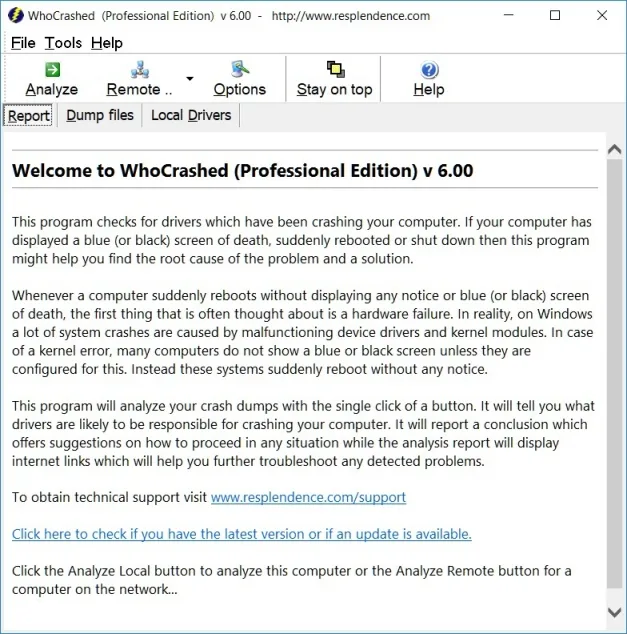
This download is the free Home Edition for home use. Remote-computer analysis, analysis of an arbitrary dump directory, detailed dump views and command-line options are among the publisher's Professional Edition additions. The screenshot is the publisher's legacy Professional Edition v6.00 report view, not a screenshot of the current Home Edition.
Treat the reported driver as a troubleshooting lead, not proof of the root cause: one kernel module can corrupt another. WhoCrashed reports system crashes, not individual application crashes, and analysis depends on available crash dump files.
What it offers
- Analyze available Windows system crash dumps and present the findings in a readable report.
- Identify suspected drivers or kernel modules and receive suggestions for further troubleshooting.
- Check whether crash dumps are enabled and get guidance on enabling them.
Good to know
- The reported driver is not guaranteed to be the true cause; drivers and other kernel modules can corrupt one another.
- Reports system crashes rather than individual application crashes; dump analysis needs available crash dump files.
- The free Home Edition is limited to home use. Remote analysis, custom dump directories and other advanced features require Professional Edition.
Product images
Sources
References used for this listing. Retrieval dates do not indicate hands-on testing.
- WhoCrashed — publisher introduction ↗Retrieved
- Resplendence Software — Free Downloads ↗Retrieved
- WhoCrashed — Supported Operating Systems ↗Retrieved
- WhoCrashed — Professional Edition ↗Retrieved
- WhoCrashed — publisher FAQ ↗Retrieved
- WhoCrashed — publisher screenshots ↗Retrieved
- WhoCrashed - Download — passive browser retrieval ↗Retrieved
More in utilities
View category ↗
1.1.1.1 with WARP 2026.8.2115.0
Encrypt traffic from your Mac to Cloudflare’s network with WARP, or use DNS-only mode for encrypted DNS queries to the 1.1.1.1 resolver.
1.1.1.1 with WARP 2026.8.2115.0
Encrypt traffic between your Windows PC and Cloudflare, or use encrypted DNS only, with the free 1.1.1.1 with WARP app.

3uTools 9.12.005
Manage iPhone and iPad photos, music, apps and backups from Windows with 3uTools, a free utility that also includes device checks and firmware flashing tools.