

Utilities Windows
WhoIsConnectedSniffer for Windows
Discover devices on your local network by listening to their packets with WhoIsConnectedSniffer, a free Windows utility that requires a capture driver.
- Operating system
- Windows 2000 through Windows 11, as listed by the publisher
- Architecture
- 32-bit package; separate x64 build available
- Download package
- ZIP archive containing the portable executable
Capture driver required separately. Microsoft Network Monitor on 64-bit Windows requires the x64 build rather than this 32-bit download.
Link checked · Download guidance
What is WhoIsConnectedSniffer?
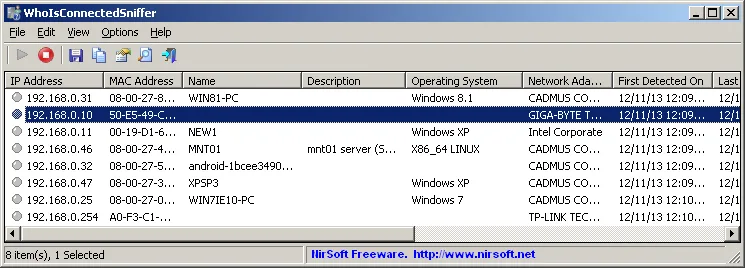
WhoIsConnectedSniffer builds a list of computers and devices from packets received by a Windows network adapter. Unlike an active network scanner, it does not send discovery packets to other devices. It can collect IP and MAC addresses, device names, operating-system details and adapter manufacturers when that information is present in the traffic.
Choose a capture driver and network adapter to begin collecting devices, then export selected entries as CSV, tab-delimited text, XML or HTML. The utility can also read supported capture files and save device lists from the command line. The program itself needs no installation, but a compatible capture driver must be installed separately.
This is not a complete inventory of every connected device. A device only appears if its packets reach the computer running the tool, some fields can remain blank, and computers on other subnets are not detected. The linked ZIP contains the 32-bit version; the publisher offers a separate x64 build, which is required when using Microsoft Network Monitor on 64-bit Windows.
What it offers
- Discover devices passively through ARP, UDP, DHCP, mDNS and BROWSER traffic.
- Display IP and MAC addresses, device names, operating systems and other details available in captured packets.
- Export selected devices to CSV, tab-delimited text, XML or HTML.
- Load device information from WinPcap or Microsoft Network Monitor 3.x capture files.
- Save device lists from the command line with capture-time and sorting options.
Good to know
- Requires a separately installed capture driver, such as Npcap or Microsoft Network Monitor.
- Only detects devices whose packets reach the capturing computer; it cannot detect computers on other subnets.
- Fields can remain empty when the captured traffic does not contain the information.
- The linked package is 32-bit; Microsoft Network Monitor on 64-bit Windows requires the publisher's separate x64 build.
Product images
Sources
References used for this listing. Retrieval dates do not indicate hands-on testing.
More in utilities
View category ↗
1.1.1.1 with WARP 2026.8.2115.0
Encrypt traffic from your Mac to Cloudflare’s network with WARP, or use DNS-only mode for encrypted DNS queries to the 1.1.1.1 resolver.
1.1.1.1 with WARP 2026.8.2115.0
Encrypt traffic between your Windows PC and Cloudflare, or use encrypted DNS only, with the free 1.1.1.1 with WARP app.

3uTools 9.12.005
Manage iPhone and iPad photos, music, apps and backups from Windows with 3uTools, a free utility that also includes device checks and firmware flashing tools.