
Utilities Windows
Win32 Disk Imager for Windows
Write raw disk images to SD cards and USB drives, or read removable media into an image file for backup, with this free, open-source Windows utility.
Version 1.0.0 · Direct publisher file
Link checked · Download guidance
What is Win32 Disk Imager?
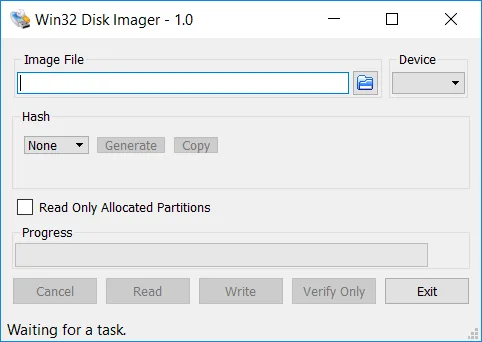
Win32 Disk Imager reads and writes raw disk images on removable storage. Select an image file and a device to write an image to an SD card or USB drive, or use Read to save the contents of removable media as an image file. Its focused workflow suits preparing media for embedded systems and backing up an existing card before changing it.
Version 1.0.0 also provides image verification and SHA-1 and SHA-256 checksum options. Verify Only compares the device against the length of the image file; it does not check extra space beyond that image. These functions are distinct from a safety assessment of the image or the application.
This entry links to the publisher's 1.0.0 EXE installer, dated March 8, 2017 in the SourceForge archive. The publisher identifies this release for Windows 7, 8.1 and 10; Windows 11 operation has not been established here. It is not a CD-writing, formatting or compressed-image tool. The publisher also reports a crash when a RAM disk is in use. Check the selected device carefully before writing and preserve any data you need elsewhere.
What it offers
- Write raw image files to removable SD cards and USB storage.
- Read removable media into a raw image file for backup.
- Compare an image file with a device using Verify Only, up to the image file's length.
- Generate SHA-1 and SHA-256 checksums.
Good to know
- No built-in reformatting or image-file compression; CD-ROM writing is not supported.
- The publisher reports a crash when a RAM disk is present and warns about USB-device imaging issues; USB floppy support should not be assumed.
- Verification covers the image's length, not any additional space on a larger device.
- The selected installer dates to 2017; the publisher lists Windows 7, 8.1 and 10, not a confirmed Windows 11 compatibility statement.
Product images
Sources
References used for this listing. Retrieval dates do not indicate hands-on testing.
More in utilities
View category ↗
1.1.1.1 with WARP 2026.8.2115.0
Encrypt traffic from your Mac to Cloudflare’s network with WARP, or use DNS-only mode for encrypted DNS queries to the 1.1.1.1 resolver.
1.1.1.1 with WARP 2026.8.2115.0
Encrypt traffic between your Windows PC and Cloudflare, or use encrypted DNS only, with the free 1.1.1.1 with WARP app.

3uTools 9.12.005
Manage iPhone and iPad photos, music, apps and backups from Windows with 3uTools, a free utility that also includes device checks and firmware flashing tools.