

Utilities Windows
WinCDEmu for Windows
Mount ISO and other optical-disc images as virtual drives in Windows Explorer, or create ISO images, with the free, open-source WinCDEmu utility.
- Operating system
- Windows XP, 2003, Vista, 2008, 7, 8, 8.1 and 10
- Architecture
- 32-bit and 64-bit Windows
- Download package
- EXE installer
Administrator rights required for installation. Publisher lists Windows through 10, not Windows 11. Portable edition is separate.
Link checked · Download guidance
What is WinCDEmu?
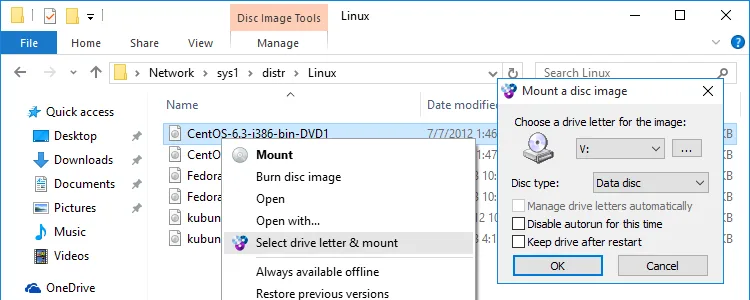
WinCDEmu opens optical-disc images as virtual CD, DVD or Blu-ray drives, so you can browse their contents without burning a physical disc. It integrates with Windows Explorer: double-click an image or use the context menu to choose a drive letter and mount it. Supported image formats include ISO, CUE, NRG, MDS/MDF, CCD and IMG.
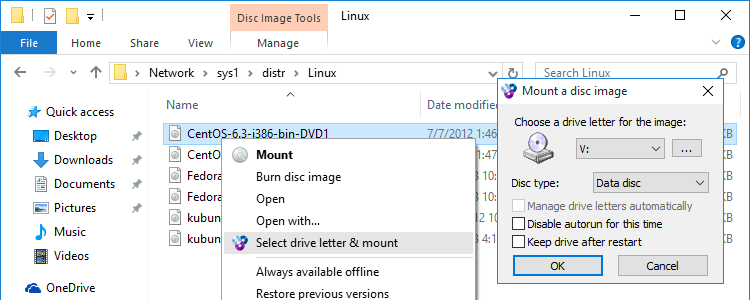
The mounting dialog lets you choose a drive letter and disc type, with options for automatic drive-letter management and keeping the drive after a restart. When finished, eject the virtual drive from Explorer or double-click the image again to unmount it. WinCDEmu also provides Explorer context-menu tools for creating ISO images.
This entry links to the publisher's WinCDEmu 4.1 EXE installer, not the separate portable edition. Installation requires administrator rights. The publisher lists 32-bit and 64-bit Windows through Windows 10; Windows 11 compatibility is not established by these sources. The free application does not come with technical support.
What it offers
- Mount ISO, CUE, NRG, MDS/MDF, CCD and IMG images from Windows Explorer.
- Choose a drive letter and disc type in the mounting dialog, or enable automatic drive-letter management.
- Create ISO images through the Explorer context menu.
- Use multiple virtual drives without reserving drive letters when they are not in use.
- Access data, DVD-video and BD-video images as virtual optical discs.
Good to know
- The linked installer requires administrator rights; the portable edition is a separate download.
- Publisher compatibility information stops at Windows 10; Windows 11 support is not established here.
- The publisher states that the free application does not come with technical support.
Product images
Sources
References used for this listing. Retrieval dates do not indicate hands-on testing.
- WinCDEmu - the easiest way to mount an ISO. And more... ↗Retrieved
- WinCDEmu - Download ↗Retrieved
- WinCDEmu - How to Mount ISO Files ↗Retrieved
More in utilities
View category ↗
1.1.1.1 with WARP 2026.8.2115.0
Encrypt traffic from your Mac to Cloudflare’s network with WARP, or use DNS-only mode for encrypted DNS queries to the 1.1.1.1 resolver.
1.1.1.1 with WARP 2026.8.2115.0
Encrypt traffic between your Windows PC and Cloudflare, or use encrypted DNS only, with the free 1.1.1.1 with WARP app.

3uTools 9.12.005
Manage iPhone and iPad photos, music, apps and backups from Windows with 3uTools, a free utility that also includes device checks and firmware flashing tools.