
Utilities Windows
Windows Memory Cleaner
Monitor RAM usage and clear selected Windows memory areas with a free portable utility offering automatic cleaning, process exclusions and a configurable hotkey.
- Operating system
- Windows XP and later; Windows Server 2003 and later, as documented by the publisher
- Architecture
- Not specified in the reviewed publisher documentation
- Download package
- Portable EXE
Requires administrator privileges. Individual memory-cleaning functions have higher minimum Windows versions.
Link checked · Download guidance
What is Windows Memory Cleaner?
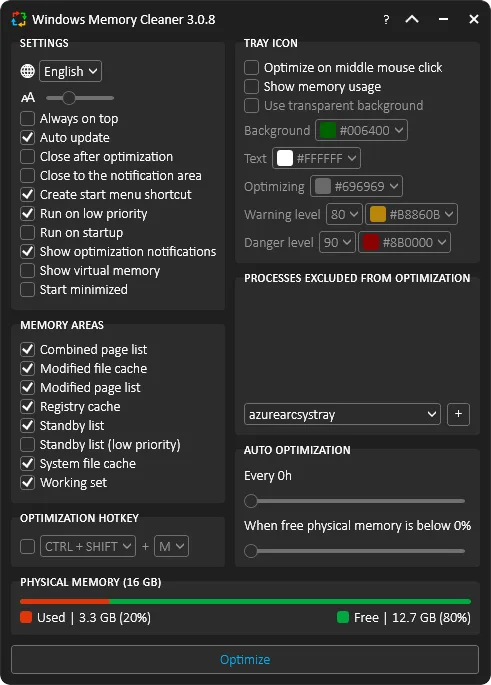
Windows Memory Cleaner puts several Windows memory-management functions in one compact interface. It shows physical memory usage and lets you select areas such as the standby list, system file cache and working sets before choosing Optimize. It is intended for people who want direct control over which memory areas are cleared, rather than a general-purpose disk cleaner.
For occasional use, the publisher distributes a single portable executable that needs no installation. Administrator privileges are required. You can trigger cleaning manually or with a configurable global hotkey, exclude individual processes, or set automatic cleaning by time interval or a free-memory threshold. Compact mode and a customizable notification-area icon provide less intrusive ways to monitor usage.
The cleaning options are not interchangeable: the publisher describes clearing the whole standby list as aggressive, while its low-priority option clears only the lowest-priority cached pages. Availability also varies with Windows version. Standby-list cleaning requires Vista or later, combined-page-list cleaning requires Windows 8 or later, and registry-cache cleaning requires Windows 8.1 or later. Broad support for older Windows therefore does not mean every cleaning function is available there.
Portable does not mean settings leave no trace. The publisher says settings are stored in the Windows registry, and enabling Run on Startup creates a Windows Task Scheduler task. Choose those options deliberately. This entry documents publisher features and an HTTP HEAD-checked download; it does not report hands-on performance results or promise a speed increase.
What it offers
- Select individual memory areas, including the standby list, system file cache and working sets.
- Schedule automatic cleaning by interval or when free physical memory falls below a selected percentage.
- Exclude selected processes from memory optimization.
- Trigger cleaning with a configurable global hotkey or from the notification area.
- Monitor physical memory usage, optionally show virtual memory, and switch to compact mode.
Good to know
- Administrator privileges are required to run the utility.
- Memory-area support depends on Windows version: standby-list cleaning needs Vista+, combined-page-list cleaning needs Windows 8+, and registry-cache cleaning needs Windows 8.1+.
- Settings are stored in the registry; enabling startup adds a scheduled task, even though the executable is portable.
Product images
Sources
References used for this listing. Retrieval dates do not indicate hands-on testing.
More in utilities
View category ↗
1.1.1.1 with WARP 2026.8.2115.0
Encrypt traffic from your Mac to Cloudflare’s network with WARP, or use DNS-only mode for encrypted DNS queries to the 1.1.1.1 resolver.
1.1.1.1 with WARP 2026.8.2115.0
Encrypt traffic between your Windows PC and Cloudflare, or use encrypted DNS only, with the free 1.1.1.1 with WARP app.


3uTools 9.12.005
Manage iPhone and iPad photos, music, apps and backups from Windows with 3uTools, a free utility that also includes device checks and firmware flashing tools.