

Utilities Windows
WinPrefetchView for Windows
Inspect Windows Prefetch files, see which files an application used, and export the recorded information with NirSoft's free WinPrefetchView utility.
- Operating system
- Windows XP through Windows 10, as documented by NirSoft
- Architecture
- x64 (selected download); separate 32-bit build available
- Download package
- ZIP archive; no installation required according to publisher
Windows 11 support is not established. Administrator access is required for the Prefetch folder on Windows Vista, 7 and 8.
Link checked · Download guidance
What is WinPrefetchView?
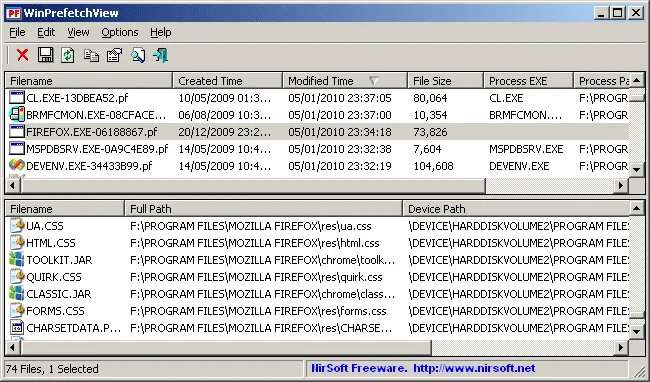
WinPrefetchView reads the information stored in Windows Prefetch (.pf) files. Its upper pane lists Prefetch entries; selecting one reveals the files referenced by that entry in the lower pane. This helps you examine files loaded by an application or recorded during Windows startup, rather than treating Prefetch as a list of files to remove.
The utility can open a Prefetch folder from another Windows installation and export records to text, CSV, HTML or XML through command-line options. NirSoft states that no installation or additional DLL files are required. This entry links to the publisher's 64-bit ZIP package; a separate 32-bit package is available on the official product page.
The publisher documents Windows XP through Windows 10, not Windows 11 compatibility. Administrator access is required to read the Prefetch folder on Windows Vista, 7 and 8. Although the utility can delete selected Prefetch files, Windows creates them again when the corresponding program next runs.
What it offers
- Browse Prefetch entries in an upper pane and the selected entry's referenced files in a lower pane.
- Inspect recorded run counts and last-run times, with up to eight run timestamps for Windows 8 or later Prefetch files.
- Load a Prefetch folder from another Windows installation using the /folder command-line option.
- Export records to text, CSV, HTML or XML, with optional sorting by column.
- Hide programs under the Windows folder to reduce system-executable entries in the list.
Good to know
- Published system requirements cover Windows XP through Windows 10; Windows 11 compatibility is not established by this source.
- Reading the Prefetch folder on Windows Vista, 7 and 8 requires administrator access.
- On a 64-bit system, the Missing Process column requires the x64 build for accurate results.
- Deleting a Prefetch file is not permanent: Windows recreates it when the same program runs again.
Product images
Sources
References used for this listing. Retrieval dates do not indicate hands-on testing.
More in utilities
View category ↗
1.1.1.1 with WARP 2026.8.2115.0
Encrypt traffic from your Mac to Cloudflare’s network with WARP, or use DNS-only mode for encrypted DNS queries to the 1.1.1.1 resolver.
1.1.1.1 with WARP 2026.8.2115.0
Encrypt traffic between your Windows PC and Cloudflare, or use encrypted DNS only, with the free 1.1.1.1 with WARP app.

3uTools 9.12.005
Manage iPhone and iPad photos, music, apps and backups from Windows with 3uTools, a free utility that also includes device checks and firmware flashing tools.