

Utilities Windows
WinSCP for Windows
Transfer files between your PC and a server with WinSCP, a free Windows SFTP, FTP, WebDAV and S3 client with directory synchronization and scripting.
- Operating system
- Windows 7 through Windows 11; Windows Server through 2025
- Architecture
- 32-bit (also runs on 64-bit Windows)
- Download package
- EXE installer
Windows 7/Server 2008 R2 require SP1 for this installer. Portable ZIP and experimental 64-bit portable builds are separate downloads.
Link checked · Download guidance
What is WinSCP?
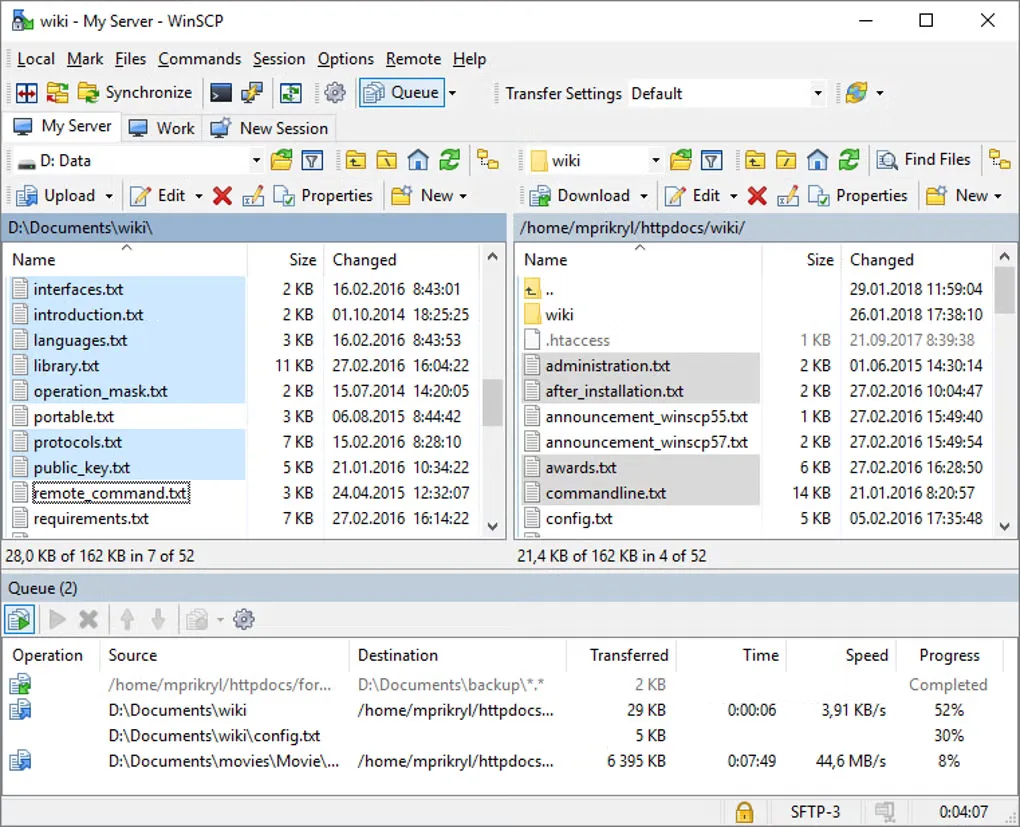
WinSCP transfers files between a Windows PC and remote servers or storage services. Its Commander and Explorer interfaces let you browse files, upload changes and edit remote text files with an integrated editor. Directory synchronization helps keep folders in step, while scripts and command-line tools handle repeat transfers. Version 6.7 also supports synchronizing two local directories.
Choose a protocol supported by your server: SFTP and SCP use SSH, while FTP, FTPS, WebDAV and S3 serve other connection types. SCP has an important restriction: WinSCP needs a Unix-like shell and commands on the remote system for operations such as directory listing. A restricted shell can therefore prevent SCP sessions from working; use SFTP when the server provides it.
The linked download is the standard WinSCP 6.7 EXE installer, a 32-bit application that also runs on 64-bit Windows. It is not the separate portable ZIP or experimental 64-bit build. Windows 7 and Server 2008 R2 need SP1 to run the installer.
What it offers
- Transfer files using SFTP, SCP, FTP, FTPS, WebDAV or S3, according to the server's supported protocols.
- Choose Commander or Explorer interfaces and edit remote text files with the integrated editor.
- Synchronize local and remote directories; version 6.7 also adds synchronization between two local directories.
- Automate repeat transfers with batch scripting and command-line tools.
- Queue transfers in the background and resume supported interrupted transfers.
Good to know
- SCP requires a Unix-like remote shell and commands for directory operations; restricted shells can be incompatible.
- The EXE installer requires SP1 on Windows 7 and Windows Server 2008 R2. The primary build is 32-bit; the separate 64-bit portable build is experimental.
Product images
Sources
References used for this listing. Retrieval dates do not indicate hands-on testing.
- Softonic discovery — supplied indexed result only ↗Retrieved
- Introducing WinSCP — official documentation ↗Retrieved
- WinSCP Downloads — official packages and release date ↗Retrieved
- WinSCP Technical Requirements — official compatibility and SCP restrictions ↗Retrieved
- WinSCP License — official software and image terms ↗Retrieved
- WinSCP Features — official feature index ↗Retrieved
- WinSCP 6.7 — publisher-linked SourceForge release files ↗Retrieved
- WinSCP for Windows — normally accessible Softonic screenshot gallery ↗Retrieved
More in utilities
View category ↗
1.1.1.1 with WARP 2026.8.2115.0
Encrypt traffic from your Mac to Cloudflare’s network with WARP, or use DNS-only mode for encrypted DNS queries to the 1.1.1.1 resolver.
1.1.1.1 with WARP 2026.8.2115.0
Encrypt traffic between your Windows PC and Cloudflare, or use encrypted DNS only, with the free 1.1.1.1 with WARP app.

3uTools 9.12.005
Manage iPhone and iPad photos, music, apps and backups from Windows with 3uTools, a free utility that also includes device checks and firmware flashing tools.