

Utilities Windows
Wireless Network Watcher for Windows
See devices connected to your network with Wireless Network Watcher, a free Windows utility that lists IP and MAC addresses and exports device details.
Version 2.45 · Direct publisher file
Link checked · Download guidance
What is Wireless Network Watcher?
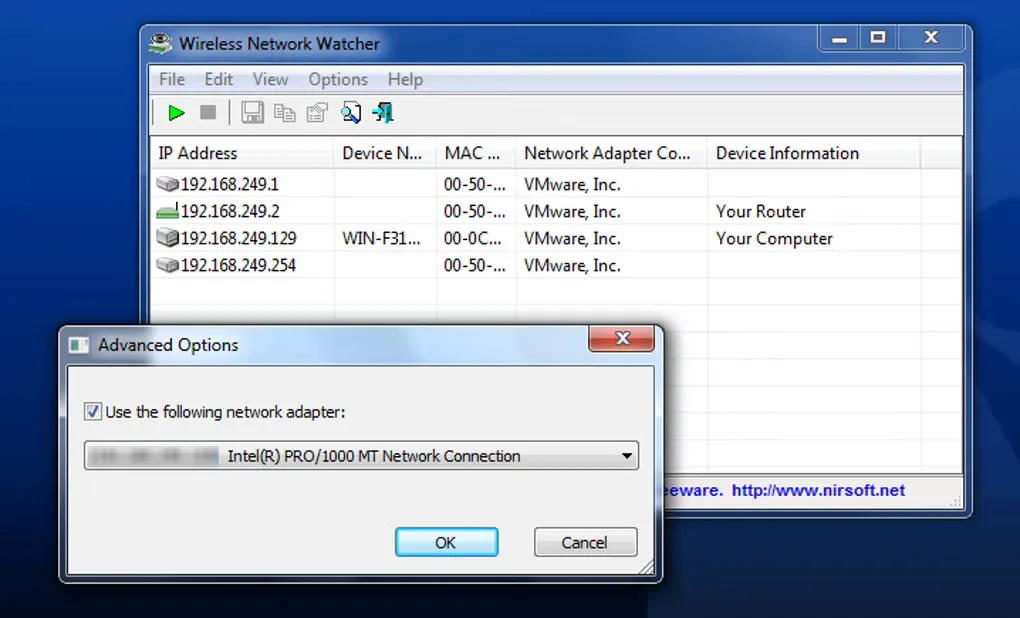
Wireless Network Watcher scans the network your Windows PC is connected to and lists the devices it finds. Its table shows IP and MAC addresses, network adapter manufacturers and device names when available. It is useful for checking the devices on your own wireless network; the publisher also supports scanning a small wired network.
Background scanning can discover newly connected devices, with an optional beep alert. You can copy the device list to a spreadsheet or export it as HTML, XML, CSV or plain text. The download here is NirSoft's setup executable with install and uninstall support; the publisher separately offers portable ZIP packages.
The scanner cannot inspect other wireless networks that you are not connected to. If it selects the wrong network adapter, open Advanced Options with F9 and choose the adapter manually. Some devices do not provide a name, so an empty name field does not mean the scan failed.
What it offers
- List connected devices with IP addresses, MAC addresses and network adapter manufacturer information.
- Discover newly connected devices through background scanning and enable an optional beep alert.
- Export device details as HTML, XML, CSV or text, or copy them to the clipboard for a spreadsheet.
- Select a network adapter manually in Advanced Options when automatic detection chooses incorrectly.
Good to know
- Can scan only the wireless network you are currently connected to, not other wireless networks.
- Automatic adapter detection can fail; manual selection through Advanced Options may be necessary.
- Device names may be blank when a device does not supply its name.
Product images
Sources
References used for this listing. Retrieval dates do not indicate hands-on testing.
More in utilities
View category ↗
1.1.1.1 with WARP 2026.8.2115.0
Encrypt traffic from your Mac to Cloudflare’s network with WARP, or use DNS-only mode for encrypted DNS queries to the 1.1.1.1 resolver.
1.1.1.1 with WARP 2026.8.2115.0
Encrypt traffic between your Windows PC and Cloudflare, or use encrypted DNS only, with the free 1.1.1.1 with WARP app.


3uTools 9.12.005
Manage iPhone and iPad photos, music, apps and backups from Windows with 3uTools, a free utility that also includes device checks and firmware flashing tools.