

Utilities Windows
WirelessNetView for Windows
Monitor nearby Wi-Fi networks, compare signal quality and view channel and security details with WirelessNetView, a freeware Windows utility from NirSoft.
- Operating system
- Windows 10, 8, 7, Vista, Server 2008, or XP SP2/SP3, as listed by NirSoft
- Architecture
- Not specified by the publisher for this ZIP
- Download package
- ZIP archive containing WirelessNetView.exe
Compatible Wi-Fi adapter and driver required. Windows 11 support is not confirmed by the cited requirements.
Link checked · Download guidance
What is WirelessNetView?
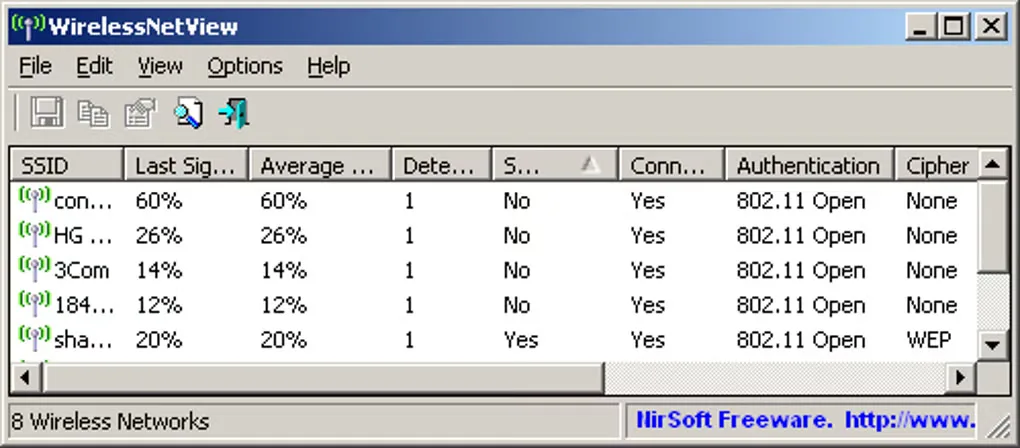
WirelessNetView lists the wireless networks detected by your Windows Wi-Fi adapter. It shows each network's SSID, last and average signal quality, detection count, authentication and cipher algorithms, MAC address, RSSI and channel details. The list updates automatically every 10 seconds, helping you watch signal changes without repeatedly refreshing a scan.
You can save the network list as text, CSV, HTML or XML, including through command-line export options. Advanced Options lets you choose the wireless adapter when more than one is available. Version 1.75 also adds a MAC address description list, so known addresses can have a readable description. The linked publisher download is a ZIP archive; NirSoft documents starting the utility by running WirelessNetView.exe.
Detection depends on a compatible wireless adapter and driver. NirSoft warns that the Maximum Speed and PHY Types columns report incorrect values on Windows XP. Device company names require a separate oui.txt lookup file. The publisher lists Windows versions through Windows 10; Windows 11 support and the selected package's architecture are not confirmed by this source.
What it offers
- View nearby network SSIDs, signal quality, RSSI, MAC addresses and channel details.
- Inspect authentication and cipher information alongside the detected networks.
- Refresh the network list automatically every 10 seconds.
- Export network lists to text, CSV, HTML or XML, with command-line save and sort options.
- Choose a wireless adapter and assign descriptions to known MAC addresses.
Good to know
- Requires a wireless adapter and driver compatible with Windows wireless support; otherwise detection fails.
- Maximum Speed and PHY Types values are incorrect on Windows XP, according to NirSoft.
- Device company names require the separate oui.txt lookup file.
Product images
Sources
References used for this listing. Retrieval dates do not indicate hands-on testing.
More in utilities
View category ↗
1.1.1.1 with WARP 2026.8.2115.0
Encrypt traffic from your Mac to Cloudflare’s network with WARP, or use DNS-only mode for encrypted DNS queries to the 1.1.1.1 resolver.
1.1.1.1 with WARP 2026.8.2115.0
Encrypt traffic between your Windows PC and Cloudflare, or use encrypted DNS only, with the free 1.1.1.1 with WARP app.

3uTools 9.12.005
Manage iPhone and iPad photos, music, apps and backups from Windows with 3uTools, a free utility that also includes device checks and firmware flashing tools.