

Utilities Windows
WizMouse for Windows
Scroll inactive windows under the pointer, enable mouse-wheel input in older applications and reverse scrolling direction with WizMouse for Windows.
- Operating system
- Windows XP, Vista, 7, 8 and 10, as listed by the publisher
- Architecture
- 32-bit and 64-bit Windows
- Download package
- EXE installer
Publisher also offers a separate portable ZIP. Windows 11 support is not stated in the official compatibility banner.
Link checked · Download guidance
What is WizMouse?
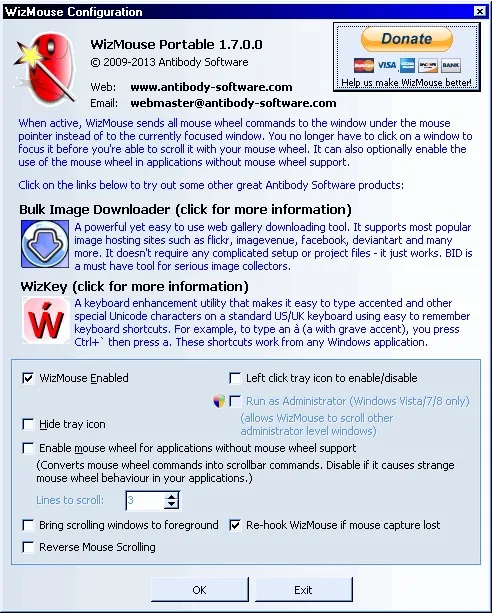
WizMouse sends mouse-wheel scrolling to the window under the pointer instead of requiring you to click it first. It is useful when moving between overlapping windows on older Windows systems. The free utility can also translate wheel input into scroll-bar messages for applications without native mouse-wheel support, and offers an optional reverse-scrolling direction.
Check whether you need its main feature before adding another utility: the publisher notes that Windows 10 already includes inactive-window scrolling. Its remaining options may still suit a particular workflow, but the publisher's compatibility banner lists Windows XP through Windows 10, not Windows 11. The linked package is the publisher's EXE installer; a separate portable ZIP is also listed on the official page.
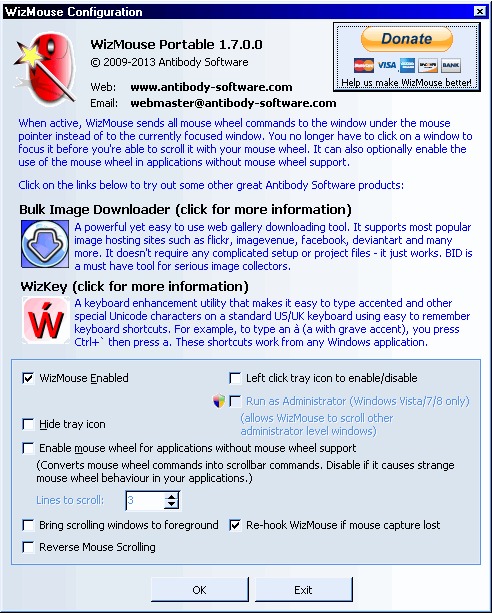
The screenshot shows the older WizMouse Portable 1.7.0.0 configuration window. It illustrates the scrolling controls, not the exact appearance or package type of the linked 1.7.0.3 installer.
What it offers
- Scroll the window under the mouse pointer without first giving it input focus.
- Translate mouse-wheel messages into scroll-bar messages for older applications without native wheel support.
- Optionally reverse the mouse-wheel scrolling direction.
Good to know
- Windows 10 already includes the core inactive-window scrolling behavior, according to the publisher; the utility is mainly useful on older Windows versions or for its additional controls.
- The publisher warns that automatic re-hooking can cause issues with AutoHotkey; its release notes say to start AutoHotkey after WizMouse.
Product images
Sources
References used for this listing. Retrieval dates do not indicate hands-on testing.
More in utilities
View category ↗
1.1.1.1 with WARP 2026.8.2115.0
Encrypt traffic from your Mac to Cloudflare’s network with WARP, or use DNS-only mode for encrypted DNS queries to the 1.1.1.1 resolver.
1.1.1.1 with WARP 2026.8.2115.0
Encrypt traffic between your Windows PC and Cloudflare, or use encrypted DNS only, with the free 1.1.1.1 with WARP app.

3uTools 9.12.005
Manage iPhone and iPad photos, music, apps and backups from Windows with 3uTools, a free utility that also includes device checks and firmware flashing tools.