

Development macOS
WordPress Studio for macOS
Build WordPress sites locally on your Mac, try themes and plugins, and share temporary previews with WordPress Studio, a free, open-source development app.
- Operating system
- macOS 13 Ventura or newer
- Architecture
- Apple Silicon (ARM64)
- Download package
- DMG disk image
Selected publisher download is the mac-silicon build; a separate Intel Mac build is available. Software was not installed or run.
Link checked · Download guidance
What is WordPress Studio?
WordPress Studio creates a local workspace for building WordPress sites before putting changes online. Use its desktop interface to manage projects, preview a site in the built-in browser, and work on themes, plugins and content. Import a backup to start from an existing site, or use a Blueprint to reuse a chosen setup across projects. Local work can be exported as an archive.
For collaboration, Studio can create temporary hosted preview sites after you connect a WordPress.com account. These previews expire seven days after their last update; they are not permanent hosting. Studio Sync can move a whole site or selected items between your Mac and eligible WordPress.com or Pressable sites. WordPress.com sync requires a paid plan, while Pressable sync requires Jetpack to be enabled.
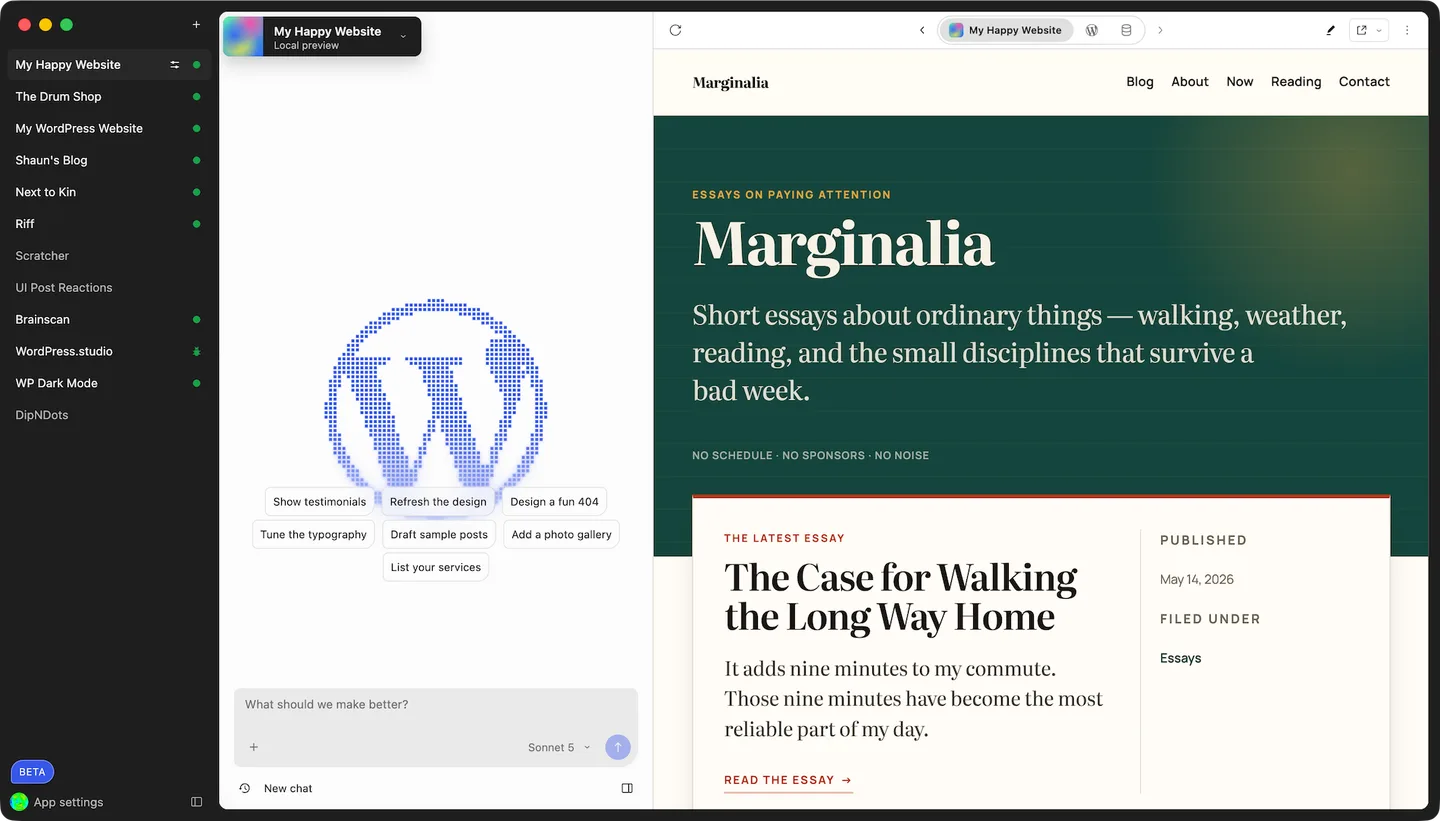
This download is the Apple Silicon Mac DMG. Intel Macs use a separate publisher download, and current publisher documentation requires macOS 13 Ventura or newer. The screenshot also shows Studio Code, which the publisher labels beta; its AI workflow should not be treated as a guarantee of stable functionality.
What it offers
- Create and manage local WordPress sites from a desktop interface.
- Preview sites in the built-in browser and check desktop or mobile layouts.
- Import a site backup, export local work, or reuse a setup with Blueprints.
- Share temporary hosted preview sites through a connected WordPress.com account.
- Push or pull a full site, theme, plugin or other selected items with Studio Sync on eligible hosting.
Good to know
- Requires macOS 13 Ventura or newer. This DMG is for Apple Silicon; Intel Macs need the separate Intel download.
- Hosted preview sites require a WordPress.com account and expire seven days after their last update.
- Studio Sync is limited to WordPress.com sites on paid plans and Pressable sites with Jetpack enabled.
- Studio Code is labeled beta by the publisher.
Product images
Sources
References used for this listing. Retrieval dates do not indicate hands-on testing.
More in development
View category ↗

010 Editor 17.0
Inspect and edit binary files on Mac with 010 Editor, a paid text and hex editor with Binary Templates, file comparison and a 30-day trial.
010 Editor 17.0
Inspect and edit binary files with 010 Editor for Windows, a text and hex editor with Binary Templates, file comparison and scripting. Includes a 30-day trial.
10x Editor
Edit and navigate C++ projects on Windows with a built-in parser, workspace search and Visual Studio project support. A paid license is required after the 30-day trial.