

Utilities Windows
X-Mouse Button Control for Windows
Remap mouse buttons and the scroll wheel in Windows with X-Mouse Button Control, a free utility with application-specific profiles and switchable button layouts.
- Operating system
- Windows 10 and Windows 11
- Architecture
- x86 and x64; selected automatically by the installer
- Download package
- EXE installer
The publisher also lists GUI editions of Windows Server 2012 R2, 2016, 2019 and 2022. Older desktop Windows versions are described as unsupported.
Link checked · Download guidance
What is X-Mouse Button Control?
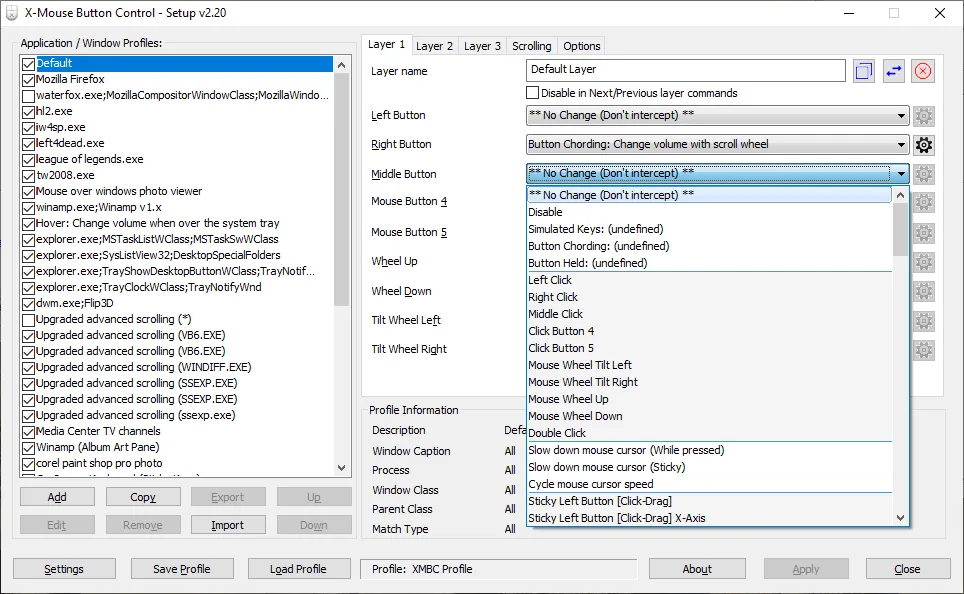
X-Mouse Button Control assigns different actions to your mouse buttons and scroll wheel. You can map a side button to a keyboard shortcut, use a button for clipboard or media controls, or launch an application. Application- and window-specific profiles let the same button do different jobs depending on where the pointer is.
Each profile supports up to ten layers of button mappings, switched with hotkeys or mouse buttons. Simulated keystrokes, button combinations and actions based on how long you hold a button offer more control than a single fixed shortcut. These options suit repeated desktop tasks and programs that do not directly use the fourth and fifth mouse buttons.
XMBC does not add support for unlimited physical buttons. It relies on standard Windows mouse messages and supports up to five mouse buttons, plus wheel controls. If the mouse driver does not expose the fourth and fifth buttons through those messages, XMBC cannot remap them through that mechanism. The publisher provides a user guide for configuring profiles and actions; this entry links to the Windows installer, which selects x86 or x64 automatically.
What it offers
- Remap mouse buttons and scroll/tilt wheel actions.
- Create application- and window-specific profiles that activate as the pointer moves over the matching target.
- Configure up to ten mapping layers per profile and switch them with hotkeys or mouse buttons.
- Assign simulated keystrokes, clipboard commands, media controls or application launches.
- Use button chording and hold-duration actions for different commands from the same buttons.
Good to know
- Supports up to five mouse buttons through the Windows mouse message queue; additional physical buttons are not independently supported through this mechanism.
- Remapping the fourth and fifth buttons depends on the mouse driver exposing their standard Windows messages.
Product images
Sources
References used for this listing. Retrieval dates do not indicate hands-on testing.
More in utilities
View category ↗
1.1.1.1 with WARP 2026.8.2115.0
Encrypt traffic from your Mac to Cloudflare’s network with WARP, or use DNS-only mode for encrypted DNS queries to the 1.1.1.1 resolver.
1.1.1.1 with WARP 2026.8.2115.0
Encrypt traffic between your Windows PC and Cloudflare, or use encrypted DNS only, with the free 1.1.1.1 with WARP app.

3uTools 9.12.005
Manage iPhone and iPad photos, music, apps and backups from Windows with 3uTools, a free utility that also includes device checks and firmware flashing tools.