
Utilities Windows
XL Delete
Remove selected files and folders with XL Delete, a free Windows wiping utility with a deletion wizard, free-space tools and scheduled cleanup.
- Operating system
- Windows; exact supported versions not stated on the product page
- Architecture
- Not specified by the publisher product page
- Download package
- EXE setup installer
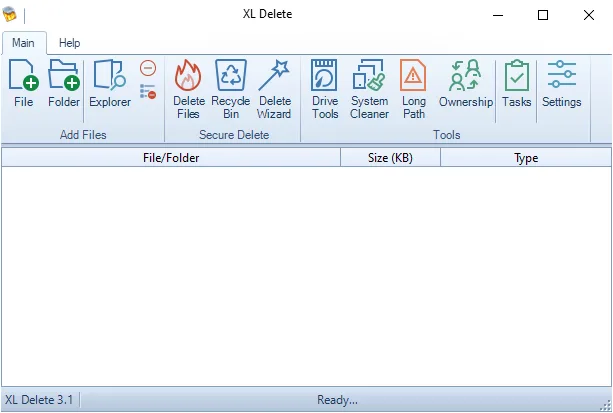
Publisher-linked XLDeleteSetup.exe. No installation or compatibility test performed; the screenshot's 3.1 status text does not establish the version of this unversioned installer.
Link checked · Download guidance
What is XL Delete?
XL Delete is a Windows utility for deliberately wiping files and folders rather than simply moving them to the Recycle Bin. Its built-in file explorer and drag-and-drop list help you choose what to remove, while a deletion wizard provides a guided route through the task. The publisher offers the application free of charge.
The tools cover different cleanup jobs. File and folder wiping targets selected items; the separate free-space wipe is intended for space left by previously deleted files. A system cleaner handles browser history, cookies and temporary files, and the scheduler can run recurring cleanup tasks. Other utilities include a long-path removal tool, a file viewer for inspecting binary contents and Windows Explorer integration. The publisher lists 12 built-in wipe methods plus custom methods.
Choose targets carefully: this is a deletion tool, not a recovery utility. The publisher's broad claims that wiped data cannot be recovered are not an independently verified guarantee in this entry. The product page identifies Windows as the platform but does not establish an exact current version, supported Windows builds or processor architecture. The linked EXE is the publisher's setup endpoint; its delivery was checked with HEAD only, without downloading or running the installer.
What it offers
- Select files and folders through a built-in explorer, drag and drop or a guided deletion wizard.
- Choose among 12 publisher-listed wipe methods or define a custom method.
- Use separate free-space wiping and Recycle Bin cleanup tools.
- Schedule cleanup of files, folders, drive free space and browser traces.
- Access a long-path removal tool, integrated file viewer and Windows Explorer integration.
Good to know
- Exact current version, supported Windows builds and processor architecture are not established by the publisher product page.
- Recovery-prevention claims, including effectiveness on particular storage devices, have not been independently verified here; do not treat this entry as a guarantee of unrecoverability.
Product images
Sources
References used for this listing. Retrieval dates do not indicate hands-on testing.
More in utilities
View category ↗
1.1.1.1 with WARP 2026.8.2115.0
Encrypt traffic from your Mac to Cloudflare’s network with WARP, or use DNS-only mode for encrypted DNS queries to the 1.1.1.1 resolver.
1.1.1.1 with WARP 2026.8.2115.0
Encrypt traffic between your Windows PC and Cloudflare, or use encrypted DNS only, with the free 1.1.1.1 with WARP app.


3uTools 9.12.005
Manage iPhone and iPad photos, music, apps and backups from Windows with 3uTools, a free utility that also includes device checks and firmware flashing tools.