

Development Windows
XLS Padlock for Windows
Compile Excel workbooks into protected Windows EXE applications with formula protection, VBA compilation and activation keys. Microsoft Excel is still required.
- Operating system
- Windows 11 and 10; older Windows and Windows Server versions are also listed by the publisher
- Architecture
- 64-bit build for 64-bit Microsoft Office or Microsoft 365
- Download package
- EXE installer
Requires Microsoft Excel 2010 or newer. Match the installer to Office bitness; a separate 32-bit build is available. End users also need a licensed copy of Excel. Administrator rights are required to install.
Link checked · Download guidance
What is XLS Padlock?
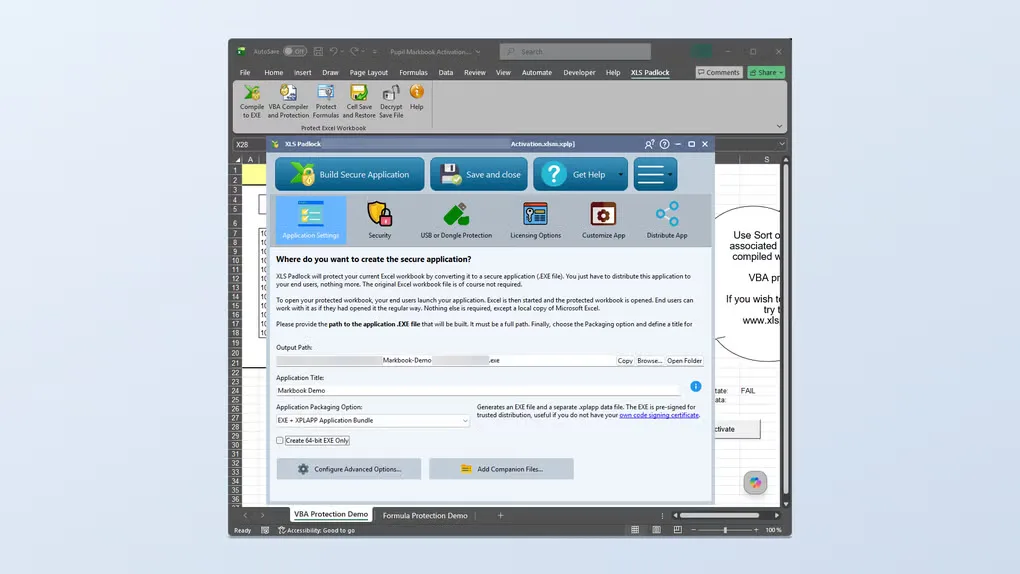
XLS Padlock packages Excel workbooks as Windows EXE applications for authors who want to distribute or sell spreadsheet-based tools. Its Excel ribbon and project manager let you select formulas to protect, compile VBA code and configure activation keys before building the application. Recipients use their own installed copy of Microsoft Excel; the compiled EXE does not include or replace Excel.
The downloadable build is for 64-bit Microsoft Office or Microsoft 365. Choose the installer to match Office, not just Windows: a separate 32-bit build is available from the publisher. The trial editor has no time limit, but applications built with it expire a few days after compilation, show a startup reminder and cannot be distributed. A commercial license is required to remove those trial restrictions.
What it offers
- Package XLSX, XLSM and XLSB workbooks as Windows EXE applications.
- Encrypt selected formulas while preserving their calculated cell values.
- Compile VBA code and remove its original source from the distributed application.
- Configure activation keys with hardware locking, time limits or run-count limits.
- Use the Excel ribbon and project manager to configure protection, licensing and packaging.
Good to know
- Microsoft Excel must be installed on both the compiler workstation and end-user machines; the EXE does not embed Excel.
- Applications compiled with the trial expire a few days after build, show a startup reminder and cannot be distributed.
- The selected installer requires 64-bit Microsoft Office or Microsoft 365, and installation requires administrator rights.
Product images
Sources
References used for this listing. Retrieval dates do not indicate hands-on testing.
More in development
View category ↗
010 Editor 17.0
Inspect and edit binary files on Mac with 010 Editor, a paid text and hex editor with Binary Templates, file comparison and a 30-day trial.
010 Editor 17.0
Inspect and edit binary files with 010 Editor for Windows, a text and hex editor with Binary Templates, file comparison and scripting. Includes a 30-day trial.
10x Editor
Edit and navigate C++ projects on Windows with a built-in parser, workspace search and Visual Studio project support. A paid license is required after the 30-day trial.