
Utilities Windows
Xpra for Windows
Use remote graphical applications on your Windows desktop with Xpra, an open-source tool that keeps applications running when you disconnect and reconnect.
- Operating system
- Windows
- Architecture
- x86_64 (64-bit)
- Download package
- EXE installer, Full stable build
Separate ARM64, Light, MSI and portable ZIP packages are available from the publisher.
Link checked · Download guidance
What is Xpra?
Xpra brings individual applications from a remote host onto your Windows desktop. Its seamless mode displays remote X11 windows alongside local programs, so you can work with a remote application without opening an entire remote desktop. Disconnecting does not end those applications: you can reconnect from the same computer or another client without losing their state. Xpra also supports accessing existing desktop sessions and starting remote desktop sessions.
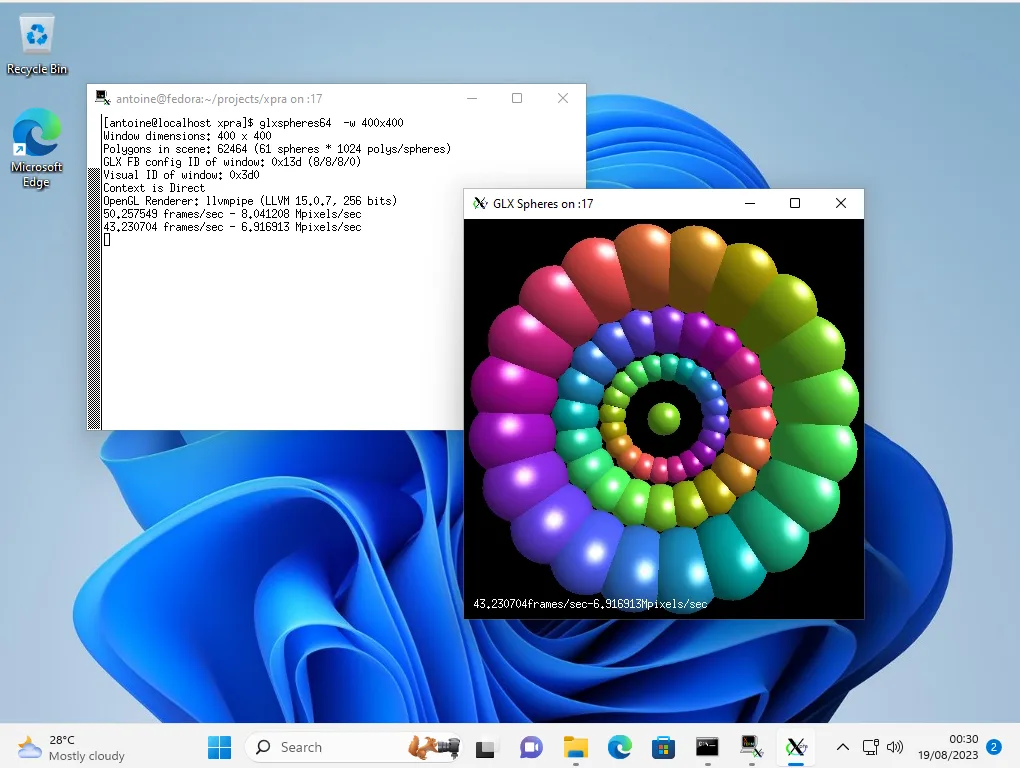
Desktop integration includes clipboard synchronization, audio input and output, printing and notifications. Connections can use protocols such as SSH or SSL, depending on the host configuration. The publisher's Windows screenshot shows an xterm terminal and GLX Spheres running on a Linux server but displayed on a Windows 11 desktop.
Xpra needs to be installed on both the client and the host for native-client use. The Windows installer alone does not create a remote environment or supply the applications you want to run. This entry links to the publisher's Full stable x86_64 EXE installer; separate Light builds have more limited codec support, and ARM64, MSI and portable ZIP packages are also available.
What it offers
- Display individual remote X11 applications as windows on the local desktop in seamless mode.
- Disconnect and reconnect to running applications without losing their state.
- Access existing desktop sessions or start remote desktop sessions.
- Integrate remote clipboard contents, audio, printers and notifications with the client desktop.
- Connect through supported network protocols, including SSH and SSL, according to the host configuration.
Good to know
- Native-client use requires Xpra on both the client and the host; the Windows installer alone does not provide remote applications.
- Light builds have more limited codec support than Full builds; package capabilities are not identical.
Product images
Sources
References used for this listing. Retrieval dates do not indicate hands-on testing.
More in utilities
View category ↗
1.1.1.1 with WARP 2026.8.2115.0
Encrypt traffic from your Mac to Cloudflare’s network with WARP, or use DNS-only mode for encrypted DNS queries to the 1.1.1.1 resolver.
1.1.1.1 with WARP 2026.8.2115.0
Encrypt traffic between your Windows PC and Cloudflare, or use encrypted DNS only, with the free 1.1.1.1 with WARP app.


3uTools 9.12.005
Manage iPhone and iPad photos, music, apps and backups from Windows with 3uTools, a free utility that also includes device checks and firmware flashing tools.