

Development Windows
Zed for Windows
Edit code, open WSL projects and use language servers, terminals and AI agents in Zed, a free, open-source editor for Windows.
- Operating system
- Windows 10 version 1903+; Windows 11 version 22H2+; 64-bit only
- Architecture
- x64 (Intel/AMD); separate ARM64 package available
- Download package
- EXE installer
Requires a DirectX 11-compatible GPU with a current vendor driver, not Microsoft Basic Display Adapter.
Link checked · Download guidance
What is Zed?
Zed is a code editor for working on local projects or files inside Windows Subsystem for Linux. Its Windows build integrates with DirectX 11 and DirectWrite rather than using Electron. Language servers, Git integration, terminals, tasks and debuggers support development without constantly switching applications.
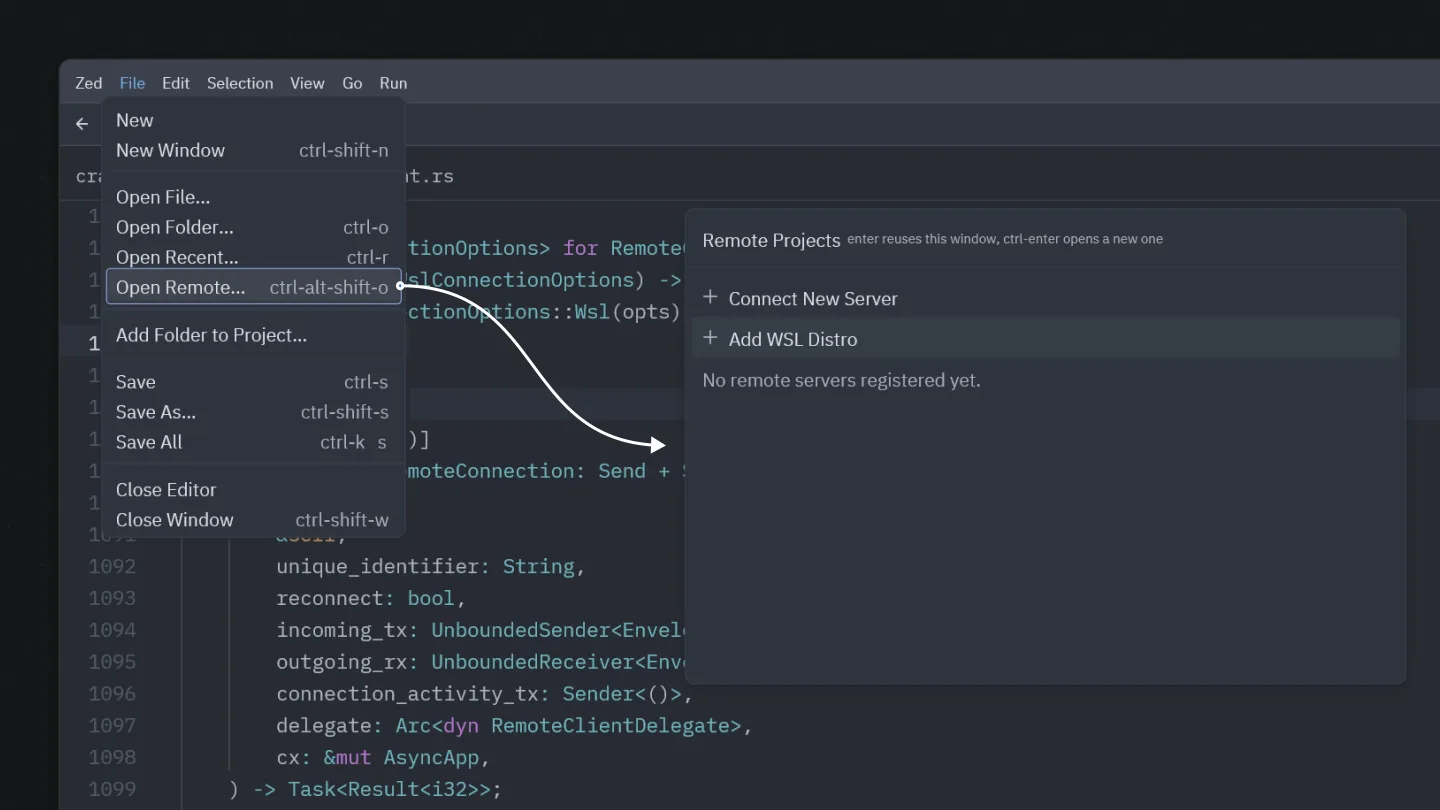
For a WSL project, use File > Open Remote and select Add WSL Distro. Zed also supports extensions on Windows, plus optional AI features such as edit predictions and ACP-compatible agents. The editor is free; optional Zed Pro subscriptions are separate. Collaboration requires signing in.
This entry links to the stable 1.26.2 Intel/AMD x64 EXE installer. ARM64 machines need the separate publisher package. Check the operating-system and GPU requirements before choosing it: Zed requires 64-bit Windows and a DirectX 11-compatible GPU with a vendor driver. The screenshot comes from the publisher's October 2025 Windows announcement and illustrates the WSL workflow, not the exact appearance of release 1.26.2.
What it offers
- Edit local projects or open folders inside WSL from the Remote Projects dialog.
- Use language servers, Git integration, terminals, tasks and debuggers with supported remote projects.
- Install Zed extensions on Windows.
- Use optional edit predictions and ACP-compatible coding agents.
Good to know
- Requires 64-bit Windows 10 version 1903 or later, or Windows 11 version 22H2 or later; 32-bit Windows is not supported.
- Requires a DirectX 11-compatible GPU and a current vendor graphics driver; Microsoft Basic Display Adapter is not sufficient.
- This download targets Intel/AMD x64; ARM64 uses a separate installer.
- Collaboration requires signing in; optional Zed Pro subscriptions are separate from the free editor.
Product images
Sources
References used for this listing. Retrieval dates do not indicate hands-on testing.
More in development
View category ↗
010 Editor 17.0
Inspect and edit binary files on Mac with 010 Editor, a paid text and hex editor with Binary Templates, file comparison and a 30-day trial.
010 Editor 17.0
Inspect and edit binary files with 010 Editor for Windows, a text and hex editor with Binary Templates, file comparison and scripting. Includes a 30-day trial.
10x Editor
Edit and navigate C++ projects on Windows with a built-in parser, workspace search and Visual Studio project support. A paid license is required after the 30-day trial.