
Utilities Windows
Zelscope
View sound-card input as waveforms or a frequency spectrum with Zelscope, a Windows oscilloscope and spectrum analyzer offered as a 14-day evaluation.
- Operating system
- Windows XP is the publisher-listed requirement; current Windows compatibility is unverified.
- Architecture
- Not specified by the publisher.
- Download package
- EXE evaluation installer
Requires a sound card. Publisher lists a 300 MHz PC, 64 MB RAM and 1 MB disk space. No Linux or Mac version is offered in the FAQ.
Link checked · Download guidance
What is Zelscope?
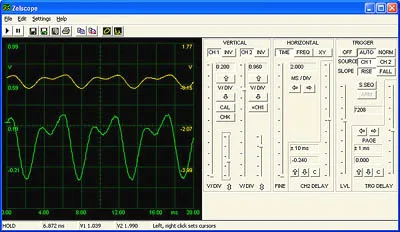
Zelscope turns sound-card input into a dual-trace oscilloscope or spectrum display. Its traditional gain, offset, timebase and trigger controls suit inspecting audio signals, comparing two channels and exploring low-frequency waveforms. The spectrum view can show amplitude and phase, while XY mode displays Lissajous figures.
Cursor measurements provide voltage and time differences and a frequency readout. You can export captured data as WAV, save visible traces as text, or save screenshots as BMP or EMF. These are publisher-described capabilities, not results from running the program.
This is legacy software: the publisher lists Windows XP and a sound card, but does not establish compatibility with current Windows releases. Its sound-card input cannot measure DC, and very low frequencies may be distorted. It is not a substitute for a general-purpose electrical oscilloscope: the publisher warns that connecting nonstandard equipment directly to a sound card can cause injury or hardware damage.
The download is a 14-day evaluation, not freeware. The publisher’s registration instructions refer to Kagi and carry historical copyright dates; a working purchase or registration route has not been verified. Confirm licensing availability before relying on continued use after the evaluation.
What it offers
- Display one or two waveform traces, or use XY mode for Lissajous figures.
- Inspect amplitude and phase in the spectrum analyzer.
- Adjust trigger level, slope and delay, with pretrigger and single-shot modes.
- Measure voltage and time differences with on-screen cursors and read frequency.
- Export raw data as WAV, visible traces as text, and screenshots as BMP or EMF.
Good to know
- The evaluation license allows 14 days of use; use beyond that requires a paid license, and current registration availability is unverified.
- Publisher requirements list Windows XP; compatibility with current Windows versions is not confirmed.
- AC-coupled sound-card input cannot display DC; signals below about 15–20 Hz may be distorted.
- Direct connection to equipment other than standard audio equipment can cause injury or hardware damage, according to the publisher.
Product images
Sources
References used for this listing. Retrieval dates do not indicate hands-on testing.
- Zelscope — publisher overview ↗Retrieved
- Zelscope — publisher features and system requirements ↗Retrieved
- Zelscope — publisher frequently asked questions ↗Retrieved
- Zelscope — publisher evaluation download ↗Retrieved
- Zelscope — evaluation license agreement ↗Retrieved
- Zelscope — publisher screenshot gallery ↗Retrieved
More in utilities
View category ↗
1.1.1.1 with WARP 2026.8.2115.0
Encrypt traffic from your Mac to Cloudflare’s network with WARP, or use DNS-only mode for encrypted DNS queries to the 1.1.1.1 resolver.
1.1.1.1 with WARP 2026.8.2115.0
Encrypt traffic between your Windows PC and Cloudflare, or use encrypted DNS only, with the free 1.1.1.1 with WARP app.


3uTools 9.12.005
Manage iPhone and iPad photos, music, apps and backups from Windows with 3uTools, a free utility that also includes device checks and firmware flashing tools.