
Utilities Windows
7+ Taskbar Tweaker
Change taskbar grouping, middle-click actions and mouse-wheel behavior on Windows 7, 8 and 10 with this free customization utility. The native Windows 11 taskbar is not supported.
- Operating system
- Windows 7, Windows 8 and Windows 10
- Architecture
- Not specified in the cited publisher pages
- Download package
- EXE installer with a Portable installation option
The native Windows 11 taskbar is unsupported. Publisher mentions a third-party legacy-taskbar workaround for Windows 11 23H2 and older, not general Windows 11 support.
Link checked · Download guidance
What is 7+ Taskbar Tweaker?
7+ Taskbar Tweaker changes how the Windows taskbar responds to clicks, grouping and window previews. It suits users who want separate taskbar buttons instead of grouped applications, or who prefer middle-clicking a button to close its window rather than opening another instance. Its settings window brings these controls together instead of relying on registry edits.
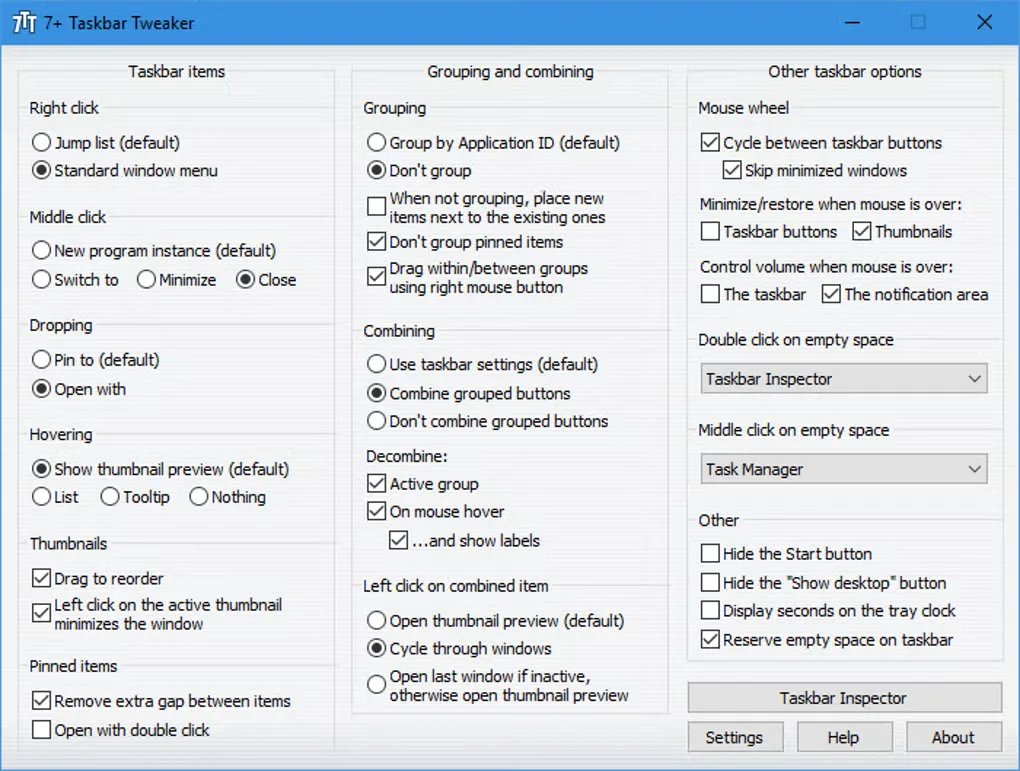
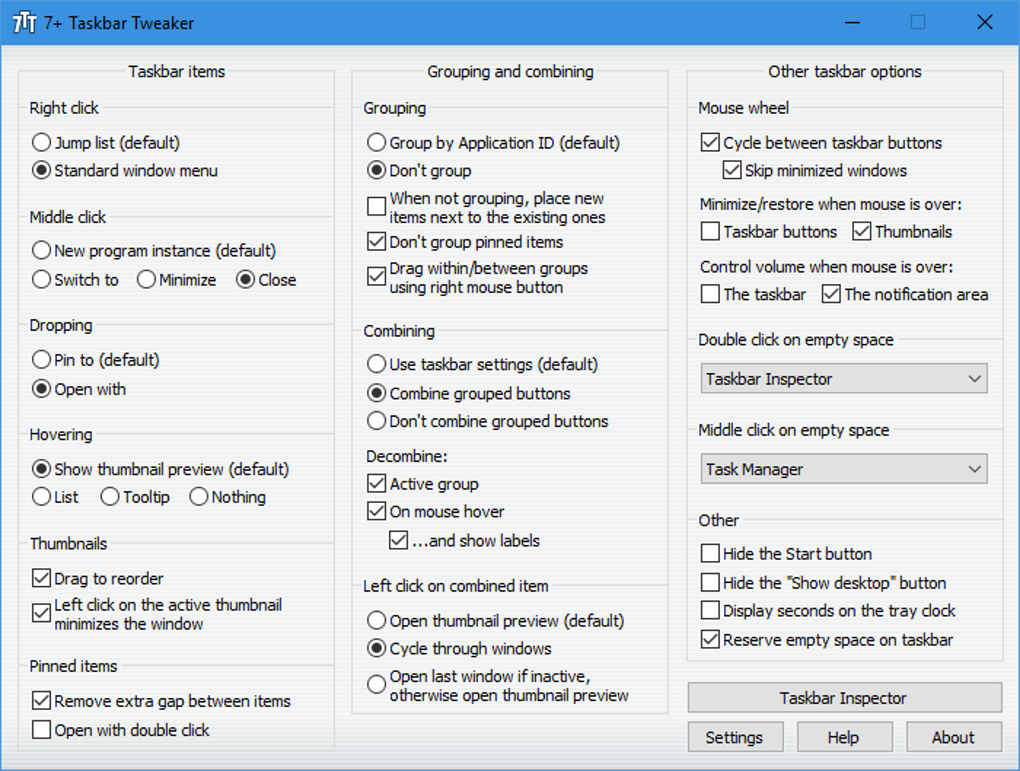
Taskbar Inspector adds per-application control over grouping, combining and labels. Other options shown in the source screenshot include cycling between taskbar buttons with the mouse wheel, dragging thumbnails to reorder them and assigning actions to empty taskbar space. These are configuration choices, not a claim that every option works on every Windows build.
The publisher designs this utility for Windows 7, Windows 8 and Windows 10, not the native Windows 11 taskbar. It works by injecting code into Explorer and manipulating it directly; it is not simply a collection of permanent Windows registry switches. The official EXE also offers a Portable installation type that extracts the program to a chosen folder. No installer was downloaded or run for this entry.
What it offers
- Disable taskbar grouping and adjust how grouped buttons combine.
- Choose middle-click actions such as closing, minimizing or switching to a window.
- Use Taskbar Inspector for per-application grouping, combining and label settings.
- Configure mouse-wheel cycling and thumbnail behavior through the settings window.
- Extract a portable copy using the Portable installation type in the official installer.
Good to know
- Does not support the native Windows 11 taskbar. The publisher describes a separate legacy-taskbar workaround only for Windows 11 version 23H2 and older; this is not native compatibility.
- Customizations inject code into Explorer rather than changing ordinary taskbar registry settings. The publisher notes that antivirus products can flag the program; no independent safety assessment is claimed here.
- The screenshot illustrates available settings but does not establish their behavior on a particular Windows build. This entry does not claim installation or runtime testing.
Product images
Sources
References used for this listing. Retrieval dates do not indicate hands-on testing.
More in utilities
View category ↗
Ultimate Windows Tweaker 5.2
Customize Windows 11 settings with Ultimate Windows Tweaker 5.2, a free portable utility for taskbar, File Explorer, context-menu and privacy adjustments.

ElevenClock 4.4.1.1
Customize Windows 11 taskbar clocks with seconds, date formats, fonts and colors, including separate clock settings for multiple monitors.
Volumouse 2.21
Adjust Windows sound volume with your mouse wheel using Volumouse, a freeware utility with configurable key, mouse-button and taskbar rules.

HiddeX 2.5 build 22
Hide selected Windows applications from the desktop and taskbar without closing them. HiddeX is a portable freeware utility with keyboard and mouse shortcuts.

Volume² 1.1.9.469
Change Windows volume with mouse-wheel actions or global hotkeys, choose an on-screen display and schedule audio-device changes with Volume².