
Utilities Windows
Ace Utilities
Remove temporary files, find duplicates, inspect disk usage and manage Windows startup items with Ace Utilities, a commercial PC-maintenance toolkit.
- Operating system
- Windows Vista, 7, 8, 8.1 and 10
- Architecture
- Publisher lists 32-bit and 64-bit Windows; selected EXE architecture not independently inspected
- Download package
- EXE installer
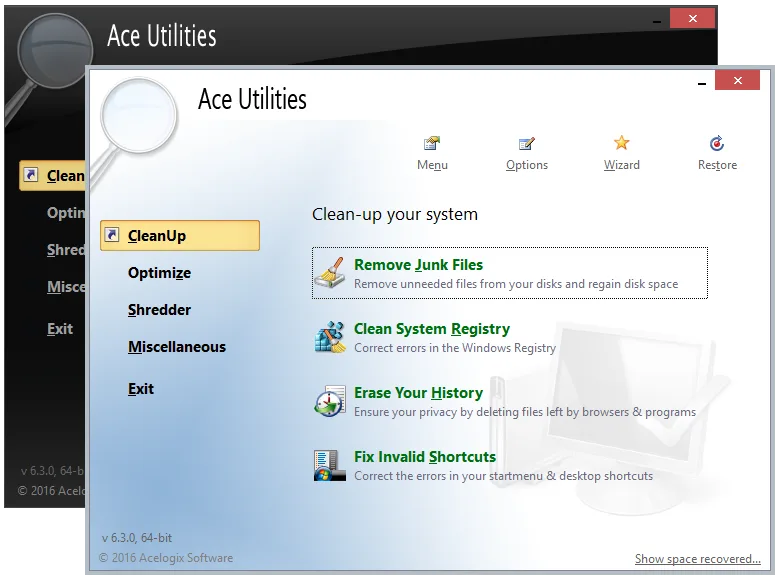
Publisher lists 6.6.0 released May 22, 2021. Windows 11 support is not established. The screenshot shows the older 6.3.0, 64-bit interface.
Link checked · Download guidance
What is Ace Utilities?
Ace Utilities brings several Windows housekeeping tasks into one application. Its tools cover temporary-file cleanup, duplicate files and folders, disk-space analysis, invalid shortcuts, startup programs and services, and browser-history cleanup. The disk analyzer shows space used by files and folders and lists the largest 100 files, making it useful for deciding where to investigate storage use before deleting anything.
The suite also includes a registry cleaner, registry backup and restore, an uninstall manager and scheduled cleanup through Windows Task Scheduler. These are separate maintenance functions, not evidence of a guaranteed speed improvement. The publisher's FAQ notes that some registry entries may need to be excluded from cleaning.
The official product page lists version 6.6.0, released May 22, 2021, for Windows Vista, 7, 8, 8.1 and 10 in 32-bit and 64-bit editions. Windows 11 support is not established by that page. The publisher screenshot below depicts an older 6.3.0 interface, not a verified view of version 6.6.0. Ace Utilities uses paid registration; the publisher documents uninstalling it through Control Panel's Add/Remove Programs.
What it offers
- Remove temporary files and locate duplicate files or folders, with duplicate searches filtered by file type, category or size range.
- Inspect disk usage through a graphical breakdown and a list of the largest 100 files.
- Find invalid shortcuts and manage programs and services that start with Windows.
- Use registry cleanup, registry backup and restore, and an uninstall manager from the same toolkit.
- Schedule cleanup using Windows Task Scheduler.
Good to know
- The publisher lists Windows Vista through Windows 10; Windows 11 compatibility is not established by the cited product page.
- The publisher's FAQ acknowledges that some registry entries need to be ignored during cleaning; its broad performance and safety claims are not independently verified here.
- Commercial software with paid registration, not a free-software license.
Product images
Sources
References used for this listing. Retrieval dates do not indicate hands-on testing.
- Acelogix Software - Ace Utilities ↗Retrieved
- Acelogix Software - FAQ ↗Retrieved
More in utilities
View category ↗PDF Explorer 1.5.66.2
Catalog PDF and CHM collections, search document text and metadata, and extract images with PDF Explorer for Windows. The publisher offers a 30-day trial.

Glary Utilities 6.49.0.53
Clean temporary files, manage startup programs and inspect disk usage with Glary Utilities, a Windows maintenance toolkit with free and paid editions.
Puran Utilities 3.2.1
Clean unwanted files, manage startup items and run selected maintenance tools from one Windows utility suite. Puran Utilities also includes disk checking and file recovery tools.
jv16 PowerTools 8.1.0.1564
Find leftover software, clean unwanted data and inspect your Windows PC with jv16 PowerTools, a maintenance suite with a 14-day trial.


Wise Disk Cleaner 11.4.0
Remove temporary files and browser traces with Wise Disk Cleaner, a free Windows cleanup utility with scheduled cleaning and drive optimization tools.