
Multimedia & graphics Windows
Airwindows Consolidated
Browse Airwindows audio effects inside one Windows VST3 or CLAP plugin, with searchable effect selection, knob controls and built-in documentation. A standalone version is included too.
- Operating system
- 64-bit Windows; minimum Windows version not established by the cited manual
- Architecture
- x64
- Download package
- EXE installer with VST3, CLAP and standalone components
Selected installer is x64. Separate Windows ARM64EC and Windows 7 ZIP assets are listed by the publisher; they are not this download. Plugin operation depends on host format support.
Link checked · Download guidance
What is Airwindows Consolidated?
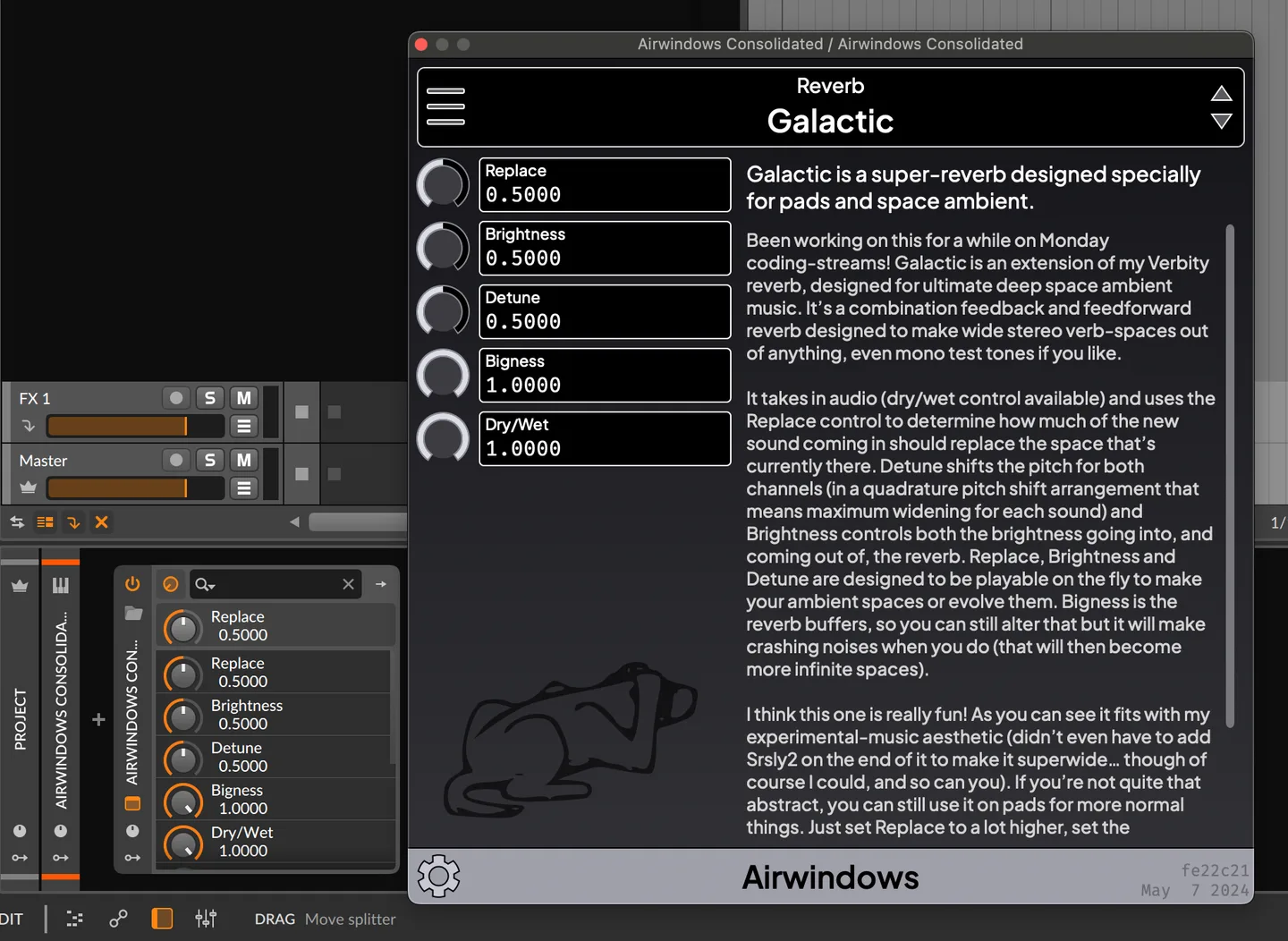
Airwindows Consolidated brings the Airwindows effects collection into a single interface instead of making you browse separate plugin names in your DAW. The Windows installer offers VST3, CLAP and standalone components. Inside the plugin, an effect selector sits above parameter knobs on the left and the selected effect's original documentation on the right. It suits musicians who want to explore Airwindows processing without leaving their audio project to look up each effect.
Start with the Recommended collection to narrow the list, or select All plugins to remove the collection filter. Clicking the effect name opens a typeahead search that accepts partial effect or category names. Parameter values can usually be typed directly; Shift-drag makes finer knob adjustments, and double-click restores a knob's default. The documentation stays alongside the controls, so you can read the effect's intended use while adjusting it. Theme settings and Windows screen-reader support provide alternatives to the default presentation.
This entry identifies the publisher's 2026-10-29-a1eb817 Windows x64 installer, not a separately tested stable edition. The official DAWPlugin release is not marked prerelease, but it is a rolling build and the project describes its automated builds as nightly. Plugin use requires a host that supports the selected format; a small number of parameters do not support typed values. The publisher's manual screenshot shows the shared interface in Bitwig on macOS, rather than a Windows installation of this build.
What it offers
- Use the Airwindows effects collection through one effect selector and parameter interface.
- Find effects by partial name or category with typeahead search and collection filters.
- Read each effect's original documentation beside its parameter controls.
- Adjust knobs with fine Shift-drag control, default resets and typed values where supported.
- Choose Windows VST3, CLAP or standalone components; configure themes and screen-reader access.
Good to know
- The official download is a rolling automated build; a non-prerelease flag is not evidence of independent stability testing.
- A small number of parameters do not support direct text entry.
- VST3 and CLAP components need a compatible host. The selected installer is x64, not the separate ARM64EC or Windows 7 package.
Product images
Sources
References used for this listing. Retrieval dates do not indicate hands-on testing.
- Airwindows Consolidated — official product overview ↗Retrieved
- Airwindows Consolidated Plugin — official manual ↗Retrieved
- DAWPlugin — official GitHub release metadata ↗Retrieved
- Airwin2rack — official README and licensing notes ↗Retrieved
- Airwindows Consolidated — official Windows installer definition ↗Retrieved
- Airwin2rack — MIT license ↗Retrieved
More in multimedia & graphics
View category ↗
Surge XT 1.3.4
Design layered synth sounds with Surge XT, a free, open-source hybrid synthesizer for Windows with VST3, CLAP and standalone options.

SoundCraft 0.13.1
Record, edit and mix audio and MIDI with SoundCraft, a free, open-source Windows digital audio workstation with separate Edit and Mix windows. The project is still in development.
Reason 14.1.0
Record, sequence and mix music in Reason for Windows, combining a standalone DAW with a modular Rack of instruments, effects and MIDI tools.

REAPER 7.83
Record, edit and mix multitrack audio and MIDI with REAPER for Windows. The publisher offers a fully functional 60-day evaluation and a separate Windows x64 installer.
Sonikr Media Hub 1.0.0 (Softonic listing)
Organize and play your own music on Windows with Sonikr Media Hub. Browse albums, artists and folders, build playlists, and optionally enable remote access.