
Utilities Windows
OpenHashTab
Calculate and compare file checksums from Windows file properties with OpenHashTab, a free, open-source shell extension with checksum-file checking and export tools.
- Operating system
- Windows 7 or later, according to the publisher
- Architecture
- x64 (selected download)
- Download package
- MSI installer — User variant
Publisher also lists x86 and ARM64, plus Machine variants. README recommends 1 GB RAM or more for efficient hashing of more than 512 files at once.
Link checked · Download guidance
What is OpenHashTab?
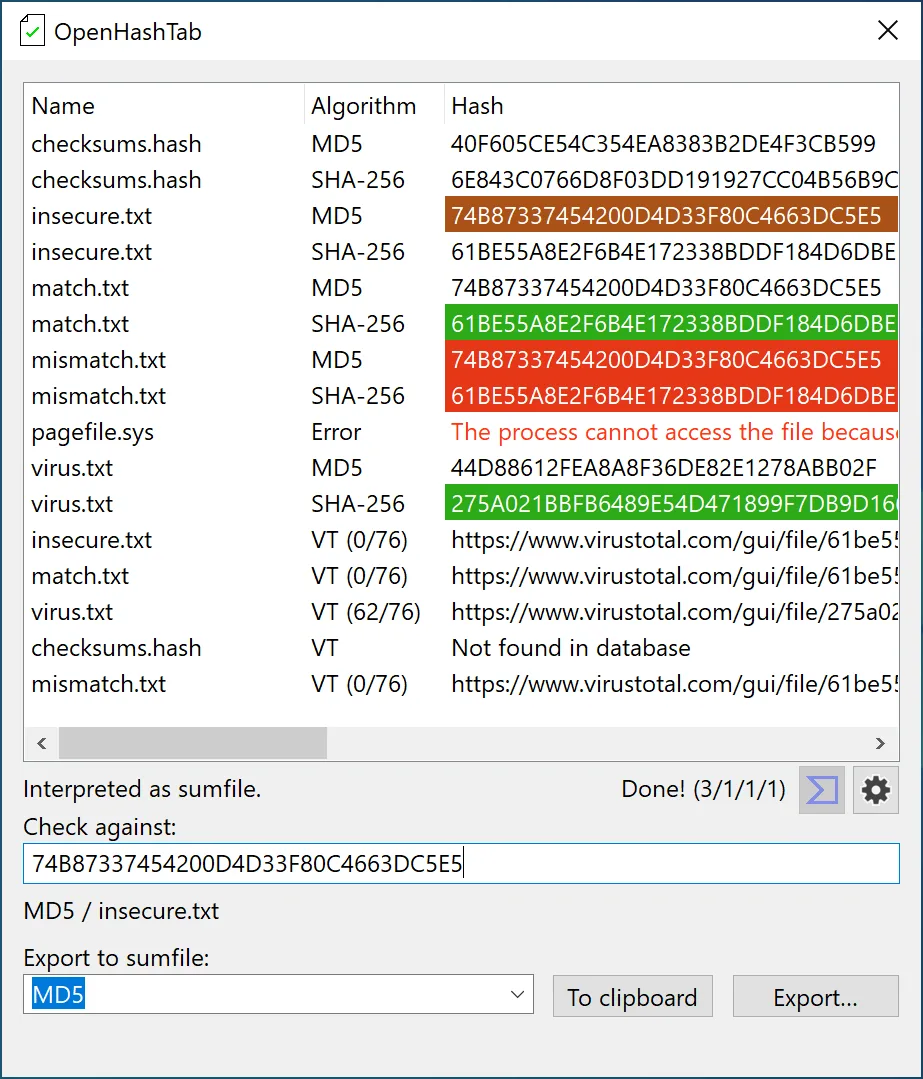
OpenHashTab adds file hashing and checksum comparison to Windows file properties. It suits checking a file against a supplied checksum or working through a checksum list without opening a separate command-line tool. Select multiple files or folders to hash their contents, double-click a hash to copy it, or export results to a checksum file or the clipboard. Supported algorithms include MD5, SHA-256, SHA-3 and BLAKE3.
Checksum-file support makes it useful for checking a collection rather than comparing one value at a time. The publisher documents checking *sum output, corz .hash and SFV files, as well as hexadecimal hashes stored alongside files. Opening the hashing tab for a checksum file processes the files it lists. Optional context-menu access, file associations and a standalone mode provide other entry points.
The download here is the publisher's OpenHashTab 3.1.1 User x64 MSI package. Separate x86, ARM64 and Machine packages are listed in the same publisher catalog; choose the package for your system rather than treating this x64 link as universal. Long-path support depends on Windows and its configuration. OpenHashTab is a separate open-source product, not the proprietary HashTab application.
What it offers
- Calculate file hashes from Windows file properties, with optional context-menu access and a standalone mode.
- Choose algorithms including MD5, SHA-256, SHA-3 and BLAKE3.
- Hash multiple selected files or traverse selected folders.
- Check supported checksum files, including *sum output, corz .hash and SFV.
- Copy hashes or export results to the clipboard or a checksum file.
Good to know
- Long-path handling is limited by Windows and its configuration; support is not unconditional.
- This download is the User x64 MSI package, not the separate x86, ARM64 or Machine package.
Product images
Sources
References used for this listing. Retrieval dates do not indicate hands-on testing.
More in utilities
View category ↗
TeraCopy 4.0.5
Copy and move files on Windows with queued transfers, checksum verification and per-file error handling. The free edition has limits on commercial use and advanced features.

Japplis Toolbox 6.5
Encode text, clean up lists, apply regular expressions and calculate hashes with Japplis Toolbox, a free text-utility application for Windows.
Icaros 3.3.6
Show video thumbnails, embedded cover art and media properties in Windows File Explorer with Icaros, a free collection of shell extensions.

HashMyFiles 2.51
Calculate and compare file hashes with HashMyFiles, a portable Windows utility supporting MD5, SHA1, CRC32 and SHA-2 hashes, clipboard copying and report export.
Disk Space Fan
See which folders occupy your Windows disk with Disk Space Fan's ring chart, file-type filters and duplicate-file tools. The publisher offers a free trial and a paid Pro edition.