
Utilities Windows
pyfa
Plan EVE Online ship fittings outside the game with pyfa, a free, open-source fitting assistant for Windows. Experiment with modules and save fits before committing to a setup.
Version 2.69.3 · Direct publisher file
Link checked · Download guidance
What is pyfa?
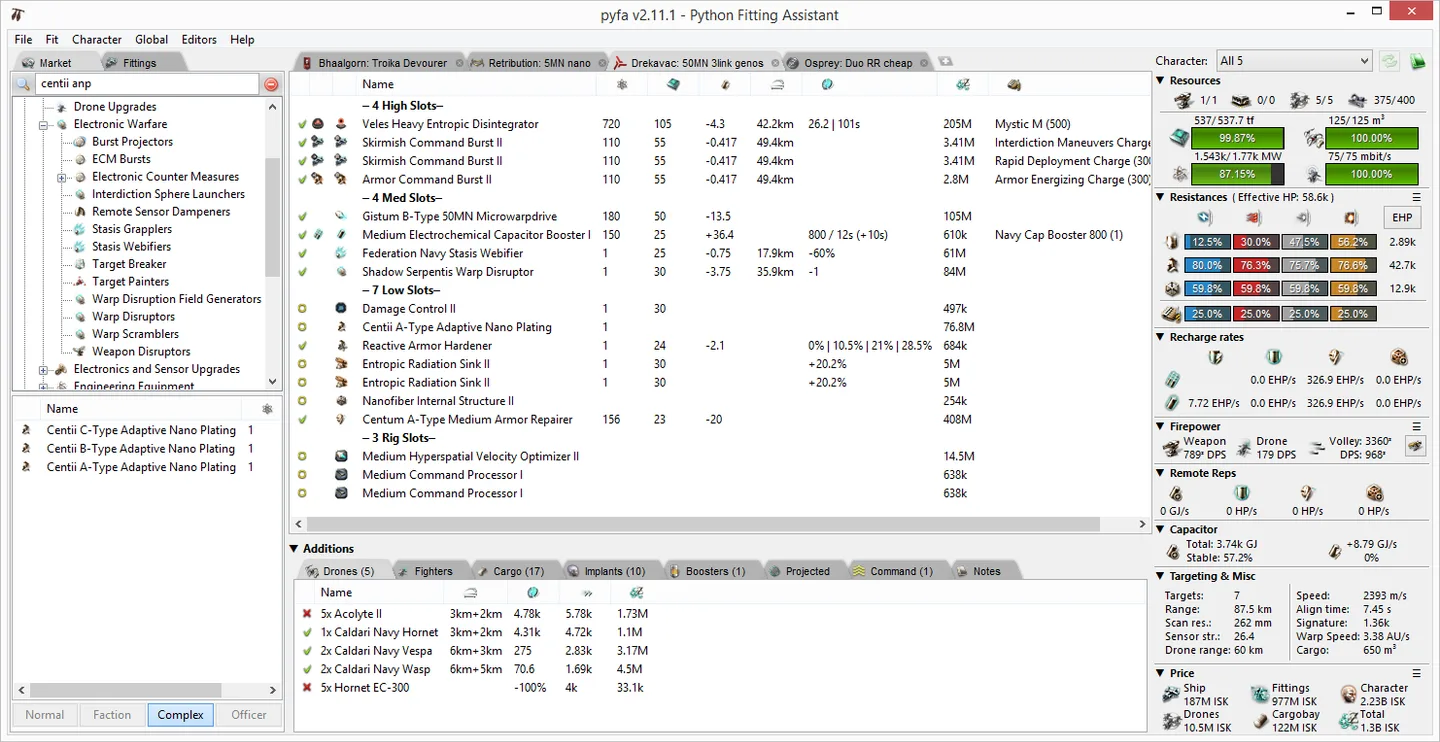
Pyfa, short for Python fitting assistant, lets EVE Online players create, experiment with and save ship fittings without being in game. Its fitting workspace brings module choices and ship statistics together: the official example shows high, mid, low and rig slots alongside resource use, resistances, firepower and capacitor information. It is useful when you want to work on a ship setup outside an active game session.
The linked Windows EXE is the official v2.69.3 release asset; the project also offers a separate Windows ZIP. Self-contained Windows builds are supplied by the project. The sources inspected do not establish a minimum Windows version or CPU architecture, so neither is asserted here. The download link was checked using HEAD requests only; installation and application behavior were not tested.
Windows dark mode has a documented caveat: v2.69.1 reduced redraw-related performance problems but warned that some cells might not refresh when expected. The earlier v2.69.0 notes advise switching to bright mode and restarting if dark mode causes performance issues. Theme changes on Windows require a full restart. The screenshot below is the project’s older v2.11.1 example, not a capture of the current release.
What it offers
- Create, experiment with and save EVE Online ship fittings outside the game.
- Inspect module slots and ship statistics together in the fitting workspace.
- Review resources, resistances, firepower and capacitor information, as illustrated in the official example.
- Enable the optional Omega status column in General preferences for the market listing, ship browser and fitting panel.
- Use the project’s self-contained Windows build rather than setting up a Python development environment.
Good to know
- Windows dark-mode redraw mitigation documented in v2.69.1 can leave some UI cells stale; theme changes require restarting the application.
- Minimum Windows version and CPU architecture are not specified by the inspected release assets. Installation and runtime compatibility were not tested.
Product images
Sources
References used for this listing. Retrieval dates do not indicate hands-on testing.
More in utilities
View category ↗Minitab Statistical Software 22.6.0.0 (catalog package)
Analyze data, build statistical graphs and investigate process variation with Minitab for Windows. The linked 64-bit ZIP is the publisher's mass deployment package, not a free license.
Data Crow 5.1.4
Catalog books, movies, music, games and software in a local database with Data Crow, a free, open-source collection manager with custom fields and online lookups.
FCEUX 2.6.6
Emulate NES, Famicom, FDS and Dendy software on Windows with FCEUX, an open-source emulator with debugging, Lua scripting and tool-assisted movie tools.


PCSX2 2.8.2
Play PlayStation 2 games on Windows with PCSX2, a free, open-source emulator offering upscaling, save states and virtual memory cards. A BIOS dumped from your own PS2 is required.
VRCX 2026.09.16
Manage VRChat friends, favorites and invitations from your desktop with VRCX, a free, open-source companion that also records friendship history and notes.