
Utilities Windows
RapidTyping
Practice touch typing with guided lessons, a color-coded virtual keyboard and progress charts. RapidTyping is freeware for Windows, with a lesson editor for custom practice.
- Operating system
- Publisher lists Windows XP, 2003, Vista, 2008, 7, 8 and 10
- Architecture
- x64
- Download package
- EXE installer
Selected link is the 64-bit setup package. Separate x32 and portable packages exist. Requirements specify a minimum 1028 x 720 display area; Windows 11 is not listed.
Link checked · Download guidance
What is RapidTyping?
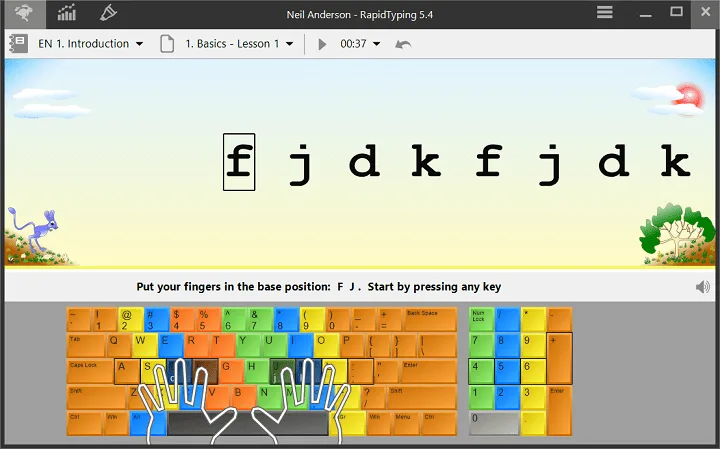
RapidTyping is a Windows typing tutor for learning finger positions and practicing speed and accuracy. Its virtual keyboard highlights finger zones, while animated hands show which finger should press the next key. Introduction and Beginner courses cover key positions, capitals, symbols and the numeric keypad; Experienced and Advanced courses move on to syllables, words and text.
For self-study, use the lesson statistics to review speed and accuracy across sessions. For teaching, the built-in lesson editor can import TXT or RTF text and split longer passages into lessons. Student or group statistics can be exported as PDF, HTML, XML or CSV, and the publisher documents classroom use over a local network.
Course coverage depends on the keyboard layout: Introduction and Beginner are available for all layouts, but Experienced and Advanced courses cover a smaller published language list, and the Testing course is for the English layout. This entry links to the 64-bit Windows setup package; separate 32-bit and portable editions are available from the publisher. The publisher's requirements name Windows 10 and older releases, not Windows 11. The accompanying publisher screenshot shows version 5.4, rather than documenting the appearance of version 5.5.
What it offers
- Follow a virtual keyboard with highlighted finger zones and animated hand guidance.
- Practice with Introduction, Beginner, Experienced, Advanced and Testing courses, subject to layout availability.
- Create custom lessons from TXT or RTF text and divide long passages into shorter lessons.
- Review speed, accuracy and lesson assessments in statistics tables and charts.
- Export student or group statistics to PDF, HTML, XML or CSV.
Good to know
- Experienced and Advanced courses are limited to the publisher's listed languages; the Testing course is for the English keyboard layout.
- The official requirements page does not list Windows 11, so Windows 11 compatibility is not established by these sources.
Product images
Sources
References used for this listing. Retrieval dates do not indicate hands-on testing.
- RapidTyping - Download ↗Retrieved
- Typing Tutor ↗Retrieved
- Download typing tutor | RapidTyping ↗Retrieved
- Requirements ↗Retrieved
- License agreement | RapidTyping ↗Retrieved
- Screenshots of program | RapidTyping ↗Retrieved