
Utilities Windows
Revo Scan
Capture point clouds with a compatible Revopoint 3D scanner, process the data and align multiple models. This Windows entry links to Revo Scan 5.5.5.2012 for x64 PCs.
- Operating system
- Windows 10 and 11 (64-bit), according to the Revo Scan 5 PC manual
- Architecture
- x86_64 (x64) only
- Download package
- EXE installer — Revo Scan 5.5.5.2012
Compatible Revopoint scanner required for capture. Manual minimum: 16 GB RAM and Intel i7 12th gen or better; recommends 32 GB RAM and Intel i9 11th gen or better. Check the publisher’s device list; INSPIRE 2 is not supported by this Windows 5 branch.
Link checked · Download guidance
What is Revo Scan?
Revo Scan connects a compatible Revopoint 3D scanner to a Windows PC and turns captured point clouds into models or processed point clouds for export. The Revo Scan 5 workflow brings capture settings, camera previews, model processing and multi-model alignment into one application. It is intended for working with scanner data, not for turning an ordinary webcam into a Revopoint scanner.
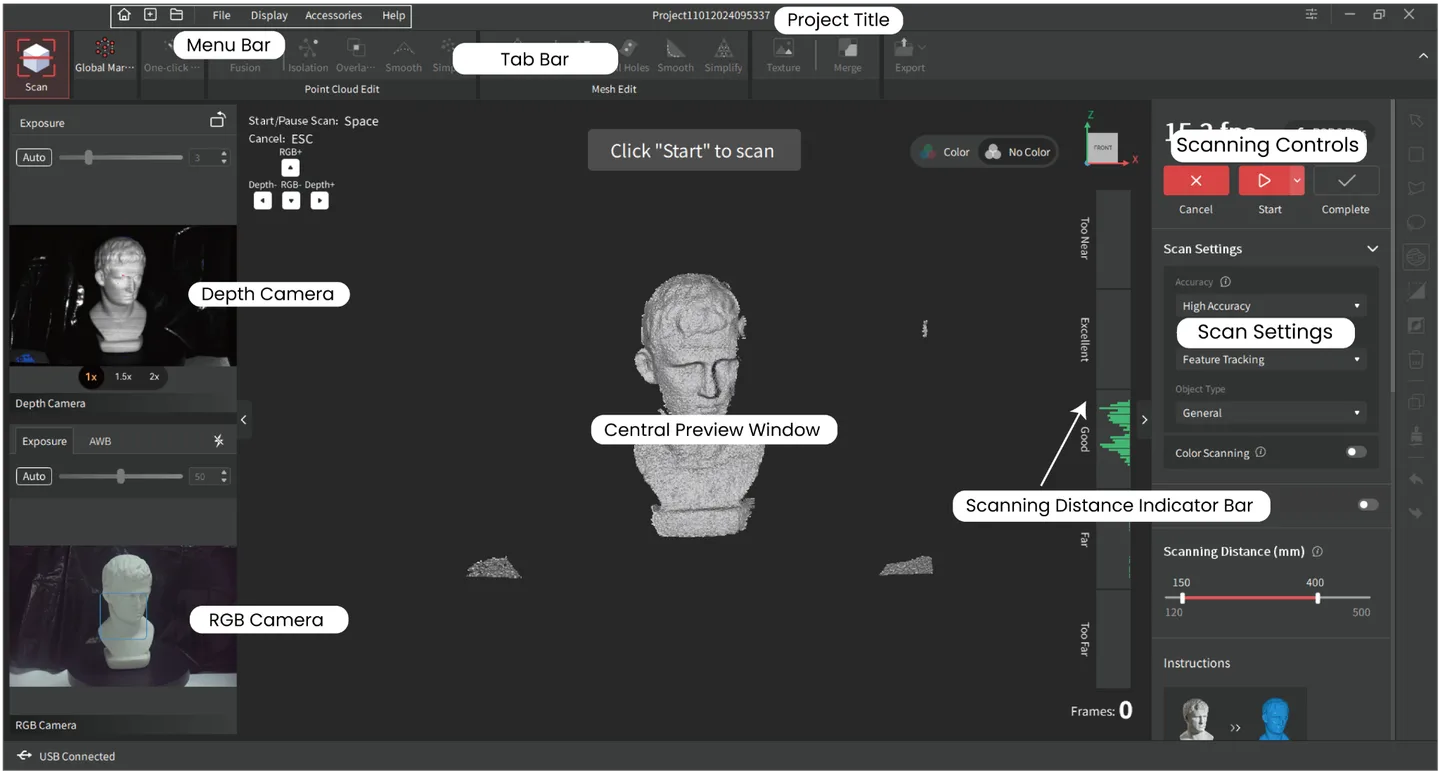
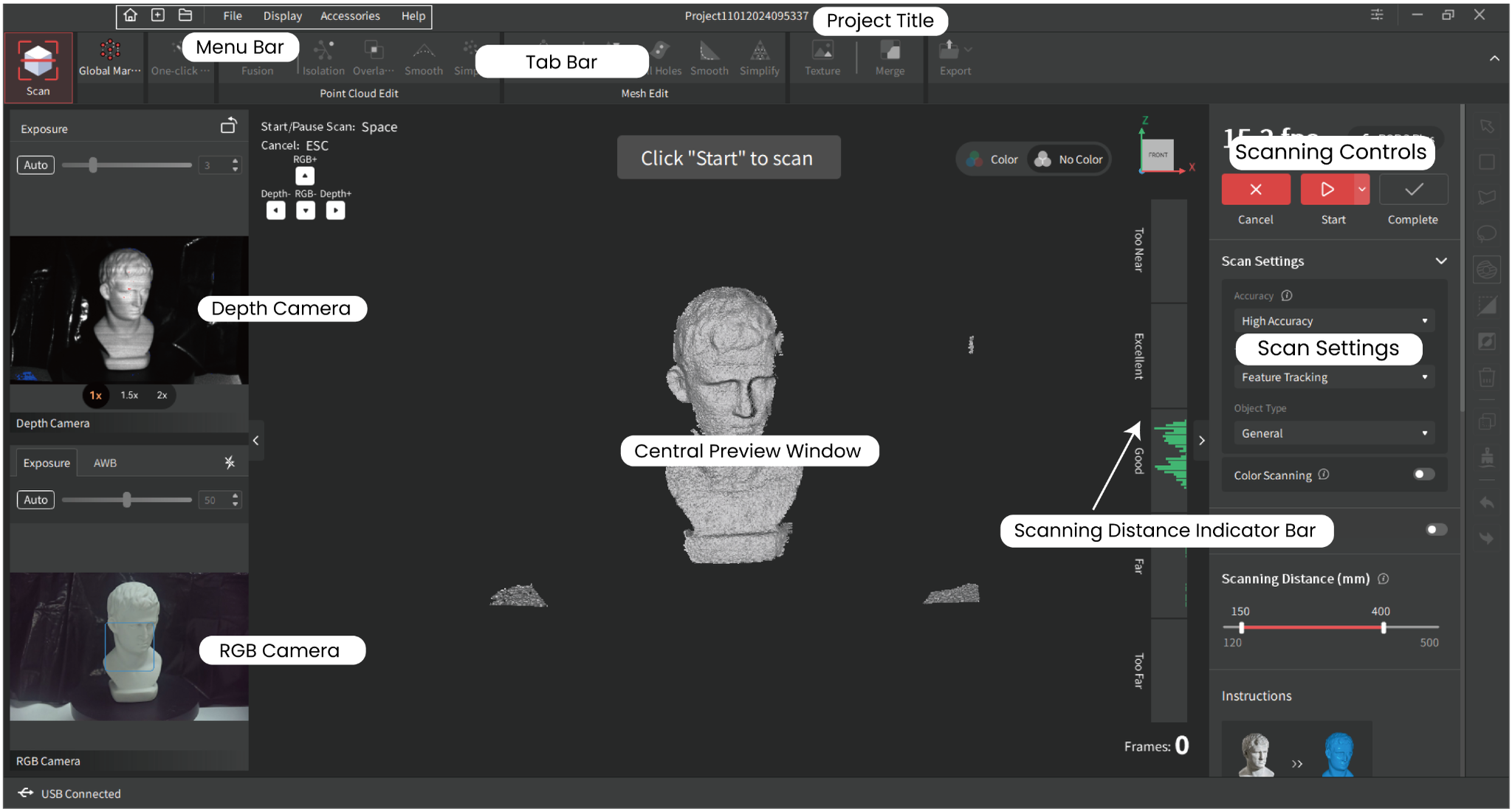
Start with a project, position the object using the camera previews and distance indicator, and choose the capture settings your scanner supports. You can pause a scan to inspect the model before completing it. The publisher’s first-scan guide then uses One-click-editing to process the point cloud and Export to choose the output state, destination and format. These are documented steps, not results of a hands-on scan.
Check both the computer and scanner before choosing this package. The PC manual lists Windows 10 or 11, 16 GB RAM and an Intel i7 12th-generation CPU or better as minimum requirements; the catalog specifies x86_64. Capture modes, speed and object-size limits depend on the scanner. Color data must be captured with Color Scanning enabled if you want to apply texture mapping.
The linked installer is the Revo Scan 5 branch, version 5.5.5.2012. Revopoint also lists Revo Scan 6 separately, so this is not presented as the newest Revo Scan family release. In particular, the catalog says INSPIRE 2 works with Revo Scan 5 only on iOS and Android, not this Windows package.
What it offers
- Capture point clouds with supported Revopoint 3D scanners.
- Process and edit scan data into 3D models or processed point clouds.
- Align multiple models within the scan-processing workflow.
- Use camera previews, scan settings and a scanning-distance indicator during capture.
- Export processed scan data for use elsewhere in your workflow.
Good to know
- Scanning requires compatible Revopoint hardware; available accuracy modes, scan speed and supported object sizes depend on the scanner model.
- This Windows package supports x86_64 only; the Revo Scan 5 catalog limits INSPIRE 2 support to iOS and Android.
- Texture mapping requires Color Scanning to have been enabled during capture.
- The selected 5.5.5.2012 installer is an older branch; the official catalog also offers Revo Scan 6.
Product images
Sources
References used for this listing. Retrieval dates do not indicate hands-on testing.
More in utilities
View category ↗
Revo Uninstaller Free 2.7.2
Uninstall Windows programs and scan for leftover files, folders and Registry entries with Revo Uninstaller Free. Includes Windows app removal and Hunter Mode.

CloudCompare 2.13.2
Compare 3D point clouds and triangular meshes, align scans and inspect distance results with CloudCompare, a free, open-source processing tool for Windows.

Radmin 3.5.2
Control networked Windows PCs, transfer files and assist remote users with Radmin. The publisher offers a 30-day trial; Radmin Viewer is free.
ProScan 24.15
Program supported Uniden radio scanners, record audio and control a scanner remotely with ProScan for Windows. The full application has a 30-day trial before paid activation.
WinScan2PDF 9.79
Scan paper documents into single- or multi-page PDF files with WinScan2PDF, a free portable Windows utility that uses an installed scanner.