
Utilities Windows
Screen Protractor
Measure angles over desktop images and drawings with Iconico Screen Protractor for Windows, using draggable guides, a numeric readout and keyboard controls.
- Operating system
- Windows; supported versions not established
- Architecture
- Not established by the reviewed publisher pages
- Download package
- ZIP archive: ScreenMeasurementPack.zip
Publisher-linked measurement pack, not a verified standalone installer. Archive contents, installed version and modern Windows compatibility were not inspected or tested.
Link checked · Download guidance
What is Screen Protractor?
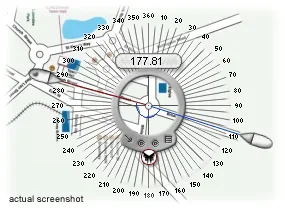
Screen Protractor places an angle-measuring overlay above other Windows applications. Instead of moving a drawing into a separate measuring workspace, position its transparent center over the angle's vertex and align the two handles with the lines on screen. The numeric display gives the angle; degrees, radians and other units are available through the menu. This makes it useful for checking angles in a diagram, photograph or plan already open on your desktop.
The publisher's manual describes both mouse and keyboard adjustments. Drag the central hub to move the tool, drag each handle to align it, or use the rotate buttons for single-degree adjustments. Typing a number and pressing Enter sets an exact angle; entering an operator and a number adjusts the current value. Sticky Angles snaps rotation to 45-degree increments, while Lock Angle and Lock Measurement constrain dragging. Ctrl+C copies the value, and Z undoes or redoes movement. Different skins change the controls' appearance.
This is proprietary evaluation software, not an unrestricted free full version. Iconico's general license allows unlimited-time evaluation with advanced features disabled; registration unlocks them. The product page identifies custom units and transparency as paid features. The download here is the publisher-linked ScreenMeasurementPack.zip archive, not a verified standalone Screen Protractor installer. Its internal contents and installer architecture were not inspected.
Iconico documents version 4.0 for Windows but the reviewed pages do not establish supported Windows builds or current Windows 11 compatibility. The manual also acknowledges graphics-related flicker and occasional bouncing with multiple monitors. These are publisher-documented limitations, not results of a local installation or compatibility test.
What it offers
- Place a transparent angle-measuring tool over another Windows application's content.
- Align two draggable handles and read angles in degrees, radians or other documented units.
- Set an exact angle or make relative arithmetic adjustments using the keyboard.
- Use sticky 45-degree angles and locks to constrain handle movement.
- Copy the measured value with Ctrl+C and undo or redo movement with Z.
- Change interface skins; custom units and transparency are advertised as registration features.
Good to know
- The unregistered evaluation has advanced features disabled; the full feature set requires paid registration.
- Supported Windows versions and CPU architecture are not established by the reviewed publisher pages; modern Windows compatibility has not been tested here.
- The publisher documents possible graphics-related flicker and occasional bouncing with multiple monitors.
- The linked ZIP is named ScreenMeasurementPack.zip. Its contents and any included installers were not downloaded or inspected.
Product images
Sources
References used for this listing. Retrieval dates do not indicate hands-on testing.
- Screen Protractor, The on-screen Angle Tool ↗Retrieved
- How to use Screen Protractor on Windows ↗Retrieved
- Iconico Software License ↗Retrieved
More in utilities
View category ↗ColorPic
Pick screen colors, collect palettes of up to 16 chips and copy hexadecimal or decimal values with ColorPic for Windows. Advanced features require paid registration.
PicPick 7.6.2
Capture scrolling windows, annotate screenshots and measure on-screen details with PicPick for Windows. Free for personal, non-commercial use; business use requires a license.
GeoEnZo 5.2
Teach geometry on a digital school board with GeoEnZo, a free Windows mathematics program with on-screen measuring and drawing tools.
Screen Calipers 4.0
Measure gaps, image details and angled distances on a Windows screen with Iconico's floating calipers. A free trial is available; custom units and transparency require purchase.
Screen Compass
Measure the radius, circumference and area of circles and polygons over other Windows applications with Screen Compass, an on-screen measurement tool from Iconico.