
Utilities Windows
Screen Compass
Measure the radius, circumference and area of circles and polygons over other Windows applications with Screen Compass, an on-screen measurement tool from Iconico.
- Operating system
- Windows; supported versions not specified in reviewed sources
- Architecture
- Not established by reviewed publisher sources
- Download package
- Publisher-linked ScreenMeasurementPack ZIP archive
Not installed or tested. Archive contents were not inspected; no Windows 10, Windows 11 or ARM compatibility claim is made.
Link checked · Download guidance
What is Screen Compass?
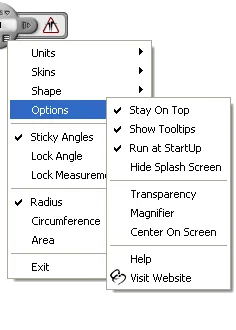
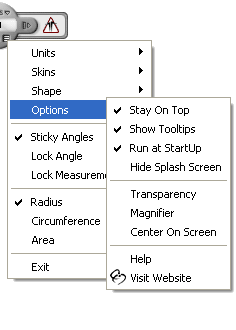
Screen Compass places an adjustable measurement overlay above another application, so you can measure circular and polygonal shapes without moving the image into a separate editor. Drag its base into position, extend the right-hand handle, and switch the readout between radius, circumference and area. Its Shape menu includes circles and polygons with 3 to 39 sides.
For small adjustments, the documented keyboard controls move or extend the Compass; you can also enter a measurement directly and copy the readout to the clipboard. Skins change the interface, while angle and measurement locks help keep a chosen setting as you position the overlay.
Measurements start from pixels. Inches and centimeters use conversion factors, not the physical size displayed on your monitor; use an appropriate calibrated scale before interpreting an image as a real-world measurement. The unregistered edition is an evaluation version with advanced features disabled, not the fully unlocked product.
The download links to the publisher’s ScreenMeasurementPack.zip archive, not a separately verified standalone Screen Compass installer. The archive was checked with HEAD only; its contents and installation behavior were not inspected. The reviewed publisher pages identify Windows but do not establish a supported Windows build list or CPU architecture.
What it offers
- Measure radius, circumference or area with a floating on-screen overlay.
- Choose a circle or a polygon with 3 to 39 sides.
- Move and extend the Compass with the mouse or keyboard controls.
- Enter measurement values directly and copy the readout to the clipboard.
- Change interface skins and use angle or measurement locks.
Good to know
- Advanced features require paid registration; the free download is an evaluation edition.
- Physical units use pixel conversion factors and do not automatically match the size shown on your monitor.
- Supported Windows versions and CPU architecture are not established by the reviewed publisher pages.
- The linked ScreenMeasurementPack ZIP was verified by HEAD only; archive contents and installation behavior were not inspected.
Product images
Sources
References used for this listing. Retrieval dates do not indicate hands-on testing.
More in utilities
View category ↗ColorPic
Pick screen colors, collect palettes of up to 16 chips and copy hexadecimal or decimal values with ColorPic for Windows. Advanced features require paid registration.
Color Cop 5.5.16
Pick on-screen colors and copy RGB or hex values with Color Cop, a free Windows utility with a magnifier, sampling options and color history.
Screen Protractor 4.0
Measure angles over desktop images and drawings with Iconico Screen Protractor for Windows, using draggable guides, a numeric readout and keyboard controls.
Screen Calipers 4.0
Measure gaps, image details and angled distances on a Windows screen with Iconico's floating calipers. A free trial is available; custom units and transparency require purchase.

CapsLock Indicator 3.16.1.2
See Caps Lock, Num Lock and Scroll Lock status in the Windows system tray, with optional on-screen notifications when a key changes.