
Utilities Windows
Serva
Run a portable Windows PXE server for network boot and OS installation, or use Serva for HTTP, FTP and TFTP file delivery. Community is free for personal, non-commercial use with PXE limits.
Version 5.0.0 (Community, build 24072914) · Direct publisher file
Link checked · Download guidance
What is Serva?
Serva brings PXE network boot services and several file-transfer servers into a portable Windows application. It combines DHCP, proxyDHCP, TFTP and BINL services for booting client PCs over the network, and can also serve files through HTTP or FTP. Its proxyDHCP service is designed to work alongside an existing DHCP infrastructure rather than require changes to that infrastructure's settings.
The linked publisher ZIP is Serva Community 5.0.0, build 24072914. The publisher lists Community support from up-to-date Windows XP SP3 through Windows 11, including Windows Server versions. Serva does not require installation or write Windows registry keys, but it needs read/write access to its own directory and its repository. Host executable architecture has not been established for this ZIP; support for a client's boot architecture is a separate matter.
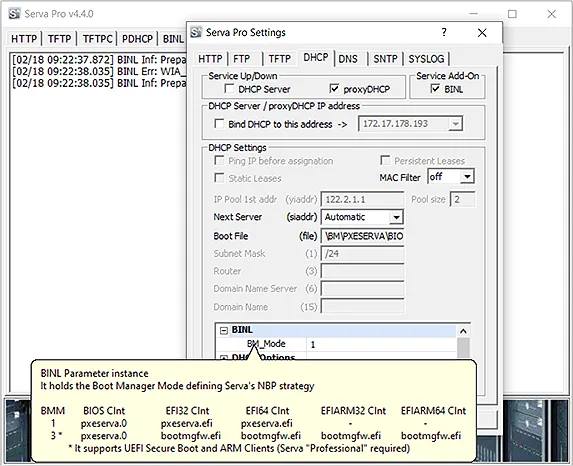
Choose the edition before planning a deployment. Community permits personal, non-commercial use only, limits PXE/BINL services to 50 minutes and two PXE clients, and caps boot-menu entries at two for EFI64/32 and seven for BIOS. WinPE booting, unattended Microsoft OS installation, the Task Sequence Manager and Boot Manager Mode 3 for Secure Boot and ARM UEFI are Professional-only features. The screenshot illustrates the publisher's older Serva Pro 4.4.0 interface, not the downloaded Community 5.0.0 build.
What it offers
- Combine DHCP, proxyDHCP, TFTP and BINL services for PXE network boot and installation.
- Use HTTP, FTP or TFTP independently for file delivery.
- Access a TFTP client plus DNS, SNTP and SYSLOG server functions in the same application.
- Use proxyDHCP alongside an existing DHCP infrastructure without changing its settings, according to the publisher.
- Run a portable application without installation or Windows registry keys.
Good to know
- Community is restricted to personal, non-commercial use; commercial use requires Professional.
- Community PXE/BINL services have a 50-minute time limit and support at most two PXE clients.
- Community boot menus allow two EFI64/32 entries and seven BIOS entries; EFIARM64/32 entries are not supported.
- WinPE booting, unattended Microsoft OS installation, Task Sequence Manager and Boot Manager Mode 3 for Secure Boot and ARM UEFI require Professional.
Product images
Sources
References used for this listing. Retrieval dates do not indicate hands-on testing.
- Serva - Download ↗Retrieved
- PXE Server for Windows (UEFI & BIOS) - Serva ↗Retrieved
- Serva 5.0.0 - Download ↗Retrieved
More in utilities
View category ↗Internet Download Accelerator
Organize Windows downloads with queues, scheduled transfers, speed controls and interrupted-download resuming in Internet Download Accelerator.

Classic FTP
Upload and download website files with Classic FTP for Windows, an FTP client with local and remote folder views, synchronization and FTP over SSL support.
FolderMill 5.6
Automatically print incoming documents or convert them to PDF and images with FolderMill for Windows. Its free evaluation version adds watermarks or print cover pages.

Advanced Port Scanner 2.5.3869
Find open ports on network computers, identify services and open shared resources with Advanced Port Scanner, a free Windows network utility from Famatech.
Privoxy 4.1.0
Filter web requests, adjust HTTP headers and block unwanted content with Privoxy, a free configurable proxy for Windows. Local use does not hide your IP address.