
Utilities Windows
SSHFS-Win Manager
Manage SSHFS-Win connections through a Windows GUI, with saved connection profiles, password or private-key authentication, and system-tray access.
Version 1.3.1 · Direct publisher file
Link checked · Download guidance
What is SSHFS-Win Manager?
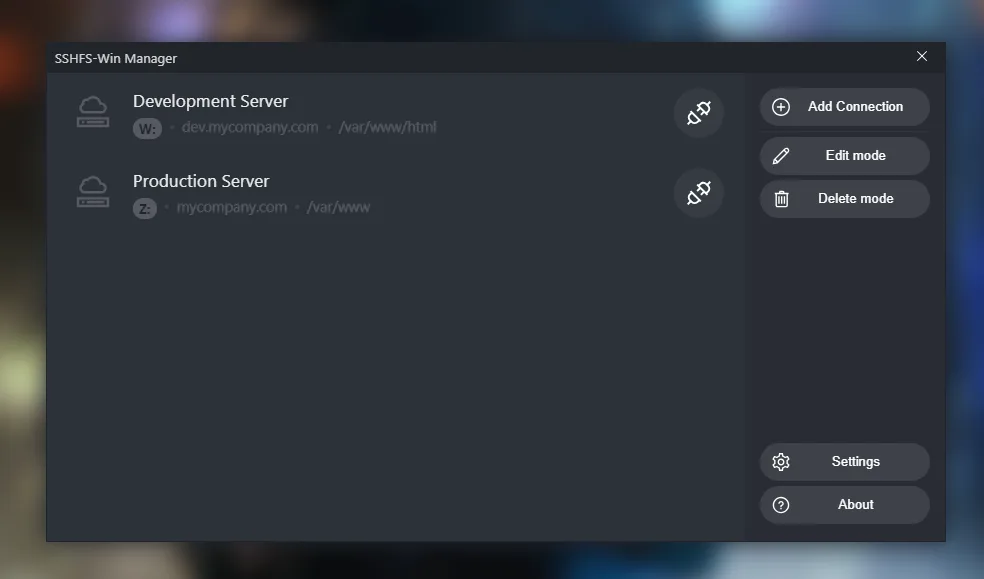
SSHFS-Win Manager gives SSHFS-Win a graphical connection manager. Use it to organize connections to remote directories rather than managing every connection through command-line parameters. The publisher's screenshots show named server profiles with drive letters and remote paths, plus controls to add, edit and delete connections.
Install SSHFS-Win first, then install the manager and add your connections. The manager supports saved passwords, unencrypted private keys and an ask-for-password option. It also offers connection duplication and reordering, startup with Windows, closing to the system tray, advanced command-line parameters and a connection debug log.
The authentication choice matters: the publisher warns that saved passwords are stored in a plain JSON file. Use another supported authentication method if that storage is unsuitable. This is a front end for SSHFS-Win, not a replacement for the required underlying component. The selected download is the publisher's v1.3.1 EXE installer; no installation or Windows-build compatibility test was performed for this entry.
What it offers
- Organize SSHFS-Win connections in a graphical Windows interface.
- Choose saved-password, unencrypted private-key or ask-for-password authentication.
- Duplicate and reorder connection profiles.
- Start with Windows and close the manager to the system tray.
- Use advanced command-line parameters and inspect a connection debug log.
Good to know
- SSHFS-Win must be installed separately before using the manager.
- Saved passwords are stored in a plain JSON file, according to the publisher; choose another authentication method if that is unsuitable.
- The documented private-key option is for keys without a password. Exact supported Windows builds and installer architecture were not established from the inspected sources.
Product images
Sources
References used for this listing. Retrieval dates do not indicate hands-on testing.
More in utilities
View category ↗Eusing Maze Lock 4.2
Lock your Windows desktop with a drawn dot pattern. Eusing Maze Lock offers tray and hotkey locking, idle auto-lock and configurable pattern grids for free.
Key Remapper 1.13 build 480
Remap or block keyboard keys, mouse buttons and wheel actions on Windows, with profiles and application-specific rules in ATNSOFT Key Remapper.


PowerToys 0.102.3001.0
Arrange windows, rename files in bulk and remap keyboard shortcuts with Microsoft PowerToys, a free, open-source Windows utility suite.
simple-acme 2.4.1.2444
Request and automatically renew ACME certificates for IIS and other server applications with simple-acme, a free, open-source Windows command-line client.
ContextMenuManager 3.3.3.1
Enable, disable and customize Windows right-click menu entries with ContextMenuManager, a free, open-source utility for files, folders and system menus.