
Utilities Windows
Supercell Wx
View live and archived NEXRAD radar data, compare weather products in multiple map panes, and display severe weather alerts with Supercell Wx for Windows.
- Operating system
- Windows 10 version 1809 or later; Windows 11
- Architecture
- x64 (Intel/AMD); separate ARM64 package for Windows 11 on Arm
- Download package
- EXE installer (Visual C++ Redistributable bootstrapper and MSI)
OpenGL 3.3 required. This link is x64 only; x64 and ARM64 installers are not interchangeable. Separate MSI and portable ZIP packages are also published.
Link checked · Download guidance
What is Supercell Wx?
Supercell Wx is a free, open-source weather radar viewer for live and archived NEXRAD Level 2 and Level 3 data. It overlays reflectivity, velocity and other radar products on an interactive map, with severe weather alerts and a configurable multi-pane layout for comparing products. Placefiles can add overlays such as weather reports and lightning data.
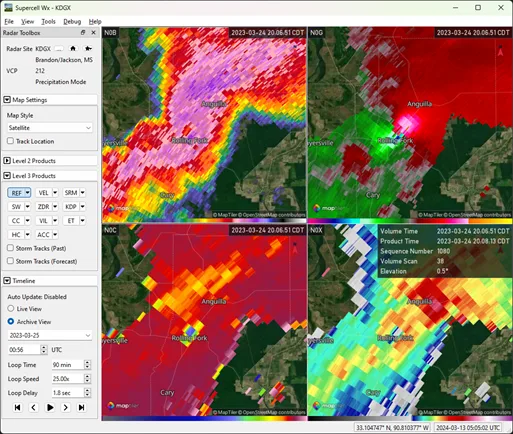
Start by choosing a map provider in the setup wizard. OpenFreeMap does not require an API key; MapTiler and Mapbox require an account and a key or public token under their own terms. Select a radar site and product in the Radar Toolbox, then use the timeline to work with radar scans. The publisher screenshot illustrates an archived four-pane view, not current weather or a hands-on test of this release.
This entry links to the version 0.6.2 x64 EXE installer for Intel/AMD Windows PCs. The publisher says it installs the Visual C++ Redistributable before the application MSI. Windows on Arm needs the separate ARM64 package; the two installers are not interchangeable. OpenGL 3.3 is required, and some Arm virtual machines cannot provide a usable graphics context.
What it offers
- Display live and archived NEXRAD Level 2 and Level 3 radar data, including reflectivity and velocity.
- Show severe weather alerts and add supported placefile overlays.
- Compare radar products in a configurable map layout of up to nine panes.
- Adjust radar and overlay opacity; use Shift-hover to inspect product values, range and radar beam height.
- Choose OpenFreeMap without an API key, or configure MapTiler or Mapbox with the required key.
Good to know
- Requires 64-bit Windows 10 version 1809 or later, or Windows 11, and OpenGL 3.3; this download is x64, not ARM64.
- MapTiler and Mapbox require separate accounts and API keys subject to provider terms; OpenFreeMap is the no-key option.
- Some settings changes require an application restart. Some Windows on Arm virtual machines cannot render the main window because of OpenGL limitations.
Product images
Sources
References used for this listing. Retrieval dates do not indicate hands-on testing.
- Supercell Wx v0.6.2 README ↗Retrieved
- Initial Setup — Supercell Wx documentation ↗Retrieved
- Supercell Wx v0.6.2 map-provider setup ↗Retrieved
- Supercell Wx v0.6.2 official release ↗Retrieved
- Supercell Wx stable FAQ ↗Retrieved
- Supercell Wx MIT License ↗Retrieved