
Utilities Windows
WXtrack
Predict satellite passes and ground tracks with WXtrack for Windows, with world-map displays and support for compatible antenna rotators. Free for amateur use; commercial use requires a licence.
Version 3.8.52 · Direct publisher file
Link checked · Download guidance
What is WXtrack?
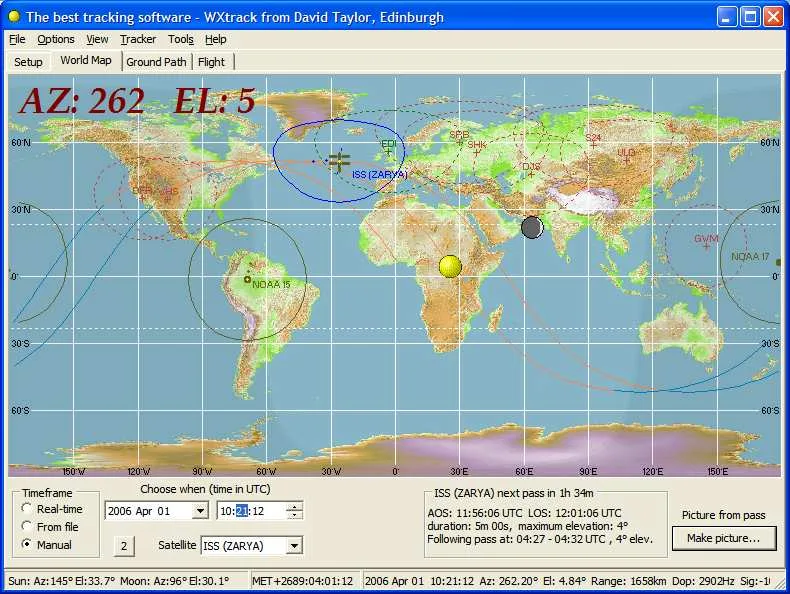
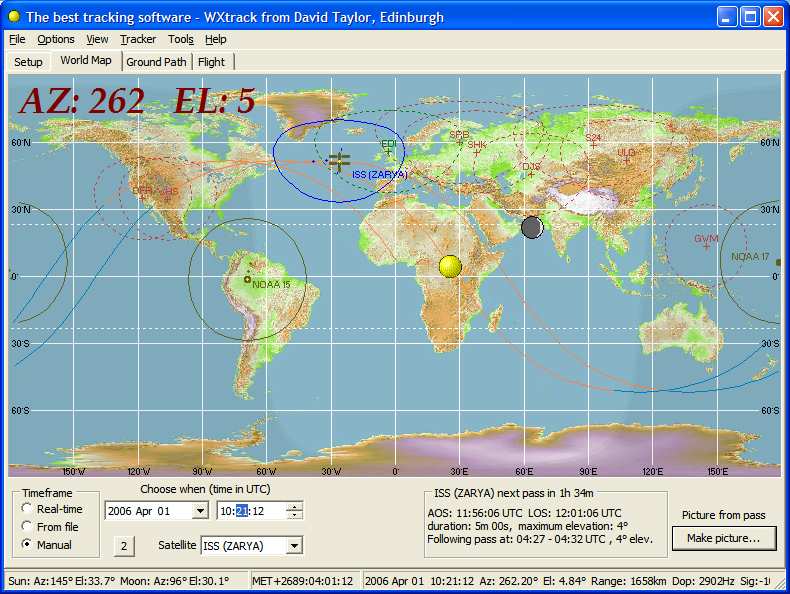
WXtrack helps satellite observers plan what will pass overhead and where a satellite will travel across the Earth. It plots satellite positions and ground tracks on a world map, highlights the selected satellite's visibility footprint and can compare predicted ground coverage with processed satellite images. Weather-satellite enthusiasts can use its minute markers to relate predicted images to NOAA APT transmissions.
For a receiving station, WXtrack also supports antenna control through compatible trackers such as Yaesu GS232, EasyComm and WiSPDDE. This is not a complete receiving system: the publisher requires a separate runtime library bundle and current Kepler orbital data. Use Options > Kepler update after setting up the program; the orbital data supplied in the archive will be out of date.
The linked package is the publisher's version 3.8.52 ZIP, dated November 2, 2022. The publisher explicitly lists Windows 7 and 8/8.1 as supported; Windows 10 and 11 compatibility has not been established here. For Windows 7 and later, the publisher recommends C:\Tools\SatSignal\WXtrack rather than Program Files, where some functions will not work. Amateur use is free, but technical support and advanced features require registration, and commercial use requires a commercial licence.
What it offers
- Plot satellite positions, ground tracks and visibility footprints on a world map with day/night shading.
- Compare processed satellite images with predicted ground coverage and NOAA APT minute markers.
- Control compatible antenna trackers, including Yaesu GS232, EasyComm and WiSPDDE systems.
- Support SDR workflows through HDSDR or SDR# with the publisher's separate DDE add-on.
Good to know
- The runtime library bundle is required separately, and supplied Kepler orbital data must be updated before use.
- Publisher-supported systems are Windows 7 and 8/8.1; Windows 10/11 compatibility is unverified, and XP/Vista are unsupported.
- Registration is required for technical support and advanced facilities such as large-text satellite location and automated daily Kepler reload; commercial use requires a paid commercial licence.
- Some functions will not work when installed under Program Files; the publisher recommends C:\Tools\SatSignal\WXtrack.
Product images
Sources
References used for this listing. Retrieval dates do not indicate hands-on testing.
More in utilities
View category ↗USB Drive Letter Manager 5.7.6
Assign preferred letters to USB drives and avoid conflicts with network mappings using USBDLM, a Windows service configured through an INI file.

DiskCheckup 3.6 (Build 1001)
Monitor SMART drive attributes, view temperatures and run supported drive self-tests with PassMark DiskCheckup for Windows.

JTDX 2.2.159
Decode weak amateur-radio signals and work digital modes including FT8, FT4 and JT65 with JTDX, a free, open-source Windows application derived from WSJT-X.
GridTracker2 2.261019.5
Map amateur-radio contacts, review WSJT-X activity and follow award progress with GridTracker2, a free Windows companion for your radio logbook.
HDSDR 2.81a
Tune and analyze radio signals with HDSDR, a free Windows SDR application with spectrum and waterfall displays, audio filtering, and scheduled WAV recording.