
Utilities Windows
PVsyst
Design photovoltaic systems, model shading and compare energy-yield simulations with PVsyst for Windows. A one-month trial is available before paid licensing.
- Operating system
- Windows 10 and 11 Home or Pro; publisher also lists Windows 8
- Architecture
- 32-bit or 64-bit Windows; ARM unsupported
- Download package
- EXE installer
Product-page minimum: 2 GB RAM, 2 GB disk space, 1280 × 720 display and OpenGL 2.0. Help lists lower RAM/.NET requirements; verify prerequisites for the intended workstation. Windows 8 listing is not a claim of current Microsoft support.
Link checked · Download guidance
What is PVsyst?
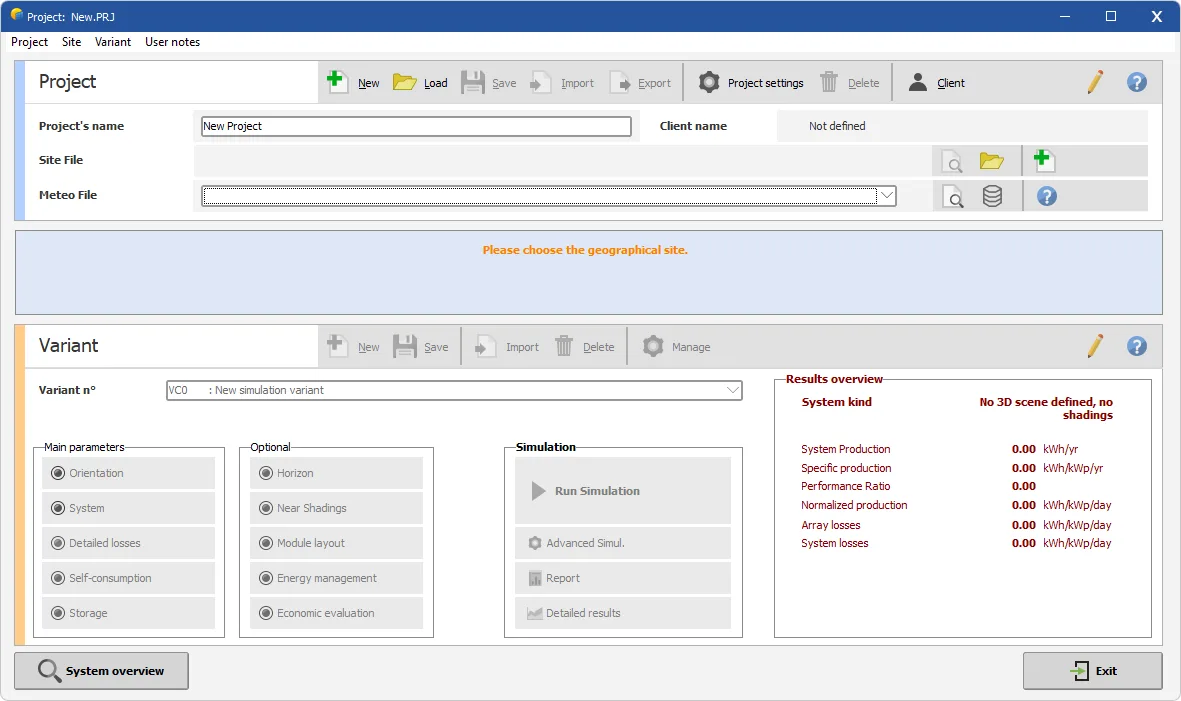
PVsyst helps plan photovoltaic installations by combining a project site, meteorological data and a defined solar-power system. It supports grid-connected, standalone and pumping projects, with tools for component sizing, shading analysis and energy-yield reports. It is aimed at users who need to compare design choices rather than simply view live solar production.
A project holds the geographic location and weather data, while variants let you compare different system definitions. Start with the orientation and module/inverter configuration, run an initial simulation, then refine losses, horizon shading and the nearby 3D scene. The results include energy yield and a breakdown of gains and losses; economic tools can assess investment and operating costs.
This is commercial Windows software, not an unrestricted free application. The publisher offers a one-month free trial and annual paid licenses. Windows ARM, Enterprise editions, server environments and Remote Desktop are excluded by the publisher. Keep the active workspace on a local, non-synced drive: the documentation warns against shared folders and folders synchronized by services such as OneDrive or Dropbox.
What it offers
- Design grid-connected, standalone and solar pumping systems with component-sizing tools.
- Compare project variants using shared location and weather data.
- Model nearby shading in 3D and define a distant horizon profile.
- Simulate bifacial systems, trackers, storage and self-consumption strategies.
- Review energy-yield reports, loss breakdowns and economic indicators such as LCOE and ROI.
Good to know
- The one-month free trial is time-limited; continued use requires a paid license, with one license per computer.
- The publisher excludes Windows ARM, Windows Enterprise, servers, Remote Desktop and Azure Virtual Desktop environments.
- Active workspaces must not be placed on shared or remotely synchronized folders; synchronize separately after closing PVsyst.
- Publisher pages disagree on minimum RAM and .NET requirements. The product page specifies 2 GB RAM and .NET 4.8 for Meteonorm; the help page lists 1 GB and .NET 4.7.2 or later.
Product images
Sources
References used for this listing. Retrieval dates do not indicate hands-on testing.
- PVsyst | Overview of PVsyst Version 8 ↗Retrieved
- Release notes - PVsyst documentation ↗Retrieved
- Requirements - PVsyst documentation ↗Retrieved
- Project design - PVsyst documentation ↗Retrieved
- Project definition - PVsyst documentation ↗Retrieved
- PVsyst - Download ↗Retrieved
More in utilities
View category ↗
DWSIM 10.2.12
Model steady-state and dynamic chemical processes with DWSIM, an open-source simulator for Windows. This download is the Open-Source Core Edition for x64 PCs.
OpenRocket 24.12
Design model rockets and compare simulated flights with OpenRocket, a free, open-source tool with component libraries, stability analysis and flight plots.

idealCircuit 1.4
Explore analog circuits with ideal switches, diodes and simplified component models in idealCircuit for Windows. The publisher provides a ZIP with the program, manual and examples.
WXtrack 3.8.52
Predict satellite passes and ground tracks with WXtrack for Windows, with world-map displays and support for compatible antenna rotators. Free for amateur use; commercial use requires a licence.

Smarter Battery 9.2
Monitor laptop battery capacity, wear and charge history with Smarter Battery for Windows. Its demo allows ten sessions of 15 minutes before purchase is required.