
Utilities Windows
WikiTaxi
Read and search Wikipedia offline with WikiTaxi, a portable Windows reader. Download a wiki XML dump separately and import it before browsing.
- Operating system
- Windows; specific supported releases are not stated on the inspected publisher page
- Architecture
- Publisher labels the linked archive for Win32 and Win64
- Download package
- Portable ZIP archive
Extract into a folder. Wiki data requires a separate download and import. Modern Windows builds and current dump compatibility were not tested.
Link checked · Download guidance
What is WikiTaxi?
WikiTaxi turns a separately acquired Wikipedia XML dump into an offline reference library for Windows. Its companion importer creates a local .taxi database; the reader then opens that database without an Internet connection. This suits keeping a chosen language edition available away from a connection, rather than expecting the application archive to contain Wikipedia. The publisher also describes support for Wiktionary and WikiQuote, with multiple wiki databases stored separately.
The publisher's setup is portable: extract the ZIP archive into a folder and start WikiTaxi.exe. Run WikiTaxi_Importer.exe with a pages-articles.xml.bz2 dump and a destination database, complete the import, then open the resulting database in the reader. Page-name search supports phrases, excluded words, OR queries and prefixes; Ctrl+F searches within the displayed article. A database filename can also be supplied as a command-line argument.
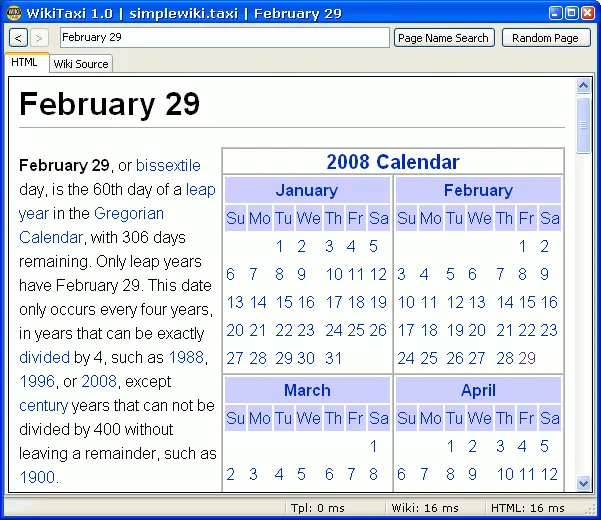
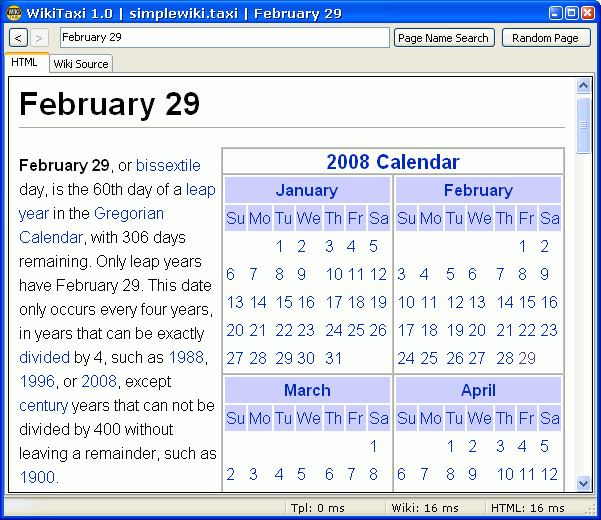
This is a legacy distribution. The linked whole-application archive is WikiTaxi 1.3.0; the separately mentioned 1.3.1 update is an importer fix for duplicate page entries, not evidence of a complete 1.3.1 release. Compatibility with current Wikimedia dumps and specific modern Windows builds has not been established here. The publisher also warns that databases made before version 1.2.0 require reimporting. The screenshot is a publisher-provided historical WikiTaxi 1.0 image, not a capture of the linked release.
What it offers
- Browse a locally imported Wikipedia database without an Internet connection.
- Keep separate databases for different languages or supported wiki projects, including Wiktionary and WikiQuote.
- Search page names using phrases, exclusions, OR expressions and prefix matching.
- Find text within the current article using Ctrl+F.
- Run from an extracted folder without a separate database engine or web browser; optionally open a database through a command-line argument.
Good to know
- Wikipedia data is not bundled: obtain a suitable XML dump separately and import it before offline browsing.
- Current Wikimedia dump compatibility and specific modern Windows build support are unverified; the publisher documents historical duplicate-entry import failures and a separate importer fix.
- Databases created by importers older than version 1.2.0 must be rebuilt for the changed database format.
- The supplied screenshot depicts WikiTaxi 1.0 and does not establish the appearance of the linked 1.3.0 release.
Product images
Sources
References used for this listing. Retrieval dates do not indicate hands-on testing.
More in utilities
View category ↗
Kiwix JS Electron 3.9.3
Read Wikipedia and other archived websites offline with Kiwix JS Electron for Windows. Choose ZIM archives for a searchable local reference library.

Marble 2.2.0
Explore a virtual globe, browse street maps and plan routes with Marble. This Windows download is the publisher-listed 64-bit 2.2.0 installer.
RSSly 2026.10.2
Follow news and blogs with RSSly, a free Windows RSS reader with OPML import, local article storage, multiple reading layouts and an embedded browser with ad blocking.
GoldenDict-ng 26.11.0
Look up words across multiple dictionaries with GoldenDict-ng, a free, open-source Windows dictionary reader supporting MDX, DSL, StarDict and other formats.

PeStudio 9.61
Inspect Windows executable files for malware indicators with PeStudio basic, a portable static-analysis tool restricted to private, occasional use.