
Utilities Windows
WinEnvEdit
Edit Windows 11 environment variables in separate System and User panes, reorder PATH entries, and export settings to TOML with WinEnvEdit.
- Operating system
- Windows 11
- Architecture
- x64 (selected installer); separate ARM64 release assets
- Download package
- MSI installer
Publisher describes a WinUI 3 and .NET 10 application. No installation or runtime checks were performed; current-documentation screenshot may differ from version 1.1.1.
Link checked · Download guidance
What is WinEnvEdit?
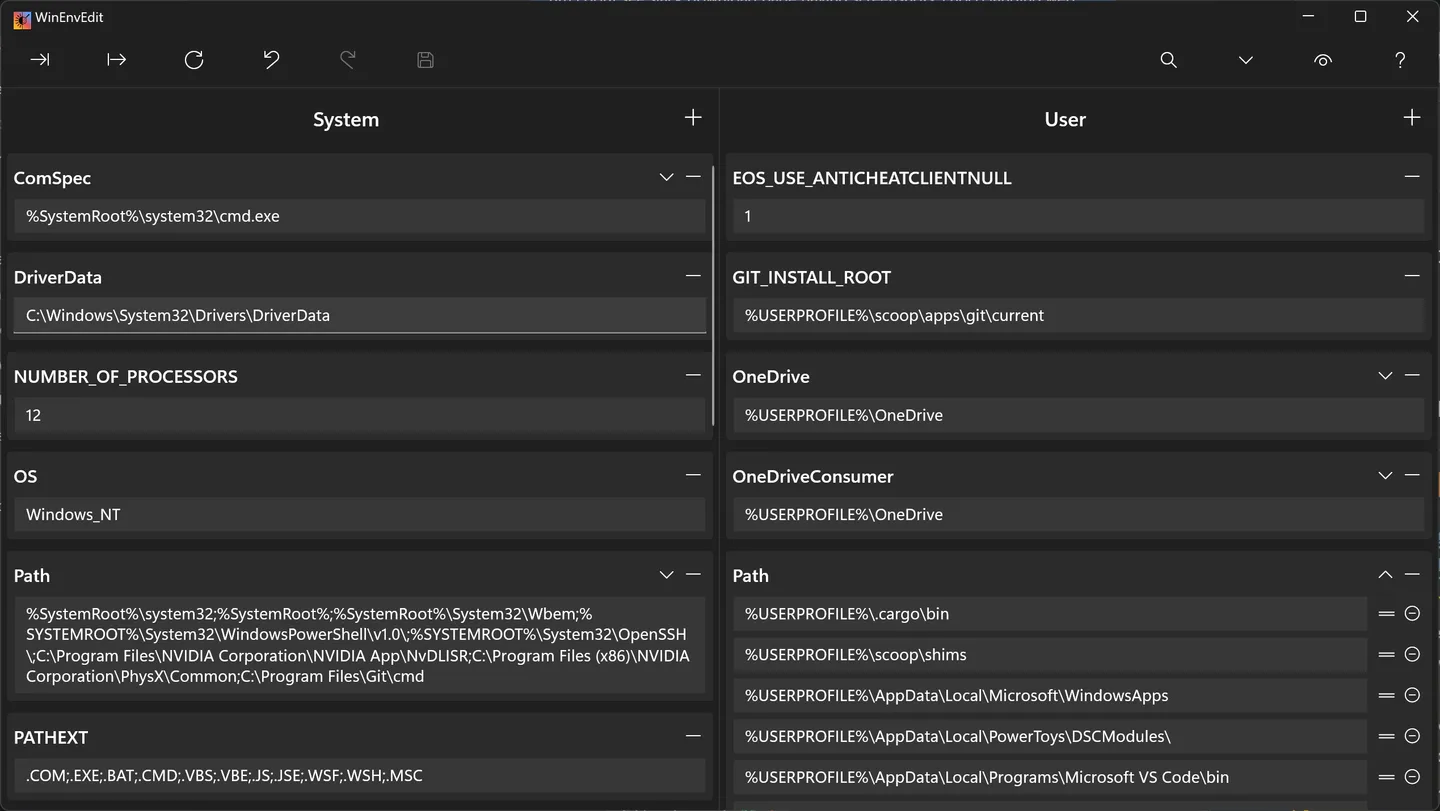
WinEnvEdit is a Windows 11 environment-variable editor for working with user settings and system-wide values in one window. It displays the two scopes side by side and lets you edit variable names and values directly. Search filters both panes by name or value, while expandable PATH lists expose individual folders for adding, removing and drag-and-drop reordering.
The editor checks variable names and path existence, including paths that use environment-variable references. It can switch between standard and expandable string values, copy variables as Name=Value lines, and import or export settings in TOML format. These tools suit reviewing a development environment or reorganizing a long PATH without editing one semicolon-separated line.
Changes remain pending until saved. Undo and redo cover edits only until the next save or refresh, so export a TOML copy before a substantial change rather than treating history as a permanent rollback. Saving System variables requires administrator authorization through Windows UAC; User variables do not require elevation. Moving a variable between scopes can overwrite a variable of the same name in the destination.
The linked package is the publisher's version 1.1.1 x64 MSI installer, not the separate ARM64 or portable ZIP build. Its availability was checked using HTTP HEAD only; the installer was not downloaded or run. The screenshot comes from the publisher's current documentation and is not a verified capture of this particular release.
What it offers
- View and edit System and User environment variables side by side.
- Expand semicolon-separated PATH values into individual rows and reorder them by dragging.
- Search variable names and values across both scopes, with validation for names and path existence.
- Import and export TOML files; copy or paste variables as Name=Value text.
- Undo and redo pending edits until saving or refreshing; request UAC authorization when saving System variables.
Good to know
- Designed for Windows 11; Windows 10 compatibility is not claimed by the cited documentation.
- Undo history ends when changes are saved or refreshed; it does not provide a permanent rollback of saved settings.
- Saving System variables requires administrator rights. Moving between scopes overwrites an existing variable with the same name in the destination.
- This download is x64 only; ARM64 and portable packages are separate release assets.
Product images
Sources
References used for this listing. Retrieval dates do not indicate hands-on testing.
- WinEnvEdit - Download — normal protected browser observation ↗Retrieved
- WinEnvEdit v1.1.1 README — features, workflow and limits ↗Retrieved
- WinEnvEdit v1.1.1 — publisher release ↗Retrieved
- WinEnvEdit v1.1.1 — exact publisher asset links ↗Retrieved
- WinEnvEdit — publisher documentation and screenshot origin ↗Retrieved
- WinEnvEdit MIT License — copyright 2026 meop ↗Retrieved
More in utilities
View category ↗Advanced Process Explorer 1.4.0.1
Find which process has a file or DLL open, inspect CPU and memory use, and control running Windows processes with Ashkon's Advanced Process Explorer. A 30-day trial is available.
Run-Command 6.41
Launch programs and folders from saved commands with Run-Command, a portable Windows Run-dialog alternative with categorized favorites and administrator launch controls.
FlexASIO 1.10b
Connect ASIO audio applications to Windows audio devices with FlexASIO, a free universal driver supporting WASAPI, DirectSound, MME and Kernel Streaming.
FlyDav 0.2.56
Share folders through WebDAV with FlyDav, an open-source server with multiple users, per-user directories and an optional browser file client.


WinSSHTerm 2.43.2
Organize remote SSH sessions in tabs and split panes with WinSSHTerm, a free Windows interface for PuTTY with WinSCP file transfer and VcXsrv integration.