
Utilities Windows
WizFlow Flowcharter
Draw Windows flowcharts with reusable shapes, attached connectors and labels in WizFlow Flowcharter. The evaluation download is time-limited and restricts diagram complexity.
- Operating system
- Windows XP or later, according to the product requirements
- Architecture
- Windows/Intel-compatible PC; installer bitness not established
- Download package
- EXE trial installer
Publisher lists 500 MB RAM and 20 MB free disk space. Its compatibility FAQ lists 32-bit and 64-bit Windows systems, including Windows 10 and newer; no software installation or OS compatibility testing was performed.
Link checked · Download guidance
What is WizFlow Flowcharter?
WizFlow Flowcharter is Pacestar Software's desktop tool for drawing flowcharts and basic block diagrams. It suits documenting a process, mapping a decision or explaining an algorithm when you want to arrange the steps yourself. Start from a supplied template, place shapes from the style bar, connect them with arrows and add text. The program keeps connectors and their labels attached when objects move, reducing the manual work of revising a chart.
Custom styles and templates let you reuse a diagram's shapes and formatting. A snap grid, alignment tools and connector crossovers help organize the result. For sharing outside the editor, the publisher documents graphics export, printing and OLE copy or embedding into compatible applications such as Microsoft Word. This is an interactive drawing tool, not a source-code-to-flowchart generator.
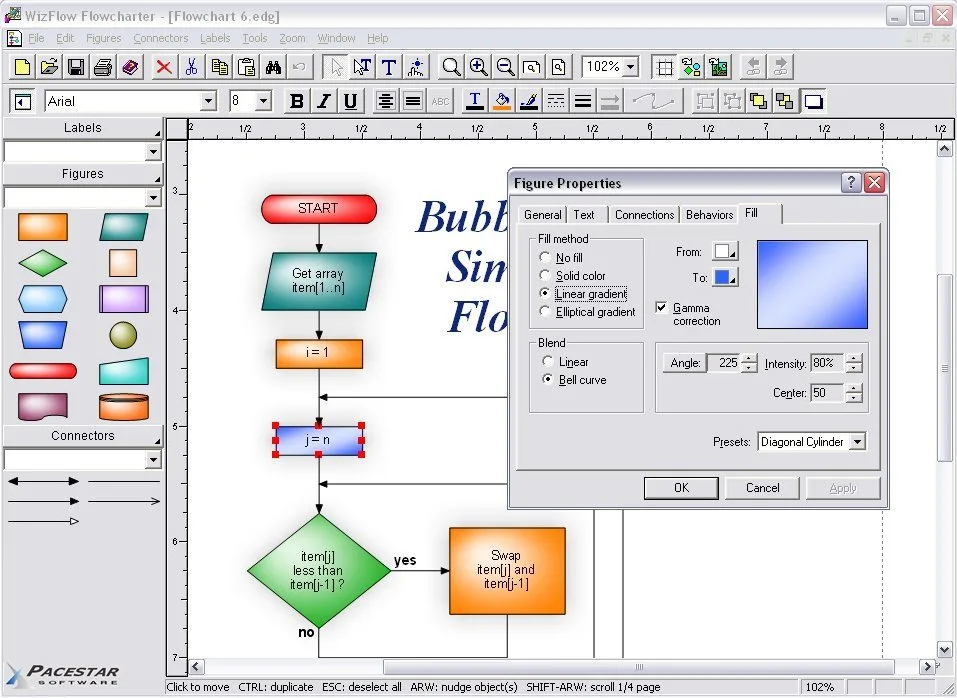
The linked EXE is a trial, not freeware or an unlocked purchased edition. Pacestar documents a trial expiry, a limit on diagram complexity and an evaluation note on printed output. Some advanced capabilities, including hyperlinks and configurable connection points, belong to the Professional edition. The screenshot is the publisher's illustrative Windows interface; it does not establish the appearance or version of the current installer.
What it offers
- Build flowcharts and block diagrams from predefined shapes, symbols and templates.
- Keep connectors and attached labels linked to diagram objects when moving them.
- Save custom styles and templates for repeated diagram layouts.
- Arrange shapes with a snap grid and alignment tools, and distinguish crossing lines with connector jogs.
- Print diagrams, export graphics such as WMF, EMF, BMP and JPG, or copy and embed through OLE.
Good to know
- The evaluation version expires, limits diagram complexity and adds an evaluation note to printed output; continued use requires a paid license.
- Hyperlinks and programmable connection points are Professional-edition features, not universal Standard-edition capabilities.
- Diagrams are drawn interactively; the publisher says its products do not generate flowcharts from source code or other description files.
Product images
Sources
References used for this listing. Retrieval dates do not indicate hands-on testing.
- Pacestar — WizFlow Flowcharter for Basic Flowcharting ↗Retrieved
- Pacestar — WizFlow Product Description ↗Retrieved
- Pacestar — WizFlow Revision History ↗Retrieved
- Pacestar — WizFlow Purchase Licenses ↗Retrieved
- Pacestar — FAQ: Free Trial Version ↗Retrieved
- Pacestar — FAQ: Compatibility Issues ↗Retrieved
- Pacestar — FAQ: Product Information ↗Retrieved
- FouSoft — WizFlow Flowcharter, historical package link ↗Retrieved
- Pacestar — Policies, Try-Before-You-Buy ↗Retrieved
More in utilities
View category ↗EdrawMax
Build flowcharts, floor plans, organizational charts and technical diagrams with EdrawMax for Windows, a commercial diagram editor with templates and a limited free trial.

ClickCharts
Draw flowcharts, organization charts and mind maps with ClickCharts for Windows. Use templates, symbols and connectors, then export diagrams as PDF or images.
BKChem 0.13.0
Draw chemical structures and reaction schemes with BKChem, a free chemical drawing program with ring templates and SVG, PDF and PNG export. This entry links to the publisher's stable Windows 0.13.0 installer.

GenoPro 2020-3.1.0.1
Draw family trees and genograms with GenoPro for Windows, adding relationship details, photos and medical history to a visual family diagram. A free trial is available; continued use requires a paid license.


LibreOffice 26.8.1
Write documents, build spreadsheets and prepare presentations with LibreOffice, a free, open-source office suite. This download is the Windows x86-64 MSI installer.