
Utilities Windows
4t Tray Minimizer
Minimize Windows applications to the system tray, roll windows up to their title bars and adjust transparency with 4t Tray Minimizer Free.
Version 6.09 · Direct publisher file
Link checked · Download guidance
What is 4t Tray Minimizer?
4t Tray Minimizer adds window-management controls for keeping applications available without leaving every window on the taskbar. You can minimize a window to the system tray, roll it up to its title bar, keep it on top or make it semi-transparent. Titlebar buttons, system and taskbar menu commands, and customizable keyboard shortcuts provide different ways to reach the controls.
The linked download is the Free edition. The publisher permits personal and commercial use and lists version 6.09, released on August 10, 2026, for Windows 11, 10, 8.1, 8, 7, Vista and XP. Application-specific Favorites, automatic minimize rules and minimizing to the tray instead of closing require the paid Pro edition. General window controls should not be confused with those per-application automation features.
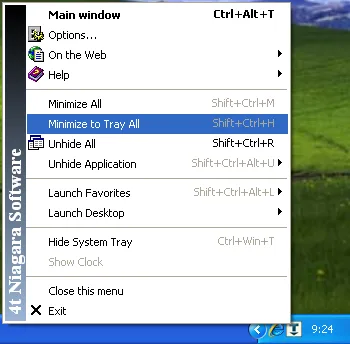
The publisher-supplied screenshot illustrates the utility's menu on a legacy Windows desktop. It shows commands for hiding and restoring applications and controlling the system tray; it is not a capture of version 6.09 running on Windows 11.
What it offers
- Minimize applications to the system tray through titlebar controls, menu commands or keyboard shortcuts.
- Roll a window up to its title bar, keep it on top or adjust its transparency.
- Customize general titlebar buttons, menu commands and keyboard shortcuts.
- Hide and restore the system tray, with an option to show the clock while it is hidden.
- Exclude applications from the utility and group multiple hidden instances under one tray icon.
Good to know
- Application-specific Favorites, automatic minimize rules and minimize-to-tray instead of closing are Pro-only features, not part of the Free download.
- The publisher screenshot shows a legacy Windows interface; it does not establish the appearance or behavior of the current release on Windows 11.
Product images
Sources
References used for this listing. Retrieval dates do not indicate hands-on testing.
More in utilities
View category ↗Actual Title Buttons 8.15.4
Add title-bar controls to Windows applications for always-on-top, transparency, roll-up, tray minimization and moving windows between monitors. Actual Title Buttons offers a 60-day trial.

Wise Auto Shutdown 2.1.2
Schedule Windows to shut down, restart, log off or sleep with Wise Auto Shutdown, a free utility with timed tasks and a five-minute reminder.
Mousotron 14.1
Count mouse clicks, cursor travel, scrolls and keystrokes with Mousotron for Windows. View activity counters on screen or keep the utility in the system tray.
Internet Check 1.6.4
Log internet outages on Windows with Internet Check, a free, open-source utility that checks connections at a chosen interval and can monitor custom servers.
Hotkey Resolution Changer 2.1
Switch between screen resolutions with custom keyboard shortcuts using HRC for Windows. Define two to nine presets; separate multi-monitor layouts are not supported.