
Utilities Windows
Actual Title Buttons
Add title-bar controls to Windows applications for always-on-top, transparency, roll-up, tray minimization and moving windows between monitors. Actual Title Buttons offers a 60-day trial.
- Operating system
- Windows 11, 10, 8.1, 8, 7, Vista, XP and 2000, as listed by the publisher
- Architecture
- x86/x64; 32-bit and 64-bit Windows editions; ARM64 not supported
- Download package
- EXE installer
Publisher-listed compatibility, not independently tested. The publisher also lists Windows Server editions from 2000 through 2022.
Link checked · Download guidance
What is Actual Title Buttons?
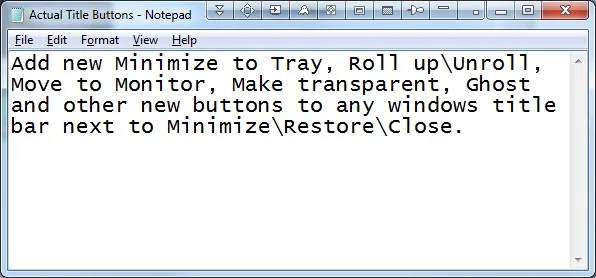
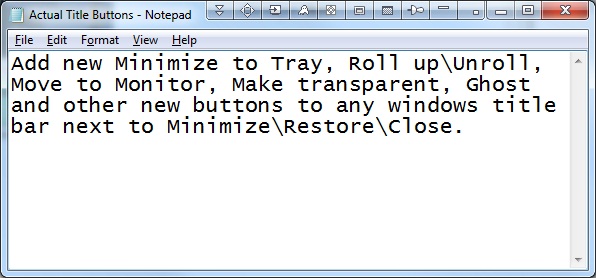
Actual Title Buttons adds window-management controls beside the standard Minimize, Maximize and Close buttons. It is useful when you want to keep a reference window visible, reduce a window to its title bar or move it to another monitor without repeatedly arranging it by hand. Other available actions include changing transparency, minimizing to the notification area, resizing and aligning windows.
You can choose a common set of extra buttons for your windows or define a different set for a particular window. This lets you put frequently used actions on the title bar without assigning every available control to every application. The publisher also lists a Ghost mode that passes mouse clicks through a window.
This is paid, try-before-buy software, not a permanently free utility: the trial lasts 60 days. The publisher lists Windows 11 and earlier desktop versions on x86/x64, but explicitly excludes ARM64. Its compatibility claim covers most software rather than every application. The screenshot is the publisher's older Windows-style demonstration of the added controls, not evidence of the current Windows 11 appearance or an independently tested installation.
What it offers
- Keep a window always on top or adjust its transparency using extra title-bar buttons.
- Roll a window up to its title bar or minimize it to the Windows notification area.
- Resize, align and move windows between monitors with dedicated controls.
- Choose a shared button set or configure a different set for a particular window.
- Use Ghost mode to let mouse clicks pass through a window.
Good to know
- The free trial lasts 60 days; continued use requires a paid license.
- ARM64 is explicitly unsupported by the publisher.
- The publisher describes compatibility with most software, not universal support for every application.
Product images
Sources
References used for this listing. Retrieval dates do not indicate hands-on testing.
More in utilities
View category ↗
Sane Break 0.10.6
Take computer breaks with Sane Break, a free Windows reminder that starts with a small flashing window and expands to a full-screen break when you stop working or reach a configured limit.
Engineering Power Tools
Calculate beam stress, convert units and consult engineering data with Engineering Power Tools for Windows. The Standard Edition download is a 30-day evaluation; Plus modules require a separate license.
4t Tray Minimizer 6.09
Minimize Windows applications to the system tray, roll windows up to their title bars and adjust transparency with 4t Tray Minimizer Free.
DWMBlurGlass 2.3.1
Customize Windows title bars with blur, Aero and Acrylic effects, adjustable colors and Windows 7-style caption buttons. This download is the official 2.3.1 x64 ZIP.
Stardock Curtains
Apply and edit Windows 10 appearance styles beyond Light and Dark mode, with controls for title bars, buttons, colors and shadows.