
Multimedia & graphics Windows
AD Stream Recorder
Record sound-card input and streaming audio to MP3, OGG, WMA, WAV or FLAC on Windows, with live level monitoring and clipping detection.
- Operating system
- Windows 7, 8, 10 and 11
- Architecture
- Not specified by the checked publisher pages
- Download package
- EXE installer
Publisher lists version 5.2 and a 1.80 MB package. Installer headers were checked; software was not installed or run.
Link checked · Download guidance
What is AD Stream Recorder?
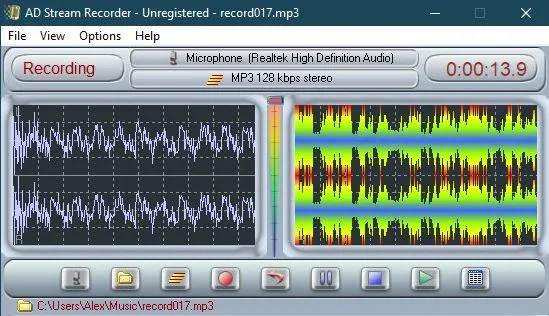
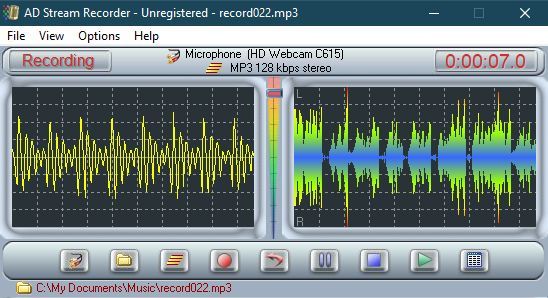
AD Stream Recorder captures audio received by your Windows sound card, including streaming audio such as Internet radio playing through a media player. Its recorder combines source selection, volume and channel-balance controls with real-time visualization, so you can watch input levels while monitoring or recording. The publisher lists MP3, OGG, WMA, WAV and FLAC as recording formats.
Hotkeys start and stop recording even when the window is minimized. A built-in player lets you listen to recordings, while the file list shows their names, duration, size and creation time. WAV-to-MP3 conversion is also included. Watch the clipping indicator before recording: the publisher warns that excessively high input signals compromise recording quality. This is paid software; the publisher lists a purchase price, and its example screenshot shows an unregistered copy. The sources checked do not specify the evaluation restrictions.
What it offers
- Record sound-card signals and streaming audio to MP3, OGG, WMA, WAV or FLAC.
- Select the audio source and adjust volume and channel balance with real-time sound visualization.
- Detect clipping when the input signal is too high.
- Start and stop recording with hotkeys, including while minimized.
- Play recordings, inspect file details and convert WAV recordings to MP3.
Good to know
- Paid software; the checked publisher pages do not state the evaluation time limit or other unregistered-copy restrictions.
- Excessively high input levels can produce clipping and reduce recording quality; monitoring does not remove that input-level constraint.
Product images
Sources
References used for this listing. Retrieval dates do not indicate hands-on testing.
More in multimedia & graphics
View category ↗
MP3myMP3 Free Sound Recorder 4.2 (publisher listing)
Record sound-card audio to MP3 or WAV, schedule recordings and convert audio CDs with MP3myMP3, a free Windows audio recorder.
RadioCaster 3.7.4
Broadcast audio from a Windows input or playback device with RadioCaster, an encoder for Icecast and Shoutcast servers with built-in sound processing and listener statistics.

XMPlay 4.1
Play music files, tracker modules and internet audio streams with XMPlay, a free Windows audio player supplied as a ZIP that needs no installation.
Echo Live 1.4.0
Change microphone audio for voice chat, build voice effects, play soundboard clips and generate speech with Echo Live for Windows. The free plan has limits; custom AI model imports require Pro.
SoundWire Server 2.5
Stream Windows PC audio to an Android phone or tablet with SoundWire Server, the free desktop component of GeorgieLabs' audio-mirroring system.