
Utilities Windows
addLEDs
See and toggle Caps Lock, Num Lock and Scroll Lock with on-screen indicators. addLEDs offers several display modes for Windows 10 and 11, with a 30-day full-function trial.
- Operating system
- Windows 10 and Windows 11
- Architecture
- Not specified on the publisher product page
- Download package
- Standalone EXE (addleds.exe); no installation required
Taskbar-mode features are documented at 100% display scaling; use another mode if Windows taskbar restrictions interfere.
Link checked · Download guidance
What is addLEDs?
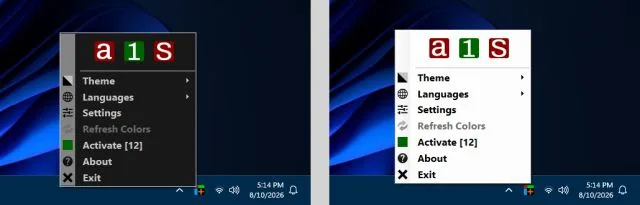
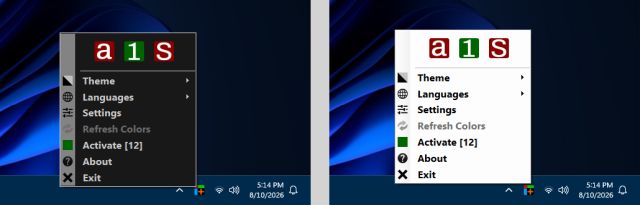
addLEDs puts keyboard lock indicators on screen when a keyboard's physical LEDs are missing or hard to see. It displays Caps Lock, Num Lock and Scroll Lock states, and its indicator icons can also toggle those states. You can keep traditional icons in the notification area, show temporary indicators beside it, use Taskbar mode or view the indicators in the tray icon's context menu. Optional sound notifications make state changes audible.
The program is a single addleds.exe file and requires no installation. Settings can be exported and imported between computers. The publisher supports Windows 10 and 11, but notes that taskbar restrictions and display scaling can affect Taskbar mode; another display mode may be necessary. Full functionality is available for 30 days after first launch. After that, the program runs in limited mode unless activated with a paid, time-limited key.
What it offers
- Display Caps Lock, Num Lock and Scroll Lock states with virtual LED icons that can also toggle the corresponding state.
- Choose Taskbar, Desktop, Classic or Menu display modes, with optional Compact mode and Hot Corners.
- Enable separate sounds for on and off state changes.
- Monitor Alt, Control and Shift in Taskbar and Hot Corners modes.
- Export and import settings; run the single executable without installation.
Good to know
- After the 30-day full-function trial, the software operates in limited mode. Restoring full functionality requires paid activation; keys are valid for one or three years from purchase.
- The publisher says all Taskbar-mode features work at 100% display scaling. Windows 10/11 taskbar restrictions may require using a different display mode.
- Current publisher compatibility lists Windows 10 and 11; support for older Windows releases is not established for this version.
Product images
Sources
References used for this listing. Retrieval dates do not indicate hands-on testing.
- addLEDs - displays the state of the Caps Lock, Num Lock and Scroll Lock ↗Retrieved
- addLEDs - Usage and Help ↗Retrieved
- addLEDs - Known Issues ↗Retrieved
- addLEDs - Activation ↗Retrieved
- addLEDs - Terms of Use ↗Retrieved
More in utilities
View category ↗
CapsLock Indicator 3.16.1.2
See Caps Lock, Num Lock and Scroll Lock status in the Windows system tray, with optional on-screen notifications when a key changes.
KeyboardTest 4.0 (Build 1003)
Check keyboard key presses, release events, scan codes and LEDs with PassMark KeyboardTest for Windows, a commercial utility available as a trial.
Volumouse 2.21
Adjust Windows sound volume with your mouse wheel using Volumouse, a freeware utility with configurable key, mouse-button and taskbar rules.
Igor Pro 10.03
Analyze scientific data, fit curves and create 2D or 3D graphs with Igor Pro for Windows. The commercial application includes a 30-day full-function evaluation.
PicPick 7.6.2
Capture scrolling windows, annotate screenshots and measure on-screen details with PicPick for Windows. Free for personal, non-commercial use; business use requires a license.