
Development Windows
Apache Tomcat
Run Jakarta Servlet and Pages web applications on Windows with Apache Tomcat, an open-source Java server. This entry links to the Tomcat 11 Windows x64 ZIP.
- Operating system
- Windows with a Java 17 or later runtime; exact Windows edition/build minimum not established by the cited sources
- Architecture
- x64 (selected Windows ZIP)
- Download package
- ZIP archive
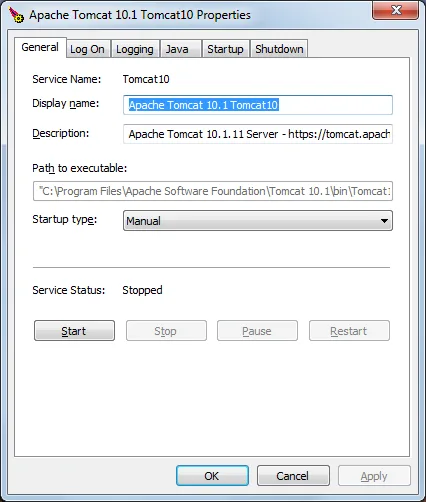
Requires a separately installed Java runtime. A Windows Service Installer is a separate publisher download. The screenshot shows historical Tomcat 10.1 service properties, not the selected Tomcat 11 build.
Link checked · Download guidance
What is Apache Tomcat?
Apache Tomcat runs Java web applications that use Jakarta Servlet, Pages and related web specifications. It is a deployment container for developers and server administrators, rather than a tool for designing a website. Its Manager web application can deploy a WAR archive, list running applications, and start, stop or reload an individual application without restarting the whole server.
The selected download is the Windows x64 ZIP for Tomcat 11.0.27. Install a Java 17 or later runtime separately, unpack Tomcat into its own directory and configure JAVA_HOME or JRE_HOME before using the Windows startup scripts. Apache also offers a separate Windows Service Installer; the ZIP linked here is not that installer. The Windows service tools include a configuration GUI for service startup and shutdown.
Choose the release family for your application, not just the highest version number. Tomcat 11 implements Servlet 6.1 and Pages 4.0, and applications written for the javax.* APIs in Tomcat 9 and earlier need migration to jakarta.*. Tomcat implements a subset of Jakarta EE, not the entire platform. Manager access also requires an explicitly configured account and role; it is disabled by default.
The screenshot is a historical Tomcat 10.1 Windows service-properties dialog supplied by a software catalog. It illustrates the service-management interface, not a tested installation or an exact view of the Tomcat 11 download.
What it offers
- Run applications using Jakarta Servlet 6.1, Pages 4.0, Expression Language 6.0 and WebSocket 2.2 in the Tomcat 11 release family.
- Deploy WAR archives and manage application lifecycle through the browser-based Manager application.
- Monitor and configure Windows services through the Tomcat service-monitor GUI.
- Use separate CATALINA_HOME and CATALINA_BASE directories to separate shared binaries from instance configuration.
Good to know
- Tomcat 11 requires Java 17 or later; a Java runtime must be installed separately.
- Applications using the javax.* APIs from Tomcat 9 and earlier require migration to jakarta.* for Tomcat 11.
- Tomcat implements a subset of Jakarta EE technologies, not a complete Jakarta EE platform.
- Manager access is disabled by default until an account with the required role is configured.
Product images
Sources
References used for this listing. Retrieval dates do not indicate hands-on testing.
- Apache Tomcat — Welcome and release announcement ↗Retrieved
- Apache Tomcat 11 Software Downloads ↗Retrieved
- Apache Tomcat — Which Version Do I Want? ↗Retrieved
- Running the Apache Tomcat 11.0 Servlet/JSP Container ↗Retrieved
- Apache Tomcat 11 — Windows Service How-To ↗Retrieved
- Apache Tomcat 11 — Manager App How-To ↗Retrieved
- Apache Tomcat (free) download Windows version — screenshot source only ↗Retrieved
More in development
View category ↗
Apache NetBeans 28
Write Java, PHP and web applications with Apache NetBeans, an open-source IDE with code highlighting, refactoring and project wizards. This download is the archived NetBeans 28 binary ZIP and requires a separate supported JDK.

Apache JMeter 5.6.3
Build repeatable load tests for web applications, APIs and other services with Apache JMeter, an open-source Java tool available for Windows.

AppServ 9.3.0
Set up Apache, PHP, MySQL and phpMyAdmin together on Windows with AppServ, a free server-stack installer. The publisher lists the 64-bit 9.3.0 bundle from 2019.

Laragon 8.8.0
Manage local web development on Windows with Laragon: switch service versions, create projects and use automatic local domains. Free unlicensed use is non-commercial only.


XAMPP 8.5.12
Run a local PHP development environment on Windows with XAMPP, a free bundle of Apache, MariaDB, PHP and Perl with a server control panel.