
Utilities Windows
MTPdrive
Map an MTP phone or camera to a Windows drive letter with MTPdrive. Browse its files through a file manager; writing depends on the device, and the trial limits transfers.
- Operating system
- Windows 7 SP1, 8, 8.1, 10 and 11; Windows Server 2008 R2 SP1, 2012 and 2016
- Architecture
- x86 (32-bit) and x64 (64-bit), as listed by the publisher
- Download package
- EXE installer
Requires a USB-connected MTP device already visible in File Explorer. Publisher specifies about 9 MB for executables, at least 100 MB for cache and 20 MB memory per mounted drive. Vista and Server 2008 require the separate legacy release, not this download.
Link checked · Download guidance
What is MTPdrive?
MTPdrive assigns a Windows drive letter to a device operating in MTP mode, so you can access its files through your preferred file manager rather than only the portable-device view. It supports reading and deleting files, while writing is available only when the device allows it. The device must already be recognized by Windows and visible in File Explorer: MTPdrive does not replace its device driver.
You can keep the device's original folder structure or use virtual file and folder names to organize navigation, including names built from metadata. The full version also supports command-line mapping and automatic mapping when a device connects. Version 5.1, build 202, supports up to four storages per device and Secure Boot.
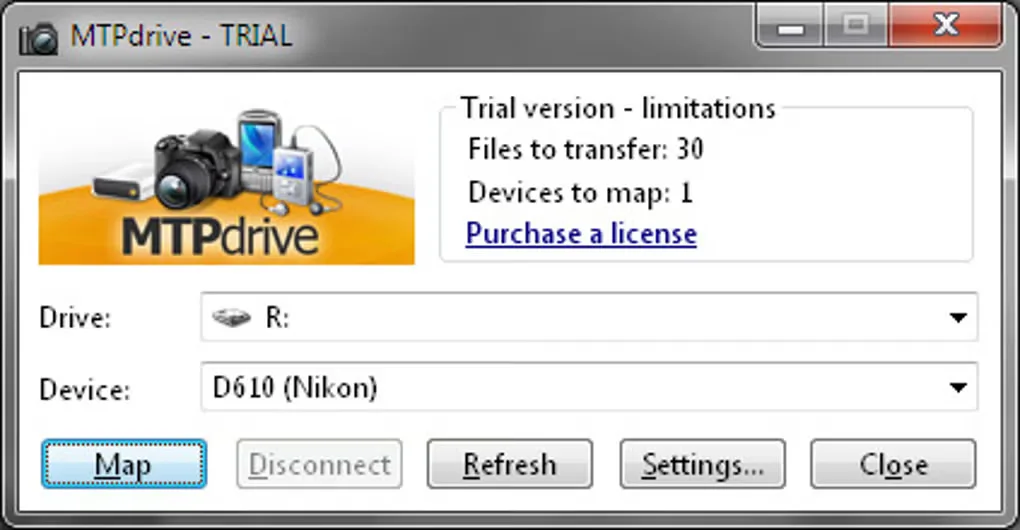
The trial is limited to 30 files transferred from a device until Windows restarts, with only one device mapped at a time. Command-line support and automatic mapping are disabled, and the trial's cache size is fixed to unlimited. A registration key unlocks the full version. The screenshot shows an older trial interface supplied on the source listing, not a verified capture of build 202.
What it offers
- Assign a drive letter to an MTP device for access through Windows file managers.
- Read and delete device files; write files when supported by the device.
- Choose the original folder structure or virtual file and directory names, including metadata-based naming.
- Use command-line and automatic device mapping in the registered version.
- Version 5.1 supports up to four storages per device and Secure Boot.
Good to know
- The device must already be recognized by Windows and visible in File Explorer; MTPdrive is not a replacement device driver.
- Write access depends on the device's capabilities and is not guaranteed for every connected device.
- The trial allows 30 transferred files from a device until Windows restarts and one mapped device at a time.
- The trial disables command-line support and automatic mapping; its cache size cannot be changed from unlimited.
Product images
Sources
References used for this listing. Retrieval dates do not indicate hands-on testing.
- MTPdrive - Download ↗Retrieved
- Home | MTP Drive ↗Retrieved
- Download | MTP Drive ↗Retrieved
More in utilities
View category ↗
GiliSoft USB Lock
Control USB storage access on Windows with separate read and write restrictions, trusted-device lists, and controls for phones and removable media. A commercial trial is available.

WinDirStat 2.9.3
Find what is taking up disk space on Windows with WinDirStat, a free disk usage analyzer with file-size lists, treemaps and optional duplicate detection.

R-Undelete 7.0 build 180048
Recover deleted files from Windows disks, USB drives and memory cards with R-Undelete. Its free Home mode covers FAT and exFAT recovery; larger NTFS and ReFS files require the paid edition.
Network Drive Control 1.72
Map different network drives at Windows logon for home, work or school with Network Drive Control, a free utility that selects mappings by connected network.
WebDrive
Map remote servers and cloud storage to Windows drive letters with WebDrive, a commercial file-access client with a publisher-provided trial.