
Utilities Windows
Network Drive Control
Map different network drives at Windows logon for home, work or school with Network Drive Control, a free utility that selects mappings by connected network.
- Operating system
- Windows 7, 8, 10 and 11, as listed by the publisher
- Architecture
- 32-bit and 64-bit for Windows 7/8/10; Windows 11 architecture not specified
- Download package
- ZIP archive (NDCSetup.zip)
Publisher compatibility statement, not independently tested. No Windows build-specific or ARM support claim is made.
Link checked · Download guidance
What is Network Drive Control?
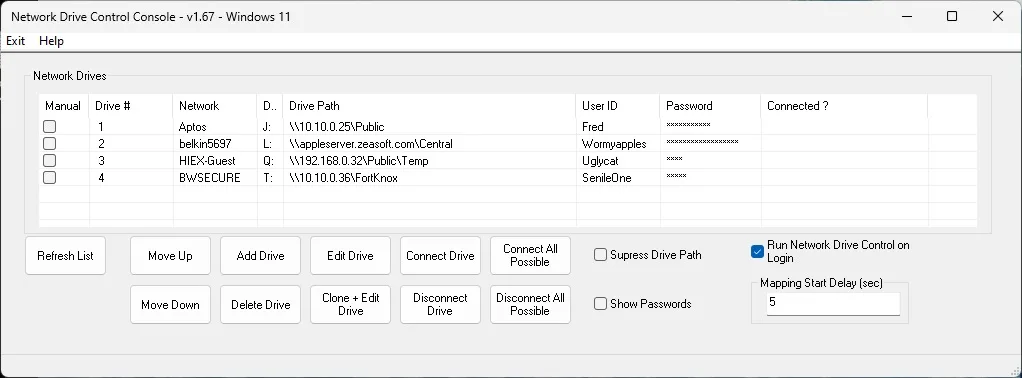
Network Drive Control lets a Windows laptop use different drive mappings on different networks. Configure the shares associated with each network, and the utility attempts the relevant mappings when you log on instead of trying every saved share regardless of location. A network without configured mappings gets none. This is useful when a home server and an office server should not both be contacted at every logon.
You can reuse a drive letter for different resources on different networks, such as mapping X: to a home share in one location and an office share in another. The publisher lists SMB, CIFS, Netbios and WebDAV mappings, plus local directories mapped to drive letters. Windows' own limits still apply; the utility does not add FTP drive-letter support.
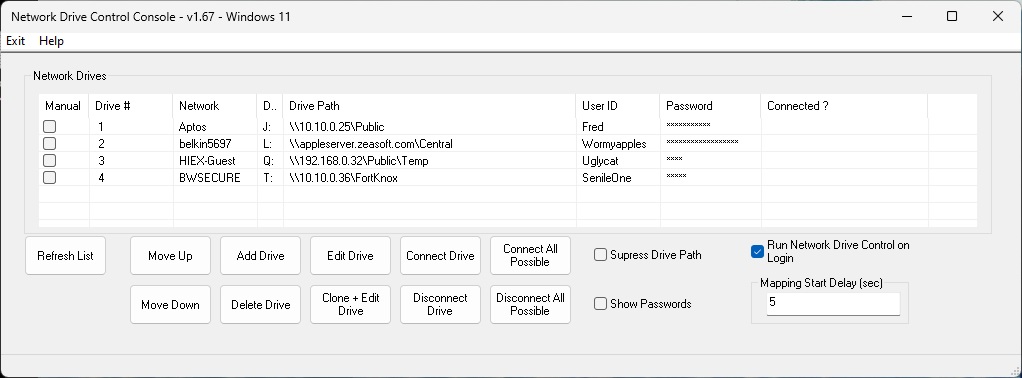
The publisher lists version 1.72, released July 3, 2026, and provides a ZIP download. Use is free, including commercial deployments. The screenshot is the publisher's older version 1.67 console on Windows 11, not a capture of version 1.72 or evidence of an installation test.
What it offers
- Apply network-specific drive mappings at Windows logon.
- Configure separate sets of drives for home, work or school networks.
- Reuse the same drive letter for different resources on different networks.
- Map SMB, CIFS, Netbios and WebDAV resources, as well as local directories, to drive letters.
- Consult the built-in help for configuration guidance.
Good to know
- Does not map FTP resources to drive letters.
- Network and drive configurations remain subject to Windows' built-in limits.
- The publisher provides no warranty that the software will work on a particular machine.
Product images
Sources
References used for this listing. Retrieval dates do not indicate hands-on testing.
More in utilities
View category ↗
Wise Disk Cleaner 11.4.0
Remove temporary files and browser traces with Wise Disk Cleaner, a free Windows cleanup utility with scheduled cleaning and drive optimization tools.
Simple Data Backup 11.3
Back up Windows files and folders to another drive or network share as direct copies, ZIP files or 7z archives. The Free edition has limits on backup jobs and advanced features.

R-Undelete 7.0 build 180048
Recover deleted files from Windows disks, USB drives and memory cards with R-Undelete. Its free Home mode covers FAT and exFAT recovery; larger NTFS and ReFS files require the paid edition.
O&O DiskImage 23.1.26049
Back up a Windows PC, recover individual files or clone a drive with O&O DiskImage Premium, a paid backup application with a 30-day trial.
Disketch CD Labeling Software
Design CD, DVD and Blu-ray labels and jewel-case covers with Disketch for Windows. Import artwork, arrange text and print labels; the free edition is for non-commercial use only.