
Utilities Windows
Simple Data Backup
Back up Windows files and folders to another drive or network share as direct copies, ZIP files or 7z archives. The Free edition has limits on backup jobs and advanced features.
- Operating system
- Windows 7, 8, 8.1, 10 and 11; corresponding Windows Server versions
- Architecture
- Not specified in the cited publisher pages
- Download package
- EXE installer (Free edition)
Publisher minimum: 1 GHz CPU, 1 GB RAM and 1024×768 display (900×570 effective). Installer requires 1 GB free space; backup runs require at least 800 MB free on the Windows drive.
Link checked · Download guidance
What is Simple Data Backup?
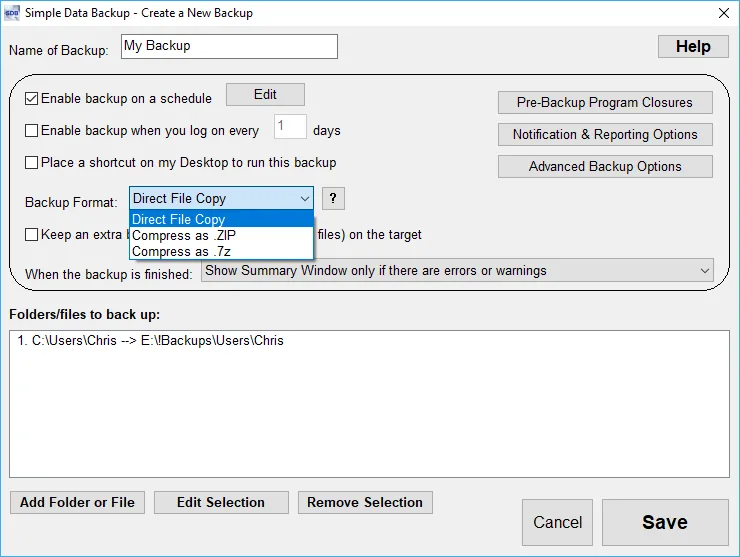
Simple Data Backup is a file-and-folder backup utility for Windows. It suits copying selected documents to an external drive or network share without committing them to a proprietary backup format. Direct File Copy preserves files and folders on the destination; ZIP and 7z are alternatives when you want archives that other compatible utilities can open. Backups can run on demand, on a schedule or at logon.
The publisher describes an automatic full-then-incremental workflow: the first successful run copies the selected data, later runs copy changes, and periodic full backups can be configured. Its Create a New Backup screen brings together the source and destination selections, backup format, schedule and completion behavior. The screenshot is a publisher-provided Windows interface example, not a test of the current installer.
Choose the Free edition for a limited backup setup, not for every feature advertised across the product range. Multiple backup jobs, more than five backup lines per job, advanced schedule/logon controls, remote-server backups, email alerts and web reporting require Pro. This is not disk-cloning software: copying files from a bootable drive does not establish that the destination will boot. Backup history is also limited to two levels, including the optional extra rollback level.
What it offers
- Back up selected files and folders to writable local drives or Windows-accessible network shares.
- Choose Direct File Copy, ZIP or 7z rather than a proprietary backup container.
- Run backups on demand, on a schedule or at logon; advanced schedule and logon controls require Pro.
- Automatically follow an initial full backup with incremental runs and configurable periodic full backups.
- Restore backed-up files and consult backup logs; optionally retain one extra level for undoing a backup.
Good to know
- Free edition excludes multiple backup jobs, more than five backup lines per job, advanced schedule/logon controls, remote-server backups, email alerts and web reporting.
- File-and-folder backups are not sector-by-sector drive clones and do not guarantee a bootable destination.
- Supports at most two backup levels, not an unlimited history of earlier versions.
- Backing up in-use files depends on requirements being met; the publisher says VSS is used when available.
Product images

Sources
References used for this listing. Retrieval dates do not indicate hands-on testing.