
Utilities Windows
MultiPar
Create PAR recovery files and check damaged or missing files with MultiPar for Windows. Repair depends on having enough matching recovery data.
- Operating system
- Windows Vista or later; version 1.3.2.9 documentation explicitly lists Windows 7, 8 and 10
- Architecture
- Not specified for the selected installer in the cited release metadata
- Download package
- EXE installer (MultiPar132_setup.exe)
Requirements are from the selected release's documentation, not an installation test. The publisher also provides a ZIP package.
Link checked · Download guidance
What is MultiPar?
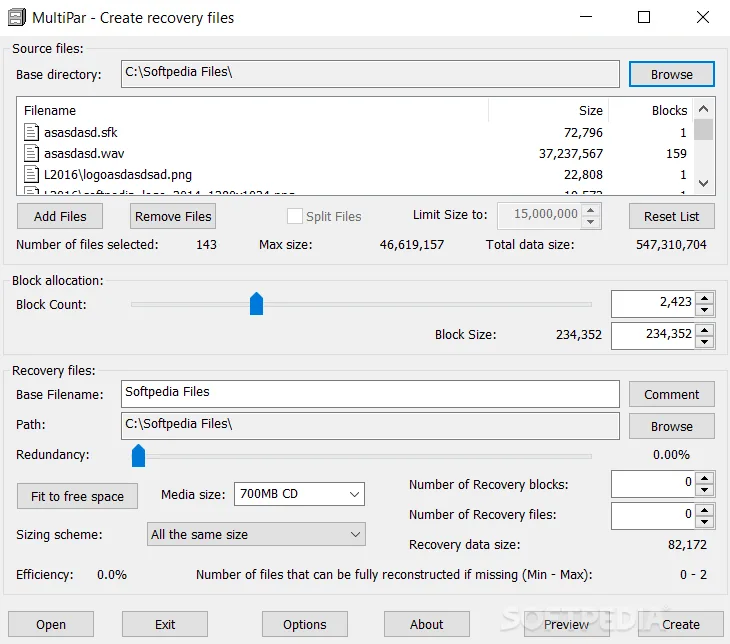
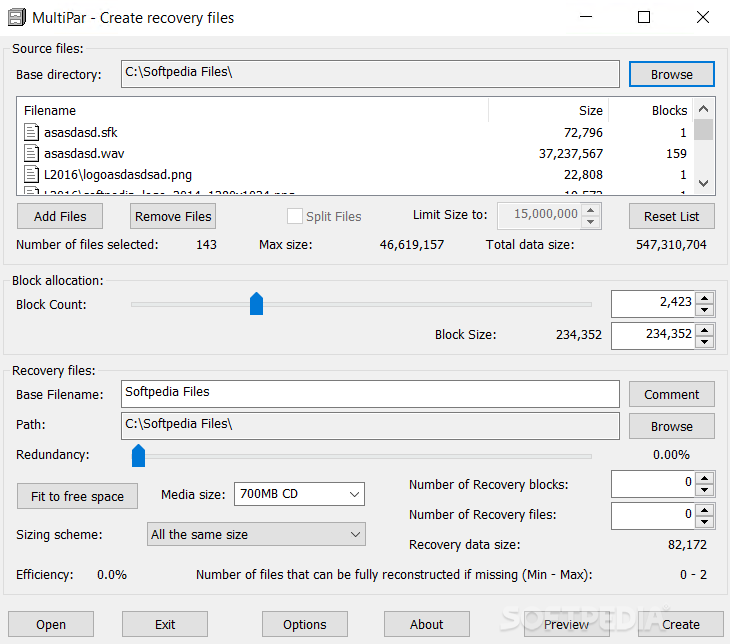
MultiPar creates parity recovery files and uses them to verify or rebuild damaged and missing files. It is useful when you want to keep recovery data alongside a collection of files, or when files you receive already come with a matching PAR or PAR2 set. Its Windows interface controls PAR clients and supports directory trees and non-ASCII filenames.
Open a recovery file to start verification. The verification window lists source and recovery files with their sizes and status, then indicates whether repair is possible. If the originals are in another folder, choose the correct base directory before treating the missing-file report as actual data loss.
Recovery is conditional: the small index PAR2 file contains verification information, not the recovery blocks needed to reconstruct missing content. You need sufficient matching recovery data. PAR files also do not authenticate their source or prevent deliberate modification; the publisher warns that malicious recovery files can alter otherwise valid files.
This entry links to the publisher's stable 1.3.2.9 EXE installer, released on August 27, 2023, rather than presenting a newer beta as stable. The application is free, but its license is mixed: the PAR console clients are GPL open source and the graphical interface is closed source.
What it offers
- Create and use PAR 1.0 and PAR 2.0 recovery files.
- Verify files and identify damaged or missing content before attempting repair.
- View file sizes, status and available recovery blocks in the verification window.
- Handle directory trees and UTF-8 or UTF-16 filenames.
Good to know
- Repair requires enough matching recovery blocks; an index PAR2 file alone is for verification only.
- PAR files do not protect against deliberate modification. Use trusted recovery files, since malicious PAR data can change valid files.
- UTF-16 filenames and comments are not supported by most other PAR2 clients, according to the publisher.
- The linked 1.3.2.9 installer is an older stable release, not a claim to be the newest available version.
Product images
Sources
References used for this listing. Retrieval dates do not indicate hands-on testing.
- MultiPar - Download — Softonic product page ↗Retrieved
- Release v1.3.2.9 — publisher stable-release notes ↗Retrieved
- GitHub publisher release metadata — v1.3.2.9 ↗Retrieved
- MultiPar 1.3.2.9 — publisher English readme ↗Retrieved
- Introduction to Parchive — MultiPar 1.3.2.9 help ↗Retrieved
- Verify window — MultiPar 1.3.2.9 help ↗Retrieved
- MultiPar Create recovery files — Softpedia-hosted screenshot ↗Retrieved
More in utilities
View category ↗
3uTools 9.12.005
Manage iPhone and iPad photos, music, apps and backups from Windows with 3uTools, a free utility that also includes device checks and firmware flashing tools.
SysTools SQL Recovery 14.0
Scan damaged SQL Server MDF and NDF files, preview recoverable database objects, and export selected data with SysTools SQL Recovery for Windows. The demo has export limits.
GetDataBack Pro 5.78
Find and preview lost files on hard drives, SSDs and USB storage with GetDataBack Pro for Windows. A paid license is required to copy recovered files.
Victoria SSD/HDD 5.37
Inspect HDD and SSD information, read SMART data and scan drive surfaces with Victoria, a free Windows diagnostic utility with advanced, potentially destructive repair tools.

WinRAR 7.23
Create RAR and ZIP archives, unpack downloaded files and encrypt archives with WinRAR for Windows. The trial permits up to 40 days of use before a license is required.